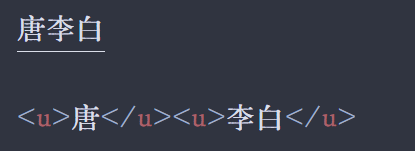
请教下各位大佬,如何设置CSS文件调整下划线长度?
我现在用的论坛的CSS,想增加一个下划线长度调整,相对字体90%长这样,如图就可以把【唐】和【李白】两个词的下划线分隔开,请教下大佬们该如何写CSS?
u {
  text-decoration: none !important; /* 去掉默认的下划线 */
  border-bottom: 0.1px solid !important; /* 设置下划线颜色 */
  padding-bottom: 0em !important; /* 调整下划线与文字之间的距离 */
  display: inline-block !important; /* 确保 padding-bottom 生效 */
}
u {
    text-decoration: none !important; /* 去掉默认下划线 */
    position: relative !important;   /* 方便伪元素定位 */
    line-height: 1;
}

u::after {
    content: '' !important;
    position: absolute !important;
    bottom: 0 !important;
    left: 5% !important;             /* 左右各留 5%,保持居中 */
    width: 90% !important;           /* 下划线长度为 90% */
    height: 0.1px !important;          /* 下划线粗细 */
    background-color: currentColor !important; /* 颜色跟随文字颜色 */
}