[!example] 插件名片
术语解说
批注在文末的储存格式示例:
Your note text. We should cut prices hard in Q3.

```tandem-comments
// Schema: { "<id>": { anchor:{exact,prefix,suffix,pos?}, status:open|resolved, thread:[{author,ts,text}] } }
// Anchor = quote from the prose. To locate: search for "exact", disambiguate via prefix/suffix.
{
  "a1f3": {
    "anchor": { "exact": "cut prices hard", "prefix": "We should ", "suffix": " in Q3", "pos": 26 },
    "status": "open",
    "thread": [
      { "author": "Leon", "ts": "2026-06-10T10:24:00Z", "text": "Too aggressive?" }
    ]
  }
}
```
基本用法
[!example] 如何添加批注?
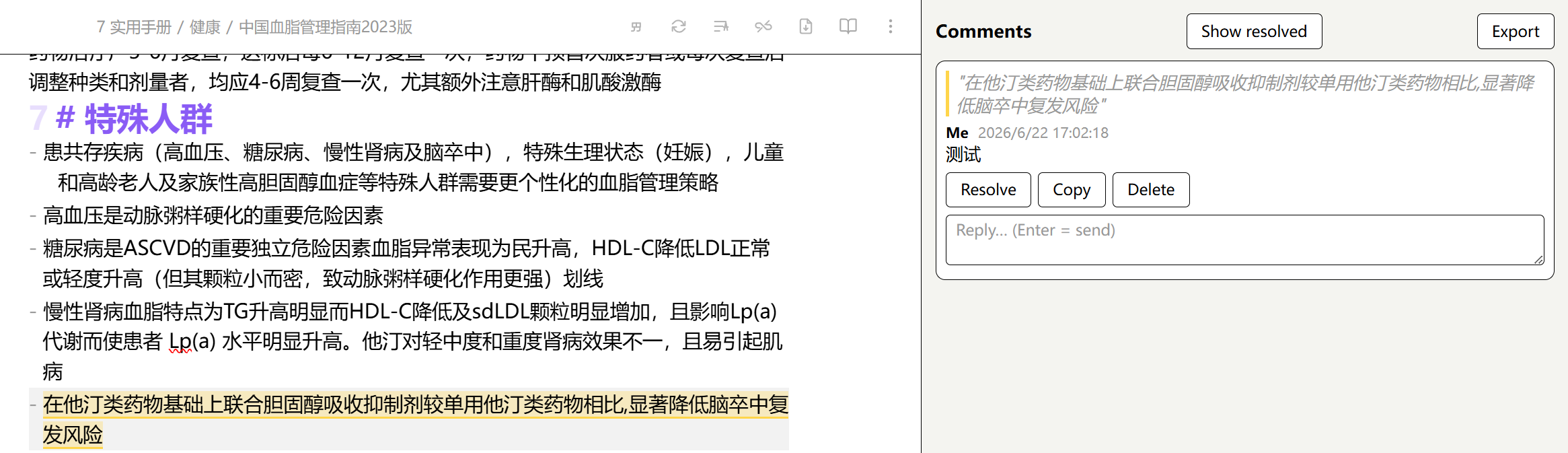
选中想要批注的文本,在命令面板中运行Tandem Comments: Add comment或直接右键点击执行Add comment命令,即可唤出批注侧边栏并对批注进行回复、标记完成与否等操作
[!example] 如何让 AI 辅助写作
以插件作者提供的例子来说明:The morning market in Hoi An wakes before the tourists do. Vendors stack mangosteen into careful pyramids while the river light is still gray.…2,000 more words…用户可在需要修改处留下批注:“weaker verb here ?”或是“this paragraph drags, tighten it”,然后对 AI 下达如下命令:
❯ claude "address my comments in hoi-an-draft.md — keep everything else exactly as it is"
Claude 对两个段落进行了修改,并在批注中回复了具体修改的内容和修改的依据
用户再根据修改后的文档在批注中回复不认同的部分,接受认同的部分
对于Claude用户,插件设置中可一键导出预设的skill.md
设置说明
Display name:空白栏中填入的文本将被视为批注者的默认姓名Highlight color:选择高亮颜色Show resolved by default:如启用,则已经标记完成的批注将显示在批注侧边栏中Resolve behavior:在下拉菜单中决定对某批注标记完成后,是直接删除还是保留Schema hint in block:如启用,则会在文末储存批注数据的代码块首添加由//引出的提示Include quote when copying:如启用,则在侧边栏点击Copy按钮时,除了批注内容、批注者和批注时间,还将复制被批注的文本Export note name:空白栏中填入的内容将被视为导出的批注文件的默认名称格式Export scope:在下拉菜单中选择导出时,是导出全部批注还是只导出活跃的批注,不导出没有对应批注文本或已标记完成的批注Export Claude skill:一键导出预设的skill.md