Obsidian 渲染性能问题
【性能问题】光标闪烁动画(cm-blink)触发合成失败,导致严重的界面卡顿与高延迟 (LCP/INP)
问题描述
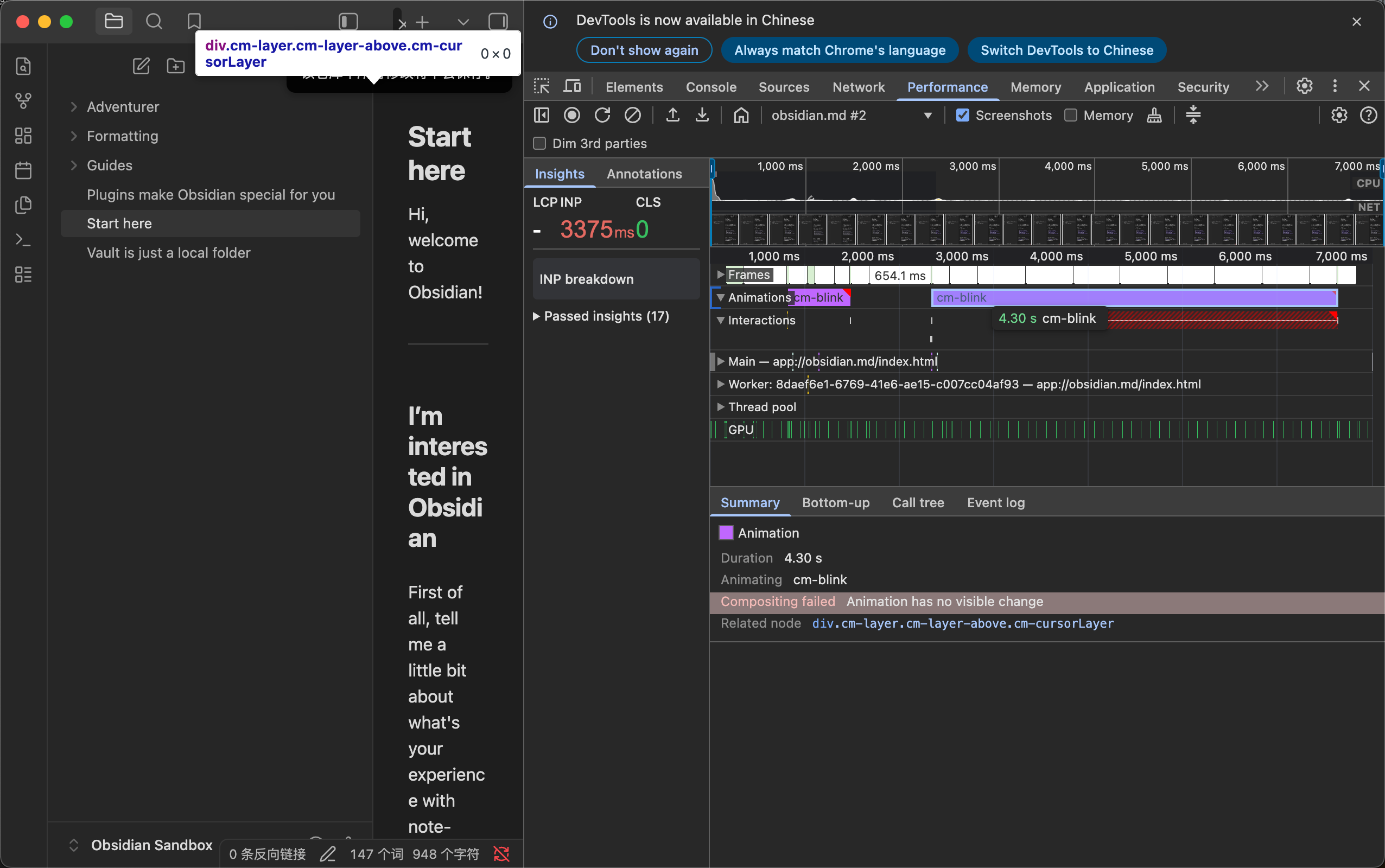
在日常编辑或光标闪烁时,Obsidian 的渲染主线程会出现严重的阻塞延迟(耗时可达 3600ms 以上)。通过 Chrome DevTools 的 Performance 面板抓取现场发现,底层 CodeMirror 的光标层动画触发了浏览器的合成失败(Compositing failed),导致渲染开销异常暴增。
复现步骤
- 打开 Obsidian 并通过快捷键打开内置的开发者工具(DevTools)。
- 切换到 Performance (性能) 面板,开始录制。
- 在编辑器中输入文本,或单纯让光标保持闪烁,之后点击文件资源管理器(可以导致光标消失的步骤),随后停止录制。
- 观察性能时间线以及下方的 Summary 摘要。
注释:让光标出现也会出现问题,问题表现和上述相同。
预期结果
光标闪烁动画(cm-blink)应该由浏览器的合成器(Compositor)流畅处理,不应当阻塞主线程,不应产生性能警告。
实际结果
DevTools 的性能分析器捕获到了严重的红色延迟警告(LCP/INP 耗时异常)。
在 Summary 面板中明确提示以下错误:
- 错误信息:
Compositing failed: Animation has no visible change(合成失败:动画无可见变化) - 关联节点:
div.cm-layer.cm-layer-above.cm-cursorLayer
这证实了卡顿源于光标闪烁动画未能正确走 GPU 硬件合成,从而拖垮了主线程的渲染效率。
环境信息 (Debug Info)
SYSTEM INFO:
	Obsidian version: 1.12.7
	Installer version: 1.12.7
	Operating system: Darwin Kernel Version 24.6.0: Mon Jul 14 11:30:40 PDT 2025; root:xnu-11417.140.69~1/RELEASE_ARM64_T6041 24.6.0
	Login status: not logged in
	Language: zh
	Insider build toggle: off
	Live preview: on
	Base theme: adapt to system
	Community theme: none
	Snippets enabled: 0
	Restricted mode: off
	Plugins installed: 3
	Plugins enabled: 3
		1: Attachment Management v0.12.1
		2: Consistent Attachments and Links v3.33.4
		3: File Explorer++ v1.3.1

RECOMMENDATIONS:
	Community plugins: for bugs, please first try updating all your plugins to latest. If still not fixed, please try to make the issue happen in the Sandbox Vault or disable community plugins.
附件及现场凭证
-
复现截图:
-
mac型号及其系统:
型号 MacBook Pro,芯片 Apple M4 Pro,系统 macOS Sequoia 15.6 -
注释:
- 测试均位于 obsidian 的沙盒仓库内,所以可以排除是插件和文件数量的问题。
- 不是 mac 中文输入法的所导致的,因为切换成了 mac 英文输入法也有上述问题。
- 不是 mac 输入法的问题,因为在别的软件上并无上述问题。
- 开启和关闭硬件加速都会有上述问题。
- 我的内存很充裕,是绿色的。以及发生上述卡顿时,obsidian 的 CPU 占用率很低,0.7%,是正常的。
- 由于我是论坛新用户,只能上传一张图片,不能上传多个图片及其 DevTool 录制数据。