一、安装与创建仓库(Vault)
Obsidian 是纯本地文件管理工具,仓库 = 电脑上的一个普通文件夹,所有笔记、配置、附件都存在这里。
二、搭建知识库目录结构(骨架)
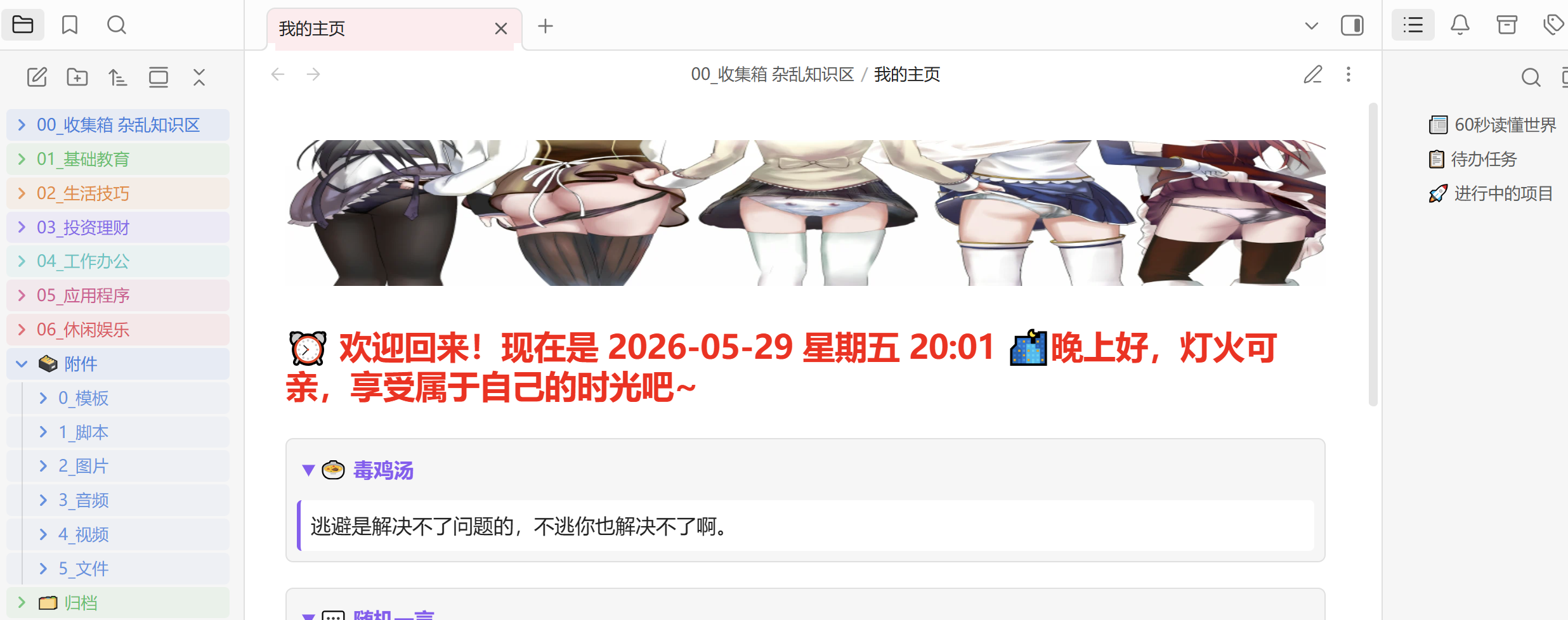
文件夹是粗分类,少用文件夹、多用双向链接是 Obsidian 精髓。推荐通用结构:
知识库/
├─00_收集箱:临时笔记、待整理、杂乱知识区
├─01_基础教育
├─02_生活技巧
├─03_投资理财
├─04_工作办公
├─05_应用程序
├─06_休闲娱乐
├─归档:已完成/过时内容,不用但舍不得删的内容
└─附件
三、避坑与最佳实践
- 文件名唯一:避免重名,双向链接才准确。
- 少建文件夹:文件夹是物理分隔,链接是逻辑关联,优先用链接。
- 定期备份:仓库是本地文件夹,定期复制到移动硬盘 / 网盘,遵循「3-2-1 备份原则」。
- 不追求完美:先记录、再整理、后优化,知识体系是逐步生长的。
美化CSS
自定义文件(夹)图标
/* 特定文件夹的自定义图标 */
/* https://forum.obsidian.md/t/add-emojis-to-folder-titles-in-explorer-without-renaming-folders/22702 */

div[data-path="附件"] .nav-folder-title-content::before {
  content: "🗃️ ";
}

div[data-path="归档"] .nav-folder-title-content::before {
  content: "🗂️ ";
}

/* 文件图标 */
div[data-path$='.md'] .nav-file-title-content::before {
  content: '📝';
}
突出文件类型
/* 突出文件类型 */

/* 文本文件(Text Files) */
.nav-file .nav-file-title[data-path*=".txt"] .nav-file-tag {
    background-color: #b83b5e; /* 玫瑰红 */
    color: white;
}
.nav-file .nav-file-title[data-path*=".doc"] .nav-file-tag,
.nav-file .nav-file-title[data-path*=".docx"] .nav-file-tag {
    background-color: #9e2d50; /* 深玫瑰 */
    color: white;
}
.nav-file .nav-file-title[data-path*=".pdf"] .nav-file-tag {
    background-color: #d9536e; /* 亮粉红(加深后对比度安全) */
    color: white;
}
.nav-file .nav-file-title[data-path*=".rtf"] .nav-file-tag,
.nav-file .nav-file-title[data-path*=".odt"] .nav-file-tag,
.nav-file .nav-file-title[data-path*=".tex"] .nav-file-tag {
    background-color: #a53f5c; /* 中等红粉 */
    color: white;
}


/* 图片文件(Image Files) */
.nav-file .nav-file-title[data-path*=".canvas"] .nav-file-tag {
    background-color: rgb(231, 118, 84);
    color: white;
}
.nav-file .nav-file-title[data-path*=".jpg"] .nav-file-tag,
.nav-file .nav-file-title[data-path*=".jpeg"] .nav-file-tag {
    background-color: #2c6e2c; /* 深绿 */
    color: white;
}
.nav-file .nav-file-title[data-path*=".png"] .nav-file-tag {
    background-color: #358035; /* 标准绿 */
    color: white;
}
.nav-file .nav-file-title[data-path*=".gif"] .nav-file-tag {
    background-color: #4a9e4a; /* 亮绿(仍保持对比度) */
    color: white;
}
.nav-file .nav-file-title[data-path*=".bmp"] .nav-file-tag,
.nav-file .nav-file-title[data-path*=".tiff"] .nav-file-tag,
.nav-file .nav-file-title[data-path*=".tif"] .nav-file-tag {
    background-color: #1e5620; /* 暗绿 */
    color: white;
}
.nav-file .nav-file-title[data-path*=".webp"] .nav-file-tag {
    background-color: #3e8e41; /* 中绿(原色过亮,加深) */
    color: white;
}
.nav-file .nav-file-title[data-path*=".svg"] .nav-file-tag {
    background-color: #5fad56; /* 浅翠绿(亮度42%,安全) */
    color: white;
}
.nav-file .nav-file-title[data-path*=".avif"] .nav-file-tag {
    background-color: #2c7a4a; /* 深翠 */
    color: white;
}


/* 音频文件(Audio Files) */
.nav-file .nav-file-title[data-path*=".mp3"] .nav-file-tag {
    background-color: #c95a0f; /* 橙红 */
    color: white;
}
.nav-file .nav-file-title[data-path*=".wav"] .nav-file-tag {
    background-color: #d96c1e; /* 橙 */
    color: white;
}
.nav-file .nav-file-title[data-path*=".aac"] .nav-file-tag,
.nav-file .nav-file-title[data-path*=".flac"] .nav-file-tag {
    background-color: #b04d0a; /* 深橙 */
    color: white;
}
.nav-file .nav-file-title[data-path*=".ogg"] .nav-file-tag,
.nav-file .nav-file-title[data-path*=".m4a"] .nav-file-tag {
    background-color: #c7772e; /* 杏橙(原色过浅,已加深) */
    color: white;
}
.nav-file .nav-file-title[data-path*=".3gp"] .nav-file-tag {
    background-color: #9b561e; /* 棕橙 */
    color: white;
}


/* 视频文件(Video Files) */
.nav-file .nav-file-title[data-path*=".mp4"] .nav-file-tag,
.nav-file .nav-file-title[data-path*=".webm"] .nav-file-tag {
    background-color: #8b5f9e; /* 紫罗兰 */
    color: white;
}
.nav-file .nav-file-title[data-path*=".avi"] .nav-file-tag {
    background-color: #6b3e7c; /* 深紫 */
    color: white;
}
.nav-file .nav-file-title[data-path*=".mkv"] .nav-file-tag,
.nav-file .nav-file-title[data-path*=".mov"] .nav-file-tag {
    background-color: #4c2c5c; /* 暗紫 */
    color: white;
}
.nav-file .nav-file-title[data-path*=".wmv"] .nav-file-tag,
.nav-file .nav-file-title[data-path*=".ogv"] .nav-file-tag {
    background-color: #7b52a3; /* 中紫 */
    color: white;
}


/* 压缩文件(Compressed Files) */
.nav-file .nav-file-title[data-path*=".zip"] .nav-file-tag {
    background-color: #607d8b; /* 蓝灰 */
    color: white;
}
.nav-file .nav-file-title[data-path*=".rar"] .nav-file-tag {
    background-color: #455a64;
    color: white;
}
.nav-file .nav-file-title[data-path*=".7z"] .nav-file-tag {
    background-color: #37474f; /* 深灰蓝 */
    color: white;
}
.nav-file .nav-file-title[data-path*=".tar"] .nav-file-tag {
    background-color: #546e7a;
    color: white;
}
.nav-file .nav-file-title[data-path*=".gz"] .nav-file-tag {
    background-color: #78909c; /* 较浅,仍可读 */
    color: white;
}


/* 可执行文件(Executable Files) */
.nav-file .nav-file-title[data-path*=".exe"] .nav-file-tag {
    background-color: #a93226; /* 暗红 */
    color: white;
}
.nav-file .nav-file-title[data-path*=".bat"] .nav-file-tag {
    background-color: #c0392b;
    color: white;
}
.nav-file .nav-file-title[data-path*=".sh"] .nav-file-tag {
    background-color: #922b21;
    color: white;
}
.nav-file .nav-file-title[data-path*=".msi"] .nav-file-tag {
    background-color: #b03a2e;
    color: white;
}


/* 表格文件(Spreadsheet Files) */
.nav-file .nav-file-title[data-path*=".xls"] .nav-file-tag,
.nav-file .nav-file-title[data-path*=".xlsx"] .nav-file-tag {
    background-color: #1a5276; /* 深蓝 */
    color: white;
}
.nav-file .nav-file-title[data-path*=".ods"] .nav-file-tag {
    background-color: #2471a3;
    color: white;
}


/* 演示文稿文件(Presentation Files) */
.nav-file .nav-file-title[data-path*=".ppt"] .nav-file-tag,
.nav-file .nav-file-title[data-path*=".pptx"] .nav-file-tag {
    background-color: #b8860b; /* 暗金 */
    color: white;
}
.nav-file .nav-file-title[data-path*=".odp"] .nav-file-tag {
    background-color: #cd9b1d;
    color: white;
}


/* 数据库文件(Database Files) */
.nav-file .nav-file-title[data-path*=".base"] .nav-file-tag {
    background-color: rgb(100, 150, 200);
    color: white;
}
.nav-file .nav-file-title[data-path*=".mdb"] .nav-file-tag,
.nav-file .nav-file-title[data-path*=".accdb"] .nav-file-tag {
    background-color: #2c5f8a;
    color: white;
}
.nav-file .nav-file-title[data-path*=".sql"] .nav-file-tag {
    background-color: #1b4f72;
    color: white;
}
.nav-file .nav-file-title[data-path*=".db"] .nav-file-tag,
.nav-file .nav-file-title[data-path*=".sqlite"] .nav-file-tag {
    background-color: #21618c;
    color: white;
}


/* 网页文件(Web Files) */
.nav-file .nav-file-title[data-path*=".html"] .nav-file-tag,
.nav-file .nav-file-title[data-path*=".htm"] .nav-file-tag {
    background-color: #00838f; /* 深青色 */
    color: white;
}
.nav-file .nav-file-title[data-path*=".css"] .nav-file-tag {
    background-color: #006064;
    color: white;
}


/* 代码文件(Code Files) */
.nav-file .nav-file-title[data-path*=".c"] .nav-file-tag,
.nav-file .nav-file-title[data-path*=".cpp"] .nav-file-tag {
    background-color: #1e4e5f;
    color: white;
}
.nav-file .nav-file-title[data-path*=".java"] .nav-file-tag {
    background-color: #2c3e50;
    color: white;
}
.nav-file .nav-file-title[data-path*=".py"] .nav-file-tag {
    background-color: #1a6e7a;
    color: white;
}
.nav-file .nav-file-title[data-path*=".js"] .nav-file-tag {
    background-color: #1f618d; /* JS 同属网页与代码,这里统一为深海色 */
    color: white;
}
.nav-file .nav-file-title[data-path*=".php"] .nav-file-tag {
    background-color: #1e4660;
    color: white;
}


/* 配置文件(Configuration Files) */
.nav-file .nav-file-title[data-path*=".ini"] .nav-file-tag {
    background-color: #5d6d7e;
    color: white;
}
.nav-file .nav-file-title[data-path*=".json"] .nav-file-tag {
    background-color: #707b7c;
    color: white;
}
.nav-file .nav-file-title[data-path*=".xml"] .nav-file-tag {
    background-color: #5b6e7a;
    color: white;
}
.nav-file .nav-file-title[data-path*=".yaml"] .nav-file-tag,
.nav-file .nav-file-title[data-path*=".yml"] .nav-file-tag {
    background-color: #616e7c;
    color: white;
}
数据库
/* 数据库 */
/* https://www.bilibili.com/video/BV1NjprzAEiQ/ */

/* 设置标题颜色 */
.bases-cards-property.mod-title {
    color: rgb(187, 128, 245);
}
/* 将所有属性块的标题(标签) */
.bases-cards-label {
    font-weight: bold !important; /* 加粗 */
    display: none;
}

/* 作者样式 */
.bases-cards-property[data-property="note.author"] {
    background-color: #f0f5f0 !important; /* 背景 */
}
.bases-cards-property[data-property="note.author"] .bases-cards-label {
    color: #607b6c !important; /* 标签文字 */
}
.bases-cards-property[data-property="note.author"] .bases-rendered-value {
    color: #3a5a40 !important; /* 标签内容 */
}

/* 总字数样式 */
.bases-cards-property[data-property="note.totalWords"] {
    background-color: #eff6ff !important;
}
.bases-cards-property[data-property="note.totalWords"] .bases-cards-label {
    color: #6b8aaa !important;
}
.bases-cards-property[data-property="note.totalWords"] .bases-rendered-value {
    color: #3b6b9c !important;
}

/* 发布者样式 */
.bases-cards-property[data-property="note.publisher"] {
    background-color: #fffaf0 !important;
}
.bases-cards-property[data-property="note.publisher"] .bases-cards-label {
    color: #d97706 !important;
}
.bases-cards-property[data-property="note.publisher"] .bases-rendered-value {
    color: #9a3412 !important;
}

/* 更新日期样式 */
.bases-cards-property[data-property="note.updateDate"] {
    background-color: #f0f9ff !important;
}
.bases-cards-property[data-property="note.updateDate"] .bases-cards-label {
    color: #0284c7 !important;
}
.bases-cards-property[data-property="note.updateDate"] .mod-date {
    color: #0369a1 !important;
}

/* 资源URL样式 */
.bases-cards-property[data-property="note.url"] {
    background-color: #f5f3ff !important;
}
.bases-cards-property[data-property="note.url"] .bases-cards-label {
    color: #8b5cf6 !important;
}
.bases-cards-property[data-property="note.url"] .bases-rendered-value {
    color: #6d28d9 !important;
}

/* 评分样式 */
.bases-cards-property[data-property="note.rating"] {
    background-color: #fff3e0;
}
.bases-cards-property[data-property="note.rating"] .bases-cards-label {
    color: #e65100;
}
.bases-cards-property[data-property="note.rating"] .bases-rendered-value {
    color: #bf360c;
}

/* 状态样式 */
.bases-cards-property[data-property="note.status"] {
    background-color: #fef2f2 !important;
}
.bases-cards-property[data-property="note.status"] .bases-cards-label {
    color: #dc2626 !important;
}
.bases-cards-property[data-property="note.status"] .bases-rendered-value {
    color: #b91c1c !important;
}

/* 颜色样式 */
.bases-cards-property[data-property="note.color"] {
    background-color: #ecfdf5 !important;
}
.bases-cards-property[data-property="note.color"] .bases-cards-label {
    color: #059669 !important;
}
.bases-cards-property[data-property="note.color"] .bases-rendered-value {
    color: #047857 !important;
}

/* 打码样式 */
.bases-cards-property[data-property="note.censorship"] {
    background-color: #faf5ff !important;
}
.bases-cards-property[data-property="note.censorship"] .bases-cards-label {
    color: #9333ea !important;
}
.bases-cards-property[data-property="note.censorship"] .bases-rendered-value {
    color: #7e22ce !important;
}

/* 字幕样式 */
.bases-cards-property[data-property="note.subtitles"] {
    background-color: #fefce8 !important;
}
.bases-cards-property[data-property="note.subtitles"] .bases-cards-label {
    color: #ca8a04 !important;
}
.bases-cards-property[data-property="note.subtitles"] .bases-rendered-value {
    color: #a16207 !important;
}

/* 别名样式 */
.bases-cards-property[data-property="note.aliases"] {
    background-color: #fef9e6 !important;
}
.bases-cards-property[data-property="note.aliases"] .bases-cards-label {
    color: #b76e2e !important;
}
.bases-cards-property[data-property="note.aliases"] .bases-rendered-value {
    color: #8b5a2b !important;
}

/* 国家样式 */
.bases-cards-property[data-property="note.country"] {
    background-color: #e6fffa !important;
}
.bases-cards-property[data-property="note.country"] .bases-cards-label {
    color: #0d9488 !important;
}
.bases-cards-property[data-property="note.country"] .bases-rendered-value {
    color: #0f766e !important;
}

/* 出生日期样式 */
.bases-cards-property[data-property="note.birthDate"] {
    background-color: #fff7ed !important;
}
.bases-cards-property[data-property="note.birthDate"] .bases-cards-label {
    color: #ea580c !important;
}
.bases-cards-property[data-property="note.birthDate"] .bases-rendered-value {
    color: #c2410c !important;
}

/* 原始标题样式 */
.bases-cards-property:not(.mod-title)[data-property="note.originalTitle"] {
    background-color: #fff1f2 !important;
}
.bases-cards-property:not(.mod-title)[data-property="note.originalTitle"] .bases-cards-label {
    color: #e11d48 !important;
}
.bases-cards-property:not(.mod-title)[data-property="note.originalTitle"] .bases-rendered-value {
    color: #be123c !important;
}

/* 发布日期 */
.bases-cards-property[data-property="note.releaseDate"] {
    background-color: #f0fdf4 !important;
}
.bases-cards-property[data-property="note.releaseDate"] .bases-cards-label {
    color: #16a34a !important;
}
.bases-cards-property[data-property="note.releaseDate"] .bases-rendered-value {
    color: #15803d !important;
}
多彩标签页
多彩目录
多彩标题
/* 多彩标题 */
/* https://obsidian.md/zh/help/snippets#%E4%B8%BA+Obsidian+%E7%BC%96%E5%86%99+CSS */
body {
  --h1-color: #FF0000;   /* 赤色 */
  --h2-color: #FFA500;   /* 橙色 */
  --h3-color: #008000;   /* 绿色 */
  --h4-color: #00FFFF;   /* 青色 */
  --h5-color: #0000FF;   /* 蓝色 */
  --h6-color: #800080;   /* 紫色 */
}
多彩列表
CSDN 风格 · 行内代码样式
注脚
行内脚注:^[脚注内容]这种形式的脚注,不管那些顺序,也方便文档移动。
数据库(base)
views:
  - type: list
    name: 数据库demo
    filters:
      and:
        - file.ext == "base"
    order:
      - file.name
      - file.folder
      - file.ctime
      - file.mtime
    image: note.cover
    imageFit: contain
    imageAspectRatio: 1
    cardSize: 50
    markers: bullet
    indentProperties: false
四、第三方插件
.obsidian\plugins
- manifest.json:介绍文件
- main.js:翻译文件
- BRAT |下载不在官方插件库的插件
- Content Cards |卡片样式
- CustomJS |调用重复使用 JavaScript 类
- Dataview |内联属性 JavaScript
- Editing Toolbar |编辑工具栏
- Excalidraw |绘图
- File Forgetting Curve |遗忘曲线
- File Order |文件排序
- I18N |插件汉化
- Linter |格式化
- Media Extended |媒体扩展
- Multi Properties |编辑属性
- QuickAdd |模板、捕获、宏
- Remotely Save |同步
- Tag Wrangler |标签整理
QuickAdd
朗读脚本
CustomJS 和 Dataview
AI提示词:
编写 Obsidian dataviewjs 并用 CustomJS 把重复的请求 → 解析 → 渲染封装成一个通用函数,任何请求失败都会显示,dv.paragraph("❌ 暂时无法获取XXX");
爬取网页上的数据
 第一步:诊断真实返回的 HTML
const url = "https://www.yduanzi.com/";
const response = await requestUrl({ url: url });
const html = response.text;

// 输出前 9000 个字符,方便查看结构
dv.paragraph("```html\n" + html.substring(0, 9000) + "\n```");
HTML 是空白或只有加载占位符(大概率),说明段子是 JavaScript 动态渲染的,requestUrl 无法执行 JS,所以抓不到。
 第二步:检查网页-以 HTML 格式修改-提取包含所需的数据片段-发给AI
AI提示词:dataviewjs爬取https://www.yduanzi.com/上的数据?
Remotely Save
纯单向上传备份:
如果修改超过百分比则中止同步设置为100同步方向设置为增量推送带删除