就是>引用这个语法和上文之间总有一行空白,感觉十分割裂,我想让他没有。
尝试过让豆包写css但是都不行,>引用这段话像是单独在一个框里,都报给我的都是调节框里文字和边框的的间距,而不是和上面一段正常文字的间距
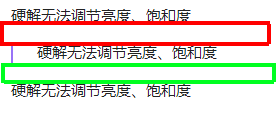
文字表达或许不太准确,我上传了图片,就是引用文本的上下会有一个空白的区域,我是想调节这两个区域的间距,起码让上间距小一些。
就是>引用这个语法和上文之间总有一行空白,感觉十分割裂,我想让他没有。
尝试过让豆包写css但是都不行,>引用这段话像是单独在一个框里,都报给我的都是调节框里文字和边框的的间距,而不是和上面一段正常文字的间距
文字表达或许不太准确,我上传了图片,就是引用文本的上下会有一个空白的区域,我是想调节这两个区域的间距,起码让上间距小一些。
引用前1行正常应该不会变化,估计是你主题/某个CSS片段导致的
可以试试这个有没有变化(让ai改的)
/* 前:当某行后面跟随引用块时压缩该行 */
.is-live-preview [class="cm-line"]:has(+ .HyperMD-quote) {
    padding-top: 0em !important;
    padding-bottom: 0em !important;
    line-height: 0.5;
    transition: line-height 0.5s ease;
    border-radius: var(--radius-s);
}
我正在使用的压缩空白行CSS:
/*
特定空白行压缩
前:
- 水平分割线 .hr
- 表格  .cm-table-widget
- 标题  .HyperMD-header
后
- 引用  .HyperMD-quote
- Callout  .cm-callout
- 列表  .HyperMD-list-line

实时阅读模式  .is-live-preview
+源码模式  .markdown-source-view.is-live-preview

:is([class=cm-line]  =  .cm-line   ?
.cm-active.cm-line 当前活动行?
line-height: var(–line-height-normal); 常规行高
*/

.is-live-preview :is([class=cm-line]:has(+ :is(.hr, .cm-table-widget, .HyperMD-header))), /*前*/
.is-live-preview :is(.HyperMD-quote, .cm-callout, .HyperMD-list-line):not(.HyperMD-quote.HyperMD-callout) + [class="cm-line"]{ /*后*/
    padding-top: 0em !important;
    padding-bottom: 0em !important;
    line-height: 0.5;
    transition: 0.5s line-height,0.5s background-color;/*0.5s行高、背景颜色变化完毕*/
    border-radius: var(--radius-s);
}


.is-live-preview :is([class=cm-line]:has(+ :is(.hr, .cm-table-widget, .HyperMD-header))):hover, /*前*/
.is-live-preview :is(.HyperMD-quote, .cm-callout, .HyperMD-list-line):not(.HyperMD-quote.HyperMD-callout) + [class="cm-line"]:hover { /*后*/
    background-color: hsla(var(--color-accent-hsl), 0.4);
}
/*˗ ˗ 额外调整表格前˗ ˗ */
.markdown-source-view.mod-cm6 .cm-table-widget {
    margin-top: -8px!important;
/*    padding-top: calc(0.5*var(--size-4-4));*/
/*    padding-bottom: calc(0.5*var(--size-4-4));*/
}
感谢回复,我更新了下问题说明,可能是我表述的不清楚。你的这个css我试了下,但是不起作用,可能是我电脑的ob版本有点老,我回家再试一下
其他正文行之间如果没有间距的话,我估计是引用块的margin值过大导致,这里所谓的空白行可能不是独立的元素。
参考 
我看上面代码调整的都是padding,可能正因如此,只能调节框里文字和边框的间距,这部分如图所示正是属于paddinig area。
所以要调整的应该是 margin-top 之类的属性。
-----以下内容为 Claude Sonnet 4.6 生成-------
解决方案是在 Obsidian 的 CSS snippet 中针对性地覆盖这个值:
css
.markdown-preview-view blockquote,
.markdown-rendered blockquote {
  margin-top: 0.2em;   /* 调小上间距 */
  margin-bottom: 0.2em; /* 调小下间距 */
}
.el-blockquote > blockquote {
margin-top: 0rem;
margin-bottom: 0rem;
}