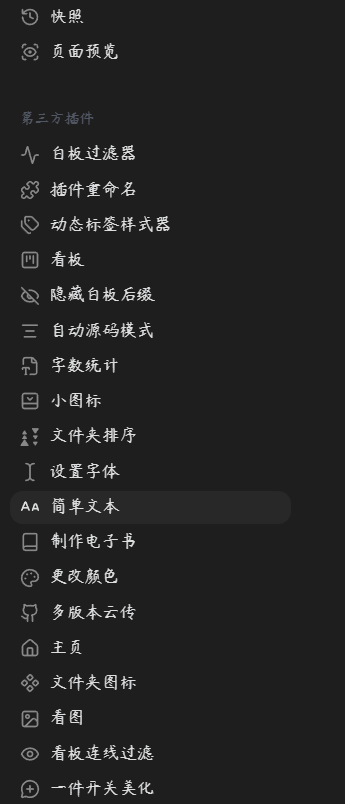
还可以改图标
还可以改中文名
const { Plugin, PluginSettingTab, Setting, FuzzySuggestModal, setIcon, getIconIds } = require('obsidian');

const DEFAULT_SETTINGS = {
    names: {},
    icons: {}
}

// --- 图标搜索选择弹窗 ---
class IconPickerModal extends FuzzySuggestModal {
    constructor(app, pluginId, plugin, onChoose) {
        super(app);
        this.pluginId = pluginId;
        this.plugin = plugin;
        this.onChoose = onChoose;
        this.setPlaceholder("搜索图标 (输入英文, 如 'star', 'settings', 'image')...");
    }

    getItems() {
        return ["恢复默认状态", ...getIconIds()];
    }

    getItemText(item) {
        return item;
    }

    renderSuggestion(match, el) {
        const iconName = match.item;

        el.style.display = "flex";
        el.style.alignItems = "center";
        el.style.gap = "10px";

        if (iconName === "恢复默认状态") {
            el.createSpan({ text: "🔄 恢复默认 (核心插件恢复原版 / 第三方恢复拼图)" });
            return;
        }

        const iconContainer = el.createDiv();
        setIcon(iconContainer, iconName);
        el.createSpan({ text: iconName });
    }

    onChooseItem(item, evt) {
        this.onChoose(item === "恢复默认状态" ? null : item);
    }
}

// --- 主插件逻辑 ---
class PluginRenamer extends Plugin {
    async onload() {
        await this.loadSettings();

        // 核心解法:监听设置面板打开,注入纯 DOM 级的 MutationObserver 监控器
        this.patchSettingOpen();

        this.app.workspace.onLayoutReady(() => {
            // 兜底:如果重载时面板本来就是开着的,立刻应用一次
            setTimeout(() => {
                if (document.querySelector('.vertical-tab-header')) {
                    this.applyToExistingTabs();
                    this.setupMutationObserver();
                }
            }, 500);
        });

        this.addSettingTab(new PluginRenamerSettingTab(this.app, this));
    }

    onunload() {
        this.unpatchSettingOpen();
        this.restoreExistingTabs();
        if (this.mutationObserver) {
            this.mutationObserver.disconnect();
            this.mutationObserver = null;
        }
    }

    async loadSettings() {
        this.settings = Object.assign({}, DEFAULT_SETTINGS, await this.loadData());
    }

    async saveSettings() {
        await this.saveData(this.settings);
    }

    // 劫持设置面板的打开动作,借机挂载雷达
    patchSettingOpen() {
        if (!this.app.setting) return;
        this.originalSettingOpen = this.app.setting.open;
        const self = this;

        this.app.setting.open = function() {
            const result = self.originalSettingOpen.apply(this, arguments);
            // 留出 50ms 等待 React 初次把 HTML 画出来
            setTimeout(() => {
                self.applyToExistingTabs();
                self.setupMutationObserver();
            }, 50);
            return result;
        };
    }

    unpatchSettingOpen() {
        if (this.app.setting && this.originalSettingOpen) {
            this.app.setting.open = this.originalSettingOpen;
        }
    }

    // 致敬参考代码:纯 DOM 级别 MutationObserver 监听器 (彻底解决“有的有没有的没”和闪烁问题)
    setupMutationObserver() {
        if (this.mutationObserver) {
            this.mutationObserver.disconnect();
        }

        const header = document.querySelector('.vertical-tab-header');
        if (!header) return;

        this.mutationObserver = new MutationObserver((mutations) => {
            mutations.forEach(m => {
                // 只要 React 敢插入新节点,我们就立刻处理
                m.addedNodes.forEach(node => {
                    if (node instanceof HTMLElement) {
                        if (node.classList.contains("vertical-tab-nav-item") && node.hasAttribute("data-setting-id")) {
                            this.applyIconToNavItem(node);
                        } else {
                            // 防范未来 Obsidian 可能会包裹一个外层 div 的情况
                            node.querySelectorAll?.(".vertical-tab-nav-item[data-setting-id]").forEach(tab => {
                                this.applyIconToNavItem(tab);
                            });
                        }
                    }
                });
            });
        });

        // 监听整个侧边栏的所有子树变动
        this.mutationObserver.observe(header, { childList: true, subtree: true });
    }

    // 扫描屏幕上现存的节点
    applyToExistingTabs() {
        const header = document.querySelector('.vertical-tab-header');
        if (!header) return;

        header.querySelectorAll(".vertical-tab-nav-item[data-setting-id]").forEach(tabEl => {
            this.applyIconToNavItem(tabEl);
        });
    }

    // 精确的纯 DOM 修改器
    applyIconToNavItem(tabEl) {
        const pluginId = tabEl.getAttribute("data-setting-id");
        if (!pluginId) return;

        // 判断是核心还是第三方
        const manifests = this.app.plugins.manifests;
        const isThirdParty = !!manifests[pluginId];

        const customName = this.settings.names[pluginId];
        let targetIcon = this.settings.icons[pluginId];

        // 默认规则:没设置的,第三方用拼图,核心为空(保留原生图标)
        if (targetIcon === undefined) {
            targetIcon = isThirdParty ? 'puzzle' : null;
        }

        // ---------------- 1. 处理名称 ----------------
        if (customName && customName.trim() !== "") {
            // 在修改前备份原名
            if (!tabEl.dataset.originalName) {
                const walker = document.createTreeWalker(tabEl, NodeFilter.SHOW_TEXT, null, false);
                let node;
                while ((node = walker.nextNode())) {
                    if (node.nodeValue.trim() !== "") {
                        tabEl.dataset.originalName = node.nodeValue;
                        break;
                    }
                }
            }
            if (tabEl.hasAttribute('aria-label') && tabEl.getAttribute('aria-label') !== customName) {
                tabEl.setAttribute('aria-label', customName);
            }
            const walker = document.createTreeWalker(tabEl, NodeFilter.SHOW_TEXT, null, false);
            let node;
            while ((node = walker.nextNode())) {
                if (node.nodeValue.trim() !== "") {
                    if (node.nodeValue !== customName) node.nodeValue = customName;
                    break;
                }
            }
        } else {
            // 清除时还原名称
            if (tabEl.dataset.originalName) {
                const walker = document.createTreeWalker(tabEl, NodeFilter.SHOW_TEXT, null, false);
                let node;
                while ((node = walker.nextNode())) {
                    if (node.nodeValue.trim() !== "") {
                        node.nodeValue = tabEl.dataset.originalName;
                        break;
                    }
                }
                if (tabEl.hasAttribute('aria-label')) {
                    tabEl.setAttribute('aria-label', tabEl.dataset.originalName);
                }
                delete tabEl.dataset.originalName;
            }
        }

        // ---------------- 2. 处理图标 ----------------
        // 强制为纯文本结构的第三方插件添加 Flex 布局,保证图文并排
        if (isThirdParty) {
            tabEl.style.display = "flex";
            tabEl.style.alignItems = "center";
        }

        // 找到我们自己创建的图标容器 和 原生可能自带的容器
        let customIconEl = tabEl.querySelector('.vertical-tab-nav-item-icon.custom-icon');
        let nativeIconEl = tabEl.querySelector('.vertical-tab-nav-item-icon:not(.custom-icon)');

        if (!targetIcon) {
            // 需要恢复为默认状态:删除我们的自定义容器,把原生容器重新显示出来
            if (customIconEl) customIconEl.remove();
            if (nativeIconEl) nativeIconEl.style.display = '';
            return;
        }

        // 如果还没有我们的自定义图标容器,就造一个进去
        if (!customIconEl) {
            if (nativeIconEl) nativeIconEl.style.display = 'none'; // 把原生的藏起来

            customIconEl = document.createElement('div');
            customIconEl.classList.add("vertical-tab-nav-item-icon", "custom-icon");

            // 同样只针对第三方微调一下边距
            if (isThirdParty) {
                customIconEl.style.marginRight = '8px';
                customIconEl.style.display = 'flex';
                customIconEl.style.alignItems = 'center';
                customIconEl.style.justifyContent = 'center';
            }

            let firstNode = tabEl.firstChild;
            firstNode ? tabEl.insertBefore(customIconEl, firstNode) : tabEl.appendChild(customIconEl);
        } else {
            // 如果容器已经在了,确保原生图标一直藏着
            if (nativeIconEl) nativeIconEl.style.display = 'none';
        }

        // 只有图案不同的时候才重绘 SVG,性能极高!
        if (customIconEl.dataset.icon !== targetIcon) {
            customIconEl.innerHTML = '';
            setIcon(customIconEl, targetIcon);
            customIconEl.dataset.icon = targetIcon;
        }
    }

    restoreExistingTabs() {
        const header = document.querySelector('.vertical-tab-header');
        if (!header) return;

        header.querySelectorAll(".vertical-tab-nav-item[data-setting-id]").forEach(tabEl => {
            // 恢复原版名称
            if (tabEl.dataset.originalName) {
                const walker = document.createTreeWalker(tabEl, NodeFilter.SHOW_TEXT, null, false);
                let node;
                while ((node = walker.nextNode())) {
                    if (node.nodeValue.trim() !== "") {
                        node.nodeValue = tabEl.dataset.originalName;
                        break;
                    }
                }
                if (tabEl.hasAttribute('aria-label')) {
                    tabEl.setAttribute('aria-label', tabEl.dataset.originalName);
                }
                delete tabEl.dataset.originalName;
            }

            // 移除自定义图标,放回原生图标
            let customIconEl = tabEl.querySelector('.vertical-tab-nav-item-icon.custom-icon');
            if (customIconEl) customIconEl.remove();

            let nativeIconEl = tabEl.querySelector('.vertical-tab-nav-item-icon:not(.custom-icon)');
            if (nativeIconEl) nativeIconEl.style.display = '';

            // 清理强制附加的第三方样式
            const pluginId = tabEl.getAttribute("data-setting-id");
            if (pluginId && this.app.plugins.manifests && this.app.plugins.manifests[pluginId]) {
                tabEl.style.display = '';
                tabEl.style.alignItems = '';
            }
        });
    }
}

// --- 设置页面 ---
class PluginRenamerSettingTab extends PluginSettingTab {
    constructor(app, plugin) {
        super(app, plugin);
        this.plugin = plugin;
    }

    display() {
        const { containerEl } = this;
        containerEl.empty();

        containerEl.createEl('h2', { text: '⚙️ 插件名称与图标自定义' });
        containerEl.createEl('p', { text: '点击左侧按钮更改图标,右侧更改名称。支持修改所有核心和第三方插件,即改即生效!', cls: "setting-item-description" });

        // 获取并合并所有设置菜单(兼容核心 + 社区插件)
        const pluginTabs = this.app.setting.pluginTabs || [];
        const settingTabs = this.app.setting.settingTabs ||[];
        const manifests = this.app.plugins.manifests;

        let allTabs = [...settingTabs, ...pluginTabs];

        const sortedTabs = allTabs.sort((a, b) => {
            const nameA = manifests[a.id]?.name || a.name || a.id;
            const nameB = manifests[b.id]?.name || b.name || b.id;
            return nameA.localeCompare(nameB);
        });

        sortedTabs.forEach((tab) => {
            if (tab.id === this.plugin.manifest.id) return; // 隐藏自己

            const pluginId = tab.id;
            const isThirdParty = manifests && !!manifests[pluginId];
            const originalName = manifests[pluginId]?.name || tab.name || pluginId;
            const fallbackIcon = isThirdParty ? 'puzzle' : (tab.icon || 'box');

            const setting = new Setting(containerEl)
                .setDesc(`ID: ${pluginId}`)
                .addExtraButton(btn => {
                    const currentIcon = this.plugin.settings.icons[pluginId];
                    const displayIcon = currentIcon !== undefined ? currentIcon : fallbackIcon;

                    btn.setIcon(displayIcon || 'image')
                       .setTooltip("更改侧边栏图标")
                       .onClick(() => {
                           new IconPickerModal(this.app, pluginId, this.plugin, async (selectedIcon) => {
                               if (selectedIcon === null) {
                                   delete this.plugin.settings.icons[pluginId];
                                   btn.setIcon(fallbackIcon || 'image');
                                   setIcon(iconEl, fallbackIcon || 'image');
                               } else {
                                   this.plugin.settings.icons[pluginId] = selectedIcon;
                                   btn.setIcon(selectedIcon);
                                   setIcon(iconEl, selectedIcon);
                               }
                               await this.plugin.saveSettings();
                               // ★ 核心:只需触发遍历一次屏幕元素,它立刻自己修补! ★
                               this.plugin.applyToExistingTabs();
                           }).open();
                       });
                });

            const currentIcon = this.plugin.settings.icons[pluginId];
            const displayIcon = currentIcon !== undefined ? currentIcon : fallbackIcon;

            const iconEl = document.createElement('span');
            iconEl.style.marginRight = '8px';
            iconEl.style.display = 'inline-flex';
            iconEl.style.alignItems = 'center';
            setIcon(iconEl, displayIcon || 'image');

            const nameSpan = document.createElement('span');
            nameSpan.textContent = this.plugin.settings.names[pluginId] || originalName;

            setting.nameEl.appendChild(iconEl);
            setting.nameEl.appendChild(nameSpan);

            setting.addText(text => text
                .setPlaceholder('输入想显示的中文...')
                .setValue(this.plugin.settings.names[pluginId] || '')
                .onChange(async (value) => {
                    this.plugin.settings.names[pluginId] = value;
                    await this.plugin.saveSettings();

                    const targetName = value.trim() !== "" ? value : originalName;
                    nameSpan.textContent = targetName;
                    this.plugin.applyToExistingTabs();
                })
            );
        });
    }
}

module.exports = PluginRenamer;