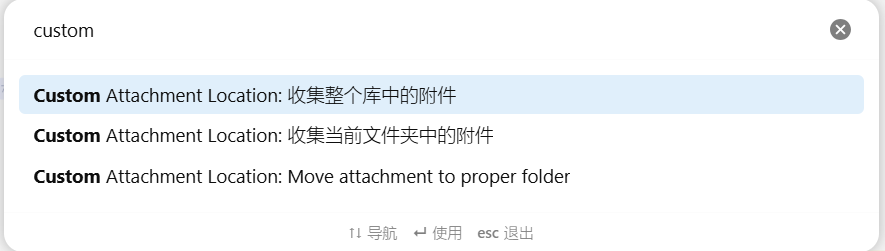
插件 Custom Attachment Location 可以自动整理附件文件,但在安装之后,对于安装之前的附件文件有没有办法进行整理?
可能这个话题,有点。。。。 
但我还想知道,有没有办法来解决这种情况。
插件 Custom Attachment Location 可以自动整理附件文件,但在安装之后,对于安装之前的附件文件有没有办法进行整理?
可能这个话题,有点。。。。
但我还想知道,有没有办法来解决这种情况。
我根据自己需求,让ai改后得到的一个在用版本(批量移动指定文件夹内所有文件的附件到各自的Assets文件夹):
/*
 * @Description: 批量移动指定文件夹内所有文件的附件到各自的Assets文件夹(弹窗统计版)
 */

const path = require('path');
const quickAddApi = app.plugins.plugins.quickadd.api;

// --- 常量定义 ---
const NOTE_TYPES = ['md', 'canvas', 'excalidraw'];
const ASSETS_FOLDER_PREFIX = 'Assets_';

// --- 辅助函数 ---

/**
 * 获取指定文件夹下的所有笔记文件
 */
function getAllNoteFilesInFolder(folderPath) {
    const folder = app.vault.getAbstractFileByPath(folderPath);
    if (!folder) {
        throw new Error(`文件夹不存在: ${folderPath}`);
    }

    const noteFiles = [];
    function scanFolder(folder) {
        for (const child of folder.children) {
            if (child.children) {
                // 如果是文件夹,递归扫描
                scanFolder(child);
            } else if (NOTE_TYPES.includes(child.extension)) {
                // 如果是笔记文件,添加到列表
                noteFiles.push(child);
            }
        }
    }

    scanFolder(folder);
    return noteFiles;
}

/**
 * 扫描单个笔记文件中的所有附件链接
 */
function getAttachmentsFromNote(noteFile) {
    const cachedMetadata = app.metadataCache.getFileCache(noteFile);
    const allLinks = new Set();

    if (cachedMetadata?.links) {
        cachedMetadata.links.forEach(l => allLinks.add(l.link));
    }
    if (cachedMetadata?.embeds) {
        cachedMetadata.embeds.forEach(e => allLinks.add(e.link));
    }

    const attachments = [];
    for (const link of allLinks) {
        const linkedFile = app.metadataCache.getFirstLinkpathDest(link, noteFile.path);
        if (linkedFile) {
            const isNote = NOTE_TYPES.includes(linkedFile.extension);
            const isInSameFolder = path.dirname(linkedFile.path) === path.dirname(noteFile.path);
            if (!isNote && !isInSameFolder) {
                attachments.push(linkedFile.path);
            }
        }
    }

    return attachments;
}

/**
 * 移动单个笔记的附件到对应的Assets文件夹
 */
async function moveAttachmentsForNote(noteFile, attachmentPaths) {
    const result = {
        noteName: noteFile.name, // 增加笔记名
        successCount: 0,
        failCount: 0,
        renamedFiles: [],
        originalFolders: new Set(),
        targetFolderName: `${ASSETS_FOLDER_PREFIX}${noteFile.basename}`
    };

    const targetFolderPath = path.join(path.dirname(noteFile.path), result.targetFolderName);

    // 创建目标文件夹
    try {
        await app.vault.createFolder(targetFolderPath);
    } catch (error) {
        if (!error.message.includes("already exists")) {
            throw error;
        }
    }

    // 获取目标文件夹现有文件
    const targetFolder = app.vault.getAbstractFileByPath(targetFolderPath);
    const existingFileNames = new Set(targetFolder?.children.map(f => f.name) || []);

    for (const oldPath of attachmentPaths) {
        const sourceFile = app.vault.getAbstractFileByPath(oldPath);
        if (!sourceFile) {
            result.failCount++;
            continue;
        }

        result.originalFolders.add(path.dirname(oldPath));
        const originalFileName = sourceFile.name;

        // 生成唯一文件名
        const fileExt = path.extname(originalFileName);
        const fileNameWithoutExt = path.basename(originalFileName, fileExt);
        let uniqueFileName = originalFileName;
        let counter = 1;

        while (existingFileNames.has(uniqueFileName)) {
            uniqueFileName = `${fileNameWithoutExt}_${counter}${fileExt}`;
            counter++;
        }
        existingFileNames.add(uniqueFileName);

        const newPath = path.join(targetFolderPath, uniqueFileName);

        try {
            await app.fileManager.renameFile(sourceFile, newPath);
            result.successCount++;

            if (uniqueFileName !== originalFileName) {
                result.renamedFiles.push({
                    originalName: originalFileName,
                    newName: uniqueFileName
                });
            }
        } catch (error) {
            console.error(`移动文件失败: ${oldPath}`, error);
            result.failCount++;
        }
    }

    return result;
}

/**
 * 删除空文件夹
 */
async function deleteFolderIfEmpty(folderPath) {
    if (!folderPath || folderPath === '/' || folderPath === '.') return false;

    const folder = app.vault.getAbstractFileByPath(folderPath);
    if (folder && folder.children && folder.children.length === 0) {
        try {
            await app.vault.delete(folder);
            return true;
        } catch (error) {
            console.error(`删除文件夹失败: ${folderPath}`, error);
        }
    }
    return false;
}

/**
 * 创建弹窗显示批量操作结果
 */
function showBatchSummaryModal(results) {
    // 创建弹窗
    const modal = new app.plugins.plugins['quickadd-api'].QuickAdd.Modal(app);
    modal.titleEl.setText("📊 批量移动附件结果统计");

    let totalSuccess = 0;
    let totalFail = 0;
    let totalNotes = 0;
    let totalRenamed = 0;
    let totalDeletedFolders = 0;

    // 构建详细结果HTML
    let content = `<div style="max-height: 400px; overflow-y: auto; padding: 10px 0;">`;

    // 每个笔记的详细结果
    content += `<div style="margin-bottom: 15px;"><strong>📝 各笔记处理详情:</strong></div>`;

    results.forEach((result, index) => {
        const hasAttachments = result.successCount > 0 || result.failCount > 0;
        const statusIcon = hasAttachments ?
            (result.failCount === 0 ? "✅" : "⚠️") : "📭";

        content += `<div style="margin: 8px 0; padding: 5px; border-left: 3px solid #666; background: var(--background-secondary);">
            <strong>${statusIcon} ${result.noteName}</strong><br>
            <span style="font-size: 0.9em; color: var(--text-muted);">
                成功: <span style="color: var(--color-green)">${result.successCount}</span> |
                失败: <span style="color: var(--color-red)">${result.failCount}</span> |
                重命名: ${result.renamedFiles.length}
            </span>
        </div>`;

        totalSuccess += result.successCount;
        totalFail += result.failCount;
        totalRenamed += result.renamedFiles.length;
        totalDeletedFolders += result.deletedFoldersCount || 0;
        if (hasAttachments) totalNotes++;
    });

    // 汇总统计
    content += `<div style="margin-top: 20px; padding: 15px; background: var(--background-primary-alt); border-radius: 8px;">
        <strong>📈 汇总统计:</strong><br>
        <div style="margin-top: 10px;">
            📁 处理笔记数: <strong>${totalNotes}</strong><br>
            ✅ 成功移动: <strong style="color: var(--color-green)">${totalSuccess}</strong><br>
            ❌ 移动失败: <strong style="color: var(--color-red)">${totalFail}</strong><br>
            🔄 重命名文件: <strong>${totalRenamed}</strong><br>
            🗑️ 清理空文件夹: <strong>${totalDeletedFolders}</strong>
        </div>
    </div>`;

    content += `</div>`;

    modal.contentEl.innerHTML = content;

    // 添加确认按钮
    modal.addButton({
        buttonText: "关闭",
        callback: () => modal.close()
    });

    modal.open();
}

// --- 主函数 ---
module.exports = {
    entry: async (QuickAdd, settings, params) => {
        try {
            // 让用户选择要处理的文件夹
            const folders = app.vault.getAllLoadedFiles()
                .filter(file => file.children) // 只获取文件夹
                .map(folder => folder.path)
                .filter(path => path !== '/'); // 排除根目录

            if (folders.length === 0) {
                new Notice("❌ 未找到任何文件夹");
                return;
            }

            const selectedFolderPath = await quickAddApi.suggester(
                folders,
                folders,
                "请选择要处理的文件夹:"
            );

            if (!selectedFolderPath) {
                new Notice("🚫 操作已取消");
                return;
            }

            new Notice(`🔍 正在扫描文件夹: ${selectedFolderPath}`);

            // 获取文件夹内所有笔记文件
            const noteFiles = getAllNoteFilesInFolder(selectedFolderPath);

            if (noteFiles.length === 0) {
                new Notice(`❌ 在文件夹 "${selectedFolderPath}" 中未找到笔记文件`);
                return;
            }

            // 确认操作
            const shouldProceed = await quickAddApi.yesNoPrompt(
                `确定要处理文件夹 "${selectedFolderPath}" 中的 ${noteFiles.length} 个笔记文件吗?`
            );

            if (!shouldProceed) {
                new Notice("🚫 操作已取消");
                return;
            }

            new Notice(`🚀 开始批量处理 ${noteFiles.length} 个笔记...`);

            const allResults = [];
            let processedCount = 0;

            for (const noteFile of noteFiles) {
                processedCount++;
                console.log(`[${processedCount}/${noteFiles.length}] 处理笔记: ${noteFile.name}`);

                // 获取当前笔记的附件
                const attachments = getAttachmentsFromNote(noteFile);

                if (attachments.length === 0) {
                    console.log(`  📭 无附件可移动`);
                    // 即使没有附件也记录结果,显示笔记名
                    allResults.push({
                        noteName: noteFile.name,
                        successCount: 0,
                        failCount: 0,
                        renamedFiles: [],
                        deletedFoldersCount: 0
                    });
                    continue;
                }

                console.log(`  📎 找到 ${attachments.length} 个附件`);

                // 移动附件
                const moveResult = await moveAttachmentsForNote(noteFile, attachments);

                // 清理空文件夹
                let deletedFoldersCount = 0;
                for (const folderPath of moveResult.originalFolders) {
                    if (await deleteFolderIfEmpty(folderPath)) {
                        deletedFoldersCount++;
                    }
                }
                moveResult.deletedFoldersCount = deletedFoldersCount;

                allResults.push(moveResult);

                // 显示单个笔记的处理结果
                new Notice(`📄 ${noteFile.name}: 成功 ${moveResult.successCount}, 失败 ${moveResult.failCount}`, 3000);

                // 短暂延迟,避免操作过于密集
                await new Promise(resolve => setTimeout(resolve, 100));
            }

            // 显示弹窗汇总结果
            showBatchSummaryModal(allResults);

        } catch (error) {
            console.error("批量移动附件过程中发生错误:", error);
            new Notice("❌ 发生错误,请查看控制台");
        }
    },
    settings: {
        name: "批量移动文件夹内所有文件的附件(弹窗统计版)",
        options: {}
    }
};
你要再修改,可以先发ai问问这个代码是什么作用的,然后告诉它针对哪一点你想改成什么样的
我这个统计有问题,不需要移动=没有移动也说移动成功了,各种让ai改都改不好就将就用了
这个插件更新很频繁阿 现在它的作用是复制到同一个文件夹? 我原本是指定一个文件夹,所有附件都扔进去,不想看到他们跟笔记在一起。看来这个插件我用不上,该删除了
指定当前位置的一个目录里面,目录名字固定,然后把这个目录名隐藏
软件里面看不到,图片在当前位置的子目录。
其它MD也可以直接看笔记,完全兼容Typro