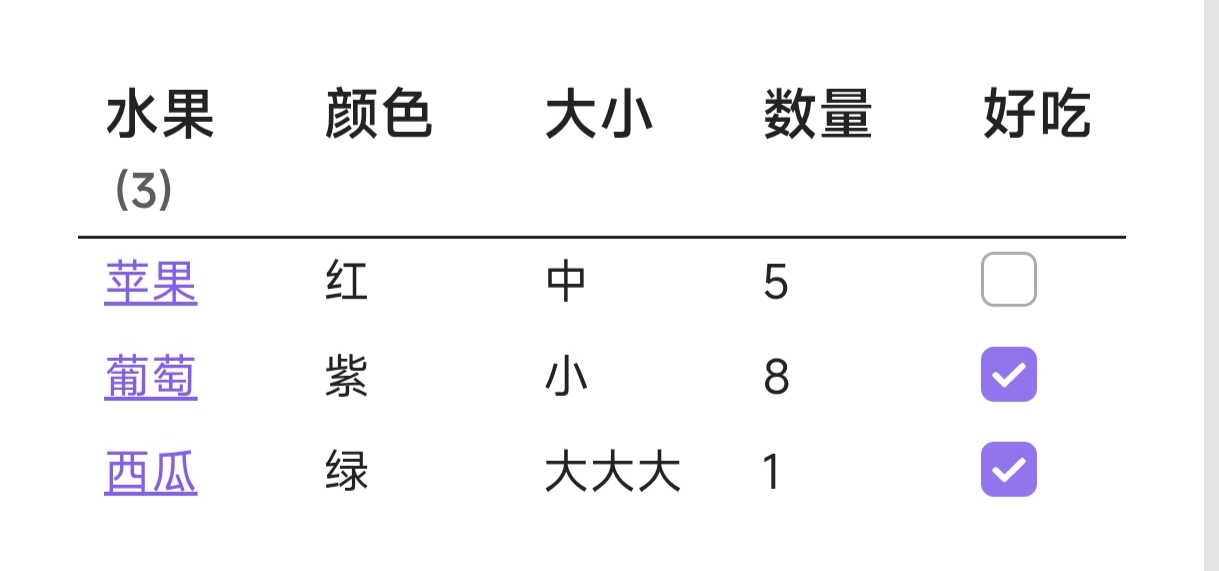
效果演示
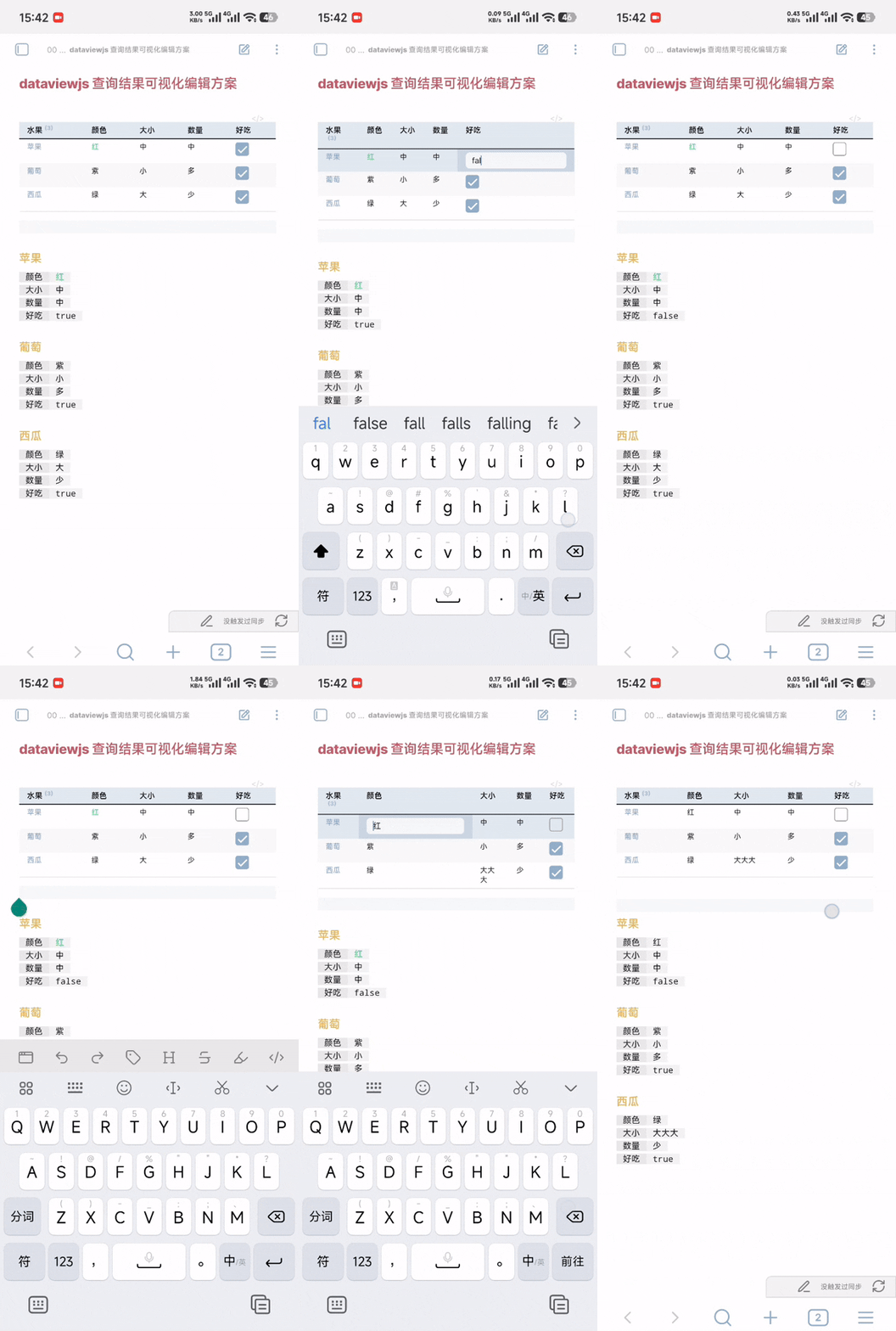
更新
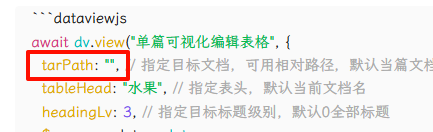
1.10 增加可选参数:目标文件路径 tarPath
1.12 增加可选参数,表格处理操作
可设置筛选、排序、条件样式等
1.13 表格处理操作增加:添加行/列等
可实现类似公式的功能
1.13.1 修复新增格中不能添加 css
1.13.2 修复 tarPath 省略时报错
用法示例
```dataviewjs
await dv.view("JS/单篇可视化编辑表格", {
  //tarPath: "水果", // 指定目标文档,可用相对路径,默认当篇文档
  tableHead: "水果", // 指定表头,默认当前文档名
  headingLv: 3, // 指定目标标题级别,默认0全部标题
  $process: data=>data
    .addCss("数量", v=>v>=5, "font-weight:bold;") // 条件样式
    .addColor("颜色", v=>v==="红", "red") // 条件颜色
    .addFormat("单价", v=>v>=1, "**") //条件格式
    //.filter("好吃", v=>v) // 筛选
    .colsOrder([0, "数量", "单价"], true) // 列顺序
    .colsHide("大小") // 隐藏列
    .addCol("总价", (_,r)=>r[1]*r[2]) // 添加列
    .sort("总价") // 排序
    .reverse() // 逆序
    .setValue("葡萄", "好吃", ()=>false) // 设置单元格值
    .addRow("总和", (_,c)=>c.reduce((r,c)=>r+=c)) // 添加行
    .setHead(5, "花费") // 设置列名
})
```


### 苹果
[颜色:: 红]
[大小:: 中]
[数量:: 5]
[单价:: 1]
[好吃:: false]

### 葡萄
[颜色:: 紫]
[大小:: 小]
[数量:: 8]
[单价:: 0.8]
[好吃:: true]

### 西瓜
[颜色:: 绿]
[大小:: 大]
[数量:: 1]
[单价:: 2.5]
[好吃:: true]

### 草莓
[颜色:: 红]
[大小:: 小]
[数量:: 13]
[单价:: 1.2]
[好吃:: true]
js 脚本
/**
 * 用法: await dv.view("JS/单篇可视化编辑表格", input)
 *
 * 为方便表格实时修改,不支持多个同名标题,不支持同标题下多个同名元数据
 */

// 配置参数
const CONFIG = {
  // 目标文件路径,默认为当前文件路径;自动转为绝对路径
  tarPath: input?.tarPath ?? undefined,
  // 表头,默认为文件名
  tableHead: input?.tableHead ?? undefined,
  // 指定标题级别 (1-6);null 或 0 表示处理所有级别的标题
  headingLv: input?.headingLv ?? 0,
  // 是否启用类型转换
  enableTypeConversion: input?.enableTypeConversion ?? true,
  // 表格处理操作(筛选、排序、条件样式等)
  // !!!错误使用可能导致文档被意外修改!!!
  process: input?.$process ?? (data=>data)
}


/**
 * 主函数 - 执行数据库查询和渲染
 */
async function renderDatabase() {
  try {
    // 1. 获取文件元数据
    const tarData = CONFIG.tarPath
      ? dv.page(CONFIG.tarPath)
      : dv.current()
    CONFIG.tarPath = tarData.file.path
    CONFIG.tableHead ??= tarData.file.name
    const fileMeta = await app.metadataCache.getCache(CONFIG.tarPath)
    if (!fileMeta?.headings) {
      dv.span("目标文档缺少标题或无法读取")
      return
    }

    // 2. 过滤标题
    const headingsList = filterHeadings(fileMeta.headings, CONFIG.headingLv)
    if (headingsList.length === 0) {
      const levelMsg = CONFIG.headingLv ? `级别 ${CONFIG.headingLv}` : "所有级别"
      dv.span(`目标文档没有找到${levelMsg}的标题`)
      return
    }

    // 3. 读取并解析内容
    const tarFile = await app.vault.getFileByPath(CONFIG.tarPath)
    if (!tarFile) {
      dv.span("目标文档未找到")
      return
    }
    const content = await app.vault.cachedRead(tarFile)
    const matches = getMetadata(content.split('\n'), headingsList, CONFIG.headingLv)
    if (matches.length === 0) {
      dv.span("未找到有效的元数据")
      return
    }

    // 4. 处理数据
    const tableData = toTableData(matches)
    const finalData = CONFIG.process(tableData)
    if (!(finalData instanceof TableData)) {
      dv.span("表格处理操作出错")
      return
    }

    // 5. 渲染表格
    renderTable(finalData, tarFile)

  } catch (e) {
    dv.span(`处理文档时出错: ${e.message}`)
    console.error(e.message, e.stack)
  }
}

/**
 * 过滤标题
 */
function filterHeadings(headings, targetLevel) {
  if (targetLevel && targetLevel >= 1 && targetLevel <= 6) {
    return headings
      .filter(k => k.level === targetLevel)
      .map(k => k.heading)
  }
  return headings.map(k => k.heading)
}

/**
 * 获取元数据
 */
function getMetadata(lines, headingsList, targetLevel) {
  const matches = []
  let currentTitle = null
  let collecting = false
  let currentMetaLines = []

  for (let i = 0; i < lines.length; i++) {
    const line = lines[i]

    if (line.trim() === '') continue

    const headingMatch = line.match(/^(#{1,6})\s+(.+)$/)

    if (headingMatch) {
      // 保存上一个标题的数据
      if (currentTitle && currentMetaLines.length > 0) {
        matches.push({ title: currentTitle, metaLines: currentMetaLines })
      }

      // 开始新标题
      const level = headingMatch[1].length
      const title = headingMatch[2].trim()

      currentTitle = title
      currentMetaLines = []

      // 检查是否为目标标题
      const isTargetLevel = !targetLevel || level === targetLevel
      collecting = isTargetLevel && headingsList.includes(title)

    } else if (collecting && isMetadataLine(line)) {
      currentMetaLines.push(line.trim())
    } else if (collecting) {
      collecting = false
    }
  }

  // 添加最后一个标题的数据
  if (currentTitle && currentMetaLines.length > 0) {
    matches.push({ title: currentTitle, metaLines: currentMetaLines })
  }

  return matches
}

/**
 * 检查是否为元数据行
 */
function isMetadataLine(line) {
  const trimmedLine = line.trim()
  const metadataPattern = /^(\s*\[.*?::.*?\])+\s*$/
  return metadataPattern.test(trimmedLine)
}

/**
 * 处理原始数据生成表格数据
 */
function toTableData(matches) {
  const tableHeads = [CONFIG.tableHead]
  const metaValues = []
  const allKeys = new Set()

  // 第一次遍历:收集所有可能的键
  matches.forEach(match => {
    match.metaLines.forEach(line => {
      extractKeyValuePairs(line).forEach(({ key }) => {
        if (key) allKeys.add(key)
      })
    })
  })
  // 构建表头
  tableHeads.push(...Array.from(allKeys))

  // 第二次遍历:填充数据
  matches.forEach(match => {
    const rowData = new Array(tableHeads.length).fill("")
    rowData[0] = `[[#${match.title}]]`
    // 解析该标题下的元数据
    const metaDict = parseMetaLines(match.metaLines)
    // 填充数据到对应列
    Object.entries(metaDict).forEach(([key, value]) => {
      const index = tableHeads.indexOf(key)
      if (index > 0) {
        rowData[index] = new Cell(match.title, key, value)
      }
    })
    metaValues.push(rowData)
  })

  return new TableData(tableHeads, metaValues)
}

/**
 * 解析多行元数据
 */
function parseMetaLines(metaLines) {
  const metaDict = {}
  metaLines.forEach(line => {
    extractKeyValuePairs(line).forEach(({ key, value }) => {
      if (!key) return
      metaDict[key] = value
    })
  })
  return metaDict
}

/**
 * 从一行中提取键值对
 */
function extractKeyValuePairs(line) {
  const kvPairs = []
  const stack = []
  let currentPart = ''
  let startIndex = -1
  let inMetadata = false

  for (let i = 0; i < line.length; i++) {
    const char = line[i]

    if (char === '[') {
      if (stack.length === 0) {
        startIndex = i
        currentPart = ''
        inMetadata = true
      }
      stack.push(char)
      if (stack.length > 1) currentPart += char
    }
    else if (char === ']') {
      if (stack.length === 0) continue

      stack.pop()

      if (stack.length === 0 && inMetadata && currentPart.includes('::')) {
        const parts = currentPart.split('::')
        if (parts.length >= 2) {
          const key = parts[0].trim()
          let value = parts.slice(1).join('::').trim()
          if (key) kvPairs.push({ key, value })
        }
        inMetadata = false
      }
      else if (stack.length > 0) {
        currentPart += char
      }
    }
    else if (stack.length > 0) {
      currentPart += char
    }
  }
  return kvPairs
}

/**
 * 将字符串转换为相应的类型
 * 支持的类型转换:
 * * 空字符串 null
 * * 单、双、反引号包裹的字符串
 * * 函数 xxx(yyy)
 * * * 默认 dv 表达式 (evaluate)
 * * dv 表达式
 * * * 字符串应使用双引号,无法识别单引号
 * * * 支持列表、对象
 * * dv 默认类型
 */
function parse(str) {
  // 空字符串
  if (str==='') return null

  // 强制字符串类型:引号['"`]包裹
  const quotedStringRegex = /^(['"`])(.*)\1$/
  const quotedMatch = str.match(quotedStringRegex)
  if (quotedMatch) {
    return quotedMatch[2]
  }

  // 函数类型
  const funcPattern = /^([a-zA-Z_$]?[a-zA-Z0-9_$]*)\((.*)\)$/
  const match = str.match(funcPattern)
  if (match) {
    const func = new FuncValue(match[1], match[2], str)
    return func.tryCall()
  }

  // 检查 Dataview 表达式
  const result = dv.evaluate(str)
  if (result.successful && result.value) return result.value

  // dv 默认类型
  return dv.parse(str)
}

/**
 * 将值转换用于显示
 */
function toShow(value, format) {
  if (value === true) return `<input type="checkbox" checked=true disabled=true />`
  if (value === false) return `<input type="checkbox" disabled=true />`
  if (Array.isArray(value)) {
    return (format?.includes('array-csv'))
      ? value.map(v => toShow(v)).join(', ')
      : value
  }

  if (value instanceof FuncValue) value = String(value)
  if (typeof value === 'number') {
    value = String(value)
  }

  if (typeof value === 'string') {
    if (format?.includes('*')) value = `*${value}*`
    if (format?.includes('**')) value = `**${value}**`
    if (format?.includes('~~')) value = `~~${value}~~`
    if (format?.includes('==')) value = `==${value}==`
  }

  return value
}


/**
 * 渲染表格
 */
function renderTable(data, tarFile) {
  const { heads, rows } = data
  dv.table(heads, rows.map(row=>row.map((cell)=>{
    if (!(cell instanceof BaseCell)) return toShow(cell)
    const cellEl = dv.container.createEl("div")
    if (cell?.css) {
      cellEl.style.cssText += cell.css
    }
    const showEl = dv.paragraph(cell.show)
    showEl.style.height = "auto"
    showEl.style.padding = "0"
    showEl.style.margin = "0"
    cellEl.append(showEl)
    if (!(cell instanceof Cell)) return cellEl
    const inputEl = dv.container.createEl("input", {
      "type": "text",
      "value": cell.rawV
    })
    inputEl.style.display = "none"
    inputEl.style.height = "auto"

    showEl.addEventListener('click', async (evt) => {
      showEl.style.display = "none"
      inputEl.style.display = "unset"
      inputEl.focus()
    })
    inputEl.addEventListener('change', async (evt) => {
      updateMetadata(tarFile, cell, inputEl.value)
      inputEl.style.display = "none"
      showEl.style.display = "unset"
    })
    inputEl.addEventListener('blur', async (evt) => {
      inputEl.style.display = "none"
      showEl.style.display = "unset"
    })
    cellEl.append(inputEl)
    return cellEl
  })))
}

/**
 * 更新元数据
 */
async function updateMetadata(tarFile, cell, newV) {
  await app.vault.process(tarFile, content => {
    const lines = content.split('\n')
    let inTargetSection = false

    for (let i = 0; i < lines.length; i++) {
      const line = lines[i]
      const isHeading = line.match(/^#{1,6}\s/)
      // 标题行处理
      if (isHeading) {
        const level = isHeading[0].trim().length
        const title = line.replace(/^#{1,6}\s+/, '').trim()
        const isTarget = (CONFIG.headingLv === 0)
          ? (title === cell.title)
          : (level === CONFIG.headingLv && title === cell.title)
        inTargetSection = isTarget
      }
      // 非标题行:检查是否应退出目标区域
      else if (inTargetSection && !isMetadataLine(line)) {
        inTargetSection = false
      }

      // 在目标区域内且是元数据行时进行替换
      if (inTargetSection && isMetadataLine(line)) {
        const pattern = new RegExp(`(\\[\\s*)${RegExp.escape(cell.rawK)}(\\s*::\\s*)${RegExp.escape(cell.rawV)}(\\s*\\])`)
        if (pattern.test(line)) {
          lines[i] = line.replace(pattern, `$1${cell.rawK}$2${newV}$3`)
          cell.rawV = newV
        }
      }
    }
    return lines.join('\n')
  })
}

// 执行主函数
renderDatabase()

/**
 * 表格单元格
 */
class BaseCell {
  constructor(value) {
    this._value = value
  }
  get value() {
    return this._value
  }
  get show() {
    return toShow(this.value, this?.format)
  }
}
class Cell extends BaseCell {
  title; rawK; rawV
  constructor(title, rawK, rawV) {
    super(undefined, true)
    this.title = title
    this.rawK = rawK
    this.rawV = rawV
  }
  get value() {
    return CONFIG.enableTypeConversion
      ? parse(this.rawV) : this.rawV
  }
}

/**
 * 元数据值:函数类型
 */
class FuncValue {
  constructor(funcName, args, str) {
    this.funcName = funcName
    this.args = args
    this.toString = () => str
  }
  tryCall() {
    let result
    switch (this.funcName) {
      case '':
      case 'evaluate':
        result = dv.evaluate(this.args)
        if (result.successful) return result.value
        break
      default:
        result = dv.evaluate(this.toString())
        if (result.successful) return result.value
        break
    }
    return this
  }
}

/**
 * 表格数据,实现了筛选、排序等功能
 */
class TableData {
  heads; rows
  constructor(heads, rows) {
    this.heads = heads
    this.rows = rows
  }
  /**
   * 任意处理表格,慎用
   */
  $then(dataToAny) {
    dataToAny(this)
    return this
  }
  $newCell(value) {
    return new BaseCell(value)
  }
  _forId(id, toAny) {
    if (Array.isArray(id)) {
      for (let _ of id) this._forId(_, toAny)
      return this
    }
    if (typeof id === 'string') {
      id = this.heads.indexOf(id)
    }
    if (id >= 0) toAny(id)
    return this
  }
  _forCell(id, toAny) {
    return this._forId(id, id => {
      for (let row of this.rows) {
        let cell = row[id]
        if (cell instanceof BaseCell) {
          toAny(cell)
        }
      }
    })
  }
  /**
   * 条件样式
   */
  addCss(id, valueToBool, css) {
    return this._forCell(id, cell => {
      if (valueToBool(cell.value)) {
        cell.css = (cell?.css ?? '') + css
      }
    })
  }
  addColor(id, valueToBool, color) {
    return this.addCss(id, valueToBool, `color: ${color};`)
  }
  addBackground(id, valueToBool, bg) {
    return this.addCss(id, valueToBool, `background: ${bg};`)
  }
  addFormat(id, valueToBool, format) {
    return this._forCell(id, cell => {
      if (valueToBool(cell.value)) {
        cell.format = (cell?.format)
          ? cell.format.push(format)
          : [format]
      }
    })
  }
  /**
   * 筛选
   */
  filter(id, valueToBool) {
    return this._forId(id, id => {
      this.rows = this.rows.filter(row => {
        let value = row[id]
        if (value instanceof BaseCell) {
          value = value.value
        }
        return valueToBool(value)
      })
    })
  }
  /**
   * 排序
   */
  sort(id, abToTernary) {
    return this._forId(id, id => {
      this.rows.sort((rowA, rowB) => {
        let a = rowA[id], b = rowB[id]
        if (a instanceof BaseCell) a = a.value
        if (b instanceof BaseCell) b = b.value
        return abToTernary ? abToTernary(a, b) : dv.compare(a, b)
      })
    })
  }
  reverse() {
    this.rows.reverse()
    return this
  }
  /**
   * 列顺序
   * 如果是永久调换建议直接修改第一个标题下元数据顺序
   */
  colsOrder(ids, isComplete) {
    if (!Array.isArray(ids)) ids = [ids]
    ids = ids
      .map(id => (typeof id === 'string') ? this.heads.indexOf(id) : id)
      .filter(id => id >= 0)
    if (isComplete && ids.length < this.heads.length) {
      ids = ids.concat([...this.heads.keys()].filter(i=>!ids.includes(i)))
    }
    this.rows = this.rows.map(row=>ids.map(id=>row[id]))
    this.heads = ids.map(id => this.heads[id])
    return this
  }
  colsHide(ids) {
    if (!Array.isArray(ids)) ids = [ids]
    ids = ids
      .map(id => (typeof id === 'string') ? this.heads.indexOf(id) : id)
        .filter(id => id >= 0)
    return this.colsOrder([...this.heads.keys()].filter(i=>!ids.includes(i)))
  }
  /**
   * 添加列
   * toValue: (行序号, 行, 所有行, 表头) => 单元格值
   */
  addCol(colName, toValue) {
    this.heads.push(colName)
    const table = this._table
    this.rows.forEach((row, i) =>
      row.push(new BaseCell(toValue(i, table[i], table, this.heads)))
    )
    return this
  }
  /**
   * 添加行
   * toValue: (列序号, 列, 所有列, 表头) => 单元格值
   */
  addRow(rowName, toValue) {
    const trans = this._trans
    let newRow = this.rows[0].map((_, i) =>
      new BaseCell(toValue(i, trans[i], trans, this.heads))
    )
    newRow[0] = rowName ?? newRow[0]
    this.rows.push(newRow)
    return this
  }
  /**
   * 设置值
   * toValue: (原值, 所有行, 表头) => 单元格值
   */
  setValue(rowId, colId, toValue) {
    if (typeof colId === 'string') colId = this.heads.indexOf(colId)
    const headings = this._headings
    if (typeof rowId === 'string') rowId = headings.indexOf(`[[#${rowId}]]`)
    if (rowId === -1) rowId = headings.indexOf(rowId)
    if (colId>=0 && rowId>=0) {
      let value = this.rows[rowId][colId]
      if (value instanceof BaseCell) value = value.value
      const table = this._table
      this.rows[rowId][colId] = new BaseCell(toValue(value, table, this.heads))
    }
    return this
  }
  setHead(id, head) {
    if (typeof id === 'string') id = this.heads.indexOf(id)
    this.heads[id] = head
    return this
  }
  /**
   * 纯值表格,不含表头
   */
  get _table() {
    return this.rows.map(row=>row.map(cell =>
      (cell instanceof BaseCell) ? cell.value : cell
    ))
  }
  /**
   * 纯值转置表格,不含表头
   */
  get _trans() {
    return this.rows[0].map((_,i)=>this.rows.map(row =>
      (row[i] instanceof BaseCell) ? row[i].value : row[i]
    ))
  }
  get _headings() {
    return this.rows.map(row => row[0])
  }
}


 新代码一直提示: