在英文论坛见到了一个把内联脚注在右侧显示的css,但是在某些文件上我不需要启用这个css,想问一下要让cssclass属性为特定值时css在该文件内启用,这种需求要怎么写css(门外汉求指教)
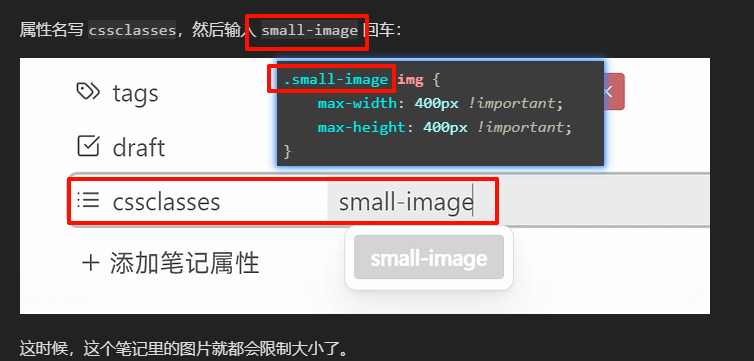
好耶,你完全掌握了
谢谢,我确实想达成这个效果,不过这个css和图片没有关联,是把内联脚注这个语法包括成block放在笔记右侧,问了豆包它在每段代码前加了body.sidenote,我试了一下它改的。。。,完全没效果
这是我使用的那个css,
.cm-comment-start,
.cm-comment-end,
.cm-inline-footnote-start,
.cm-inline-footnote-end {
  color:transparent!important;
  font-size:.1em;
  letter-spacing:-1em;
}

/* 原本fontsize 20px text-shadow: 0 0 0 var(--interactive-accent);bottom 为9  */

.cm-comment-end::after,
.cm-inline-footnote-end::after {
  content: " 💐 ";
  font-size:12px;
  text-shadow: 0 0 0 var(--interactive-accent);
  position:relative;
  bottom:13px;
  opacity: 80%;
}

/* 鼠标不移动到边注框的效果,原宽度为200,高度为77 margin-top为-25 font-size:.70em z-index:100!important */

.cm-comment:not(.cm-comment-end):not(.cm-comment-start),
.cm-inline-footnote:not(.cm-inline-footnote-end):not(.cm-inline-footnote-start) {
  position:relative;
  z-index:99!important;
  display:block;
  margin-left:25px;
  margin-right:-225px;
  margin-top:-25px;
  float:right;
  width:200px;
  height: auto;
  overflow: hidden;
  font-size:.75em;
  padding:10px;
  border: 1px solid #36454F;
  box-shadow: 3px 3px var(--interactive-accent);
  opacity: 80%;
  color: var(--text-muted);
  background: var(--background-secondary);
}

/* 鼠标移动到边注框后的效果,原宽度为200,高度为auto 、font-size为75 opacity: 80%;z-index:100!important */

.cm-comment:not(.cm-comment-end):not(.cm-comment-start):hover,
.cm-inline-footnote:not(.cm-inline-footnote-end):not(.cm-inline-footnote-start):hover {
  position:relative;
  z-index:100!important;
  display:block;
  margin-left:25px;
  margin-right:-225px;
  margin-top:-25px;
  float:right;
  width:200px;
  height: auto;
  font-size:.90em;
  padding:10px;
  border: 1px solid #36454F;
  box-shadow: 3px 3px var(--interactive-accent);
  opacity: 100%;
  color: var(--text-muted);
  background: var(--background-secondary);
}

/* The following is optional to keep comments & inline footnotes syntax editable inline */


.cm-active .cm-comment-start,
.cm-active .cm-comment-end,
.cm-active .cm-inline-footnote-start,
.cm-active .cm-inline-footnote-end {
  color:var(--text-faint)!important;
  font-size:1em;
  letter-spacing:initial;
}

.cm-active .cm-comment-end::after,
.cm-active .cm-inline-footnote-end::after {
  display:none;
}


/* Trying to hide in focus mode */


body.plugin-cm-typewriter-scroll-zen .cm-editor.cm-focused .cm-line:not(.cm-active) .cm-comment-end::after, {
  opacity: var(--zen-opacity);

	}

body.plugin-cm-typewriter-scroll-zen .CodeMirror-lines:not(.selecting) .CodeMirror-code > :not(.CodeMirror-activeline) .cm-comment {
    font-size: 0px;
  border: 0px solid #36454F;
  box-shadow: 3px 3px rgba(0, 0, 0, 0);
  color: var(--text-muted);
  background: rgba(0, 0, 0, 0);
}
body.plugin-cm-typewriter-scroll-zen .cm-editor.cm-focused .cm-line:not(.cm-active) .cm-comment {
  font-size: 0px;
  border: 0px solid #36454F;
  box-shadow: 3px 3px rgba(0, 0, 0, 0);
  color: var(--text-muted);
  background: rgba(0, 0, 0, 0);
}
这是豆包帮我改的
/* 仅当 cssclasses 包含 "sidenote" 时生效(增强版选择器) */
body.sidenote .cm-editor .cm-content .cm-comment-start,
body.sidenote .cm-editor .cm-content .cm-comment-end,
body.sidenote .cm-editor .cm-content .cm-inline-footnote-start,
body.sidenote .cm-editor .cm-content .cm-inline-footnote-end {
  color: transparent !important;
  font-size: .1em;
  letter-spacing: -1em;
}

body.sidenote .cm-editor .cm-content .cm-comment-end::after,
body.sidenote .cm-editor .cm-content .cm-inline-footnote-end::after {
  content: " 💐 ";
  font-size: 12px;
  text-shadow: 0 0 0 var(--interactive-accent);
  position: relative;
  bottom: 13px;
  opacity: 80%;
}

body.sidenote .cm-editor .cm-content .cm-comment:not(.cm-comment-end):not(.cm-comment-start),
body.sidenote .cm-editor .cm-content .cm-inline-footnote:not(.cm-inline-footnote-end):not(.cm-inline-footnote-start) {
  position: relative;
  z-index: 99 !important;
  display: block;
  margin-left: 25px;
  margin-right: -225px;
  margin-top: -25px;
  float: right;
  width: 200px;
  height: auto;
  overflow: hidden;
  font-size: .75em;
  padding: 10px;
  border: 1px solid #36454F;
  box-shadow: 3px 3px var(--interactive-accent);
  opacity: 80%;
  color: var(--text-muted);
  background: var(--background-secondary);
}

body.sidenote .cm-editor .cm-content .cm-comment:not(.cm-comment-end):not(.cm-comment-start):hover,
body.sidenote .cm-editor .cm-content .cm-inline-footnote:not(.cm-inline-footnote-end):not(.cm-inline-footnote-start):hover {
  position: relative;
  z-index: 100 !important;
  display: block;
  margin-left: 25px;
  margin-right: -225px;
  margin-top: -25px;
  float: right;
  width: 200px;
  height: auto;
  font-size: .90em;
  padding: 10px;
  border: 1px solid #36454F;
  box-shadow: 3px 3px var(--interactive-accent);
  opacity: 100%;
  color: var(--text-muted);
  background: var(--background-secondary);
}

body.sidenote .cm-editor .cm-content .cm-active .cm-comment-start,
body.sidenote .cm-editor .cm-content .cm-active .cm-comment-end,
body.sidenote .cm-editor .cm-content .cm-active .cm-inline-footnote-start,
body.sidenote .cm-editor .cm-content .cm-active .cm-inline-footnote-end {
  color: var(--text-faint) !important;
  font-size: 1em;
  letter-spacing: initial;
}

body.sidenote .cm-editor .cm-content .cm-active .cm-comment-end::after,
body.sidenote .cm-editor .cm-content .cm-active .cm-inline-footnote-end::after {
  display: none;
}

body.sidenote.plugin-cm-typewriter-scroll-zen .cm-editor.cm-focused .cm-line:not(.cm-active) .cm-comment-end::after {
  opacity: var(--zen-opacity);
}

body.sidenote.plugin-cm-typewriter-scroll-zen .cm-editor .cm-content .CodeMirror-lines:not(.selecting) .CodeMirror-code > :not(.CodeMirror-activeline) .cm-comment {
  font-size: 0px;
  border: 0px solid #36454F;
  box-shadow: 3px 3px rgba(0, 0, 0, 0);
  color: var(--text-muted);
  background: rgba(0, 0, 0, 0);
}

body.sidenote.plugin-cm-typewriter-scroll-zen .cm-editor.cm-focused .cm-line:not(.cm-active) .cm-comment {
  font-size: 0px;
  border: 0px solid #36454F;
  box-shadow: 3px 3px rgba(0, 0, 0, 0);
  color: var(--text-muted);
  background: rgba(0, 0, 0, 0);
}
还有0.01瓶水的我
内联脚注是正文中要注释的后面有变小的[1]、[2]、…,笔记末尾再一一解释的那种论文格式吗? 我没用过,不能直接试代码观察效果
如果你使用的css已经能达到你想要的效果,现在只想让cssclasses属性添加了sidenote值的笔记生效,那可以尝试原基础上这样改代码:
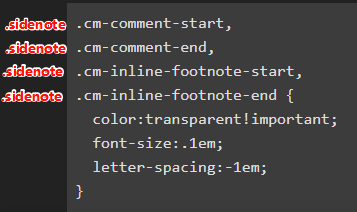
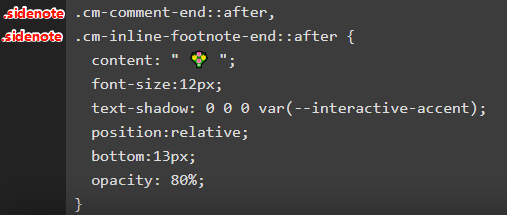
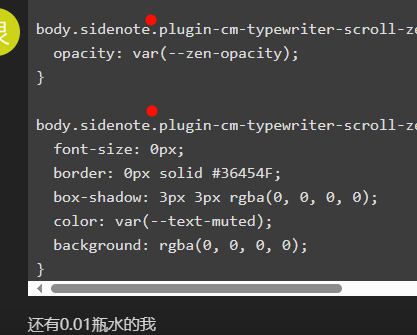
怀疑豆包改的这2个地方空格漏了
我如果想对文中某些词汇注释,会选择双链、Virtual Linker插件、自定义词典类插件
Virtual Linker插件我现在非常喜欢,着重推荐你试试。插件开启后,笔记中有文字是其他笔记的标题/别名,那该文字就会被识别为虚拟双链,可以悬浮预览、点击跳转。和自定义词典插件一样,完全不用修改正文笔记的内容
好,我试试这个改法,谢谢啦。我倒是用过virtual link,不清楚是不是电脑配置问题,一打开打字就卡卡的,
改完了,起死回生啊!神医!这就是我想要的效果,谢了bro
改完可生效的css,感兴趣的朋友们可自行copy,感谢豆包和帖友
/* 仅当 cssclasses 包含 "sidenote" 时生效(增强版选择器) */
.sidenote .cm-editor .cm-content .cm-comment-start,
.sidenote .cm-editor .cm-content .cm-comment-end,
.sidenote .cm-editor .cm-content .cm-inline-footnote-start,
.sidenote .cm-editor .cm-content .cm-inline-footnote-end {
  color: transparent !important;
  font-size: .1em;
  letter-spacing: -1em;
}

.sidenote .cm-editor .cm-content .cm-comment-end::after,
.sidenote .cm-editor .cm-content .cm-inline-footnote-end::after {
  content: " 💐 ";
  font-size: 12px;
  text-shadow: 0 0 0 var(--interactive-accent);
  position: relative;
  bottom: 13px;
  opacity: 80%;
}

.sidenote .cm-editor .cm-content .cm-comment:not(.cm-comment-end):not(.cm-comment-start),
.sidenote .cm-editor .cm-content .cm-inline-footnote:not(.cm-inline-footnote-end):not(.cm-inline-footnote-start) {
  position: relative;
  z-index: 99 !important;
  display: block;
  margin-left: 25px;
  margin-right: -225px;
  margin-top: -25px;
  float: right;
  width: 200px;
  height: auto;
  overflow: hidden;
  font-size: .75em;
  padding: 10px;
  border: 1px solid #36454F;
  box-shadow: 3px 3px var(--interactive-accent);
  opacity: 80%;
  color: var(--text-muted);
  background: var(--background-secondary);
}

.sidenote .cm-editor .cm-content .cm-comment:not(.cm-comment-end):not(.cm-comment-start):hover,
.sidenote .cm-editor .cm-content .cm-inline-footnote:not(.cm-inline-footnote-end):not(.cm-inline-footnote-start):hover {
  position: relative;
  z-index: 100 !important;
  display: block;
  margin-left: 25px;
  margin-right: -225px;
  margin-top: -25px;
  float: right;
  width: 200px;
  height: auto;
  font-size: .90em;
  padding: 10px;
  border: 1px solid #36454F;
  box-shadow: 3px 3px var(--interactive-accent);
  opacity: 100%;
  color: var(--text-muted);
  background: var(--background-secondary);
}

.sidenote .cm-editor .cm-content .cm-active .cm-comment-start,
.sidenote .cm-editor .cm-content .cm-active .cm-comment-end,
.sidenote .cm-editor .cm-content .cm-active .cm-inline-footnote-start,
.sidenote .cm-editor .cm-content .cm-active .cm-inline-footnote-end {
  color: var(--text-faint) !important;
  font-size: 1em;
  letter-spacing: initial;
}

.sidenote .cm-editor .cm-content .cm-active .cm-comment-end::after,
.sidenote .cm-editor .cm-content .cm-active .cm-inline-footnote-end::after {
  display: none;
}

.sidenote .plugin-cm-typewriter-scroll-zen .cm-editor.cm-focused .cm-line:not(.cm-active) .cm-comment-end::after {
  opacity: var(--zen-opacity);
}

.sidenote .plugin-cm-typewriter-scroll-zen .cm-editor .cm-content .CodeMirror-lines:not(.selecting) .CodeMirror-code > :not(.CodeMirror-activeline) .cm-comment {
  font-size: 0px;
  border: 0px solid #36454F;
  box-shadow: 3px 3px rgba(0, 0, 0, 0);
  color: var(--text-muted);
  background: rgba(0, 0, 0, 0);
}

.sidenote .plugin-cm-typewriter-scroll-zen .cm-editor.cm-focused .cm-line:not(.cm-active) .cm-comment {
  font-size: 0px;
  border: 0px solid #36454F;
  box-shadow: 3px 3px rgba(0, 0, 0, 0);
  color: var(--text-muted);
  background: rgba(0, 0, 0, 0);
}
1 个赞
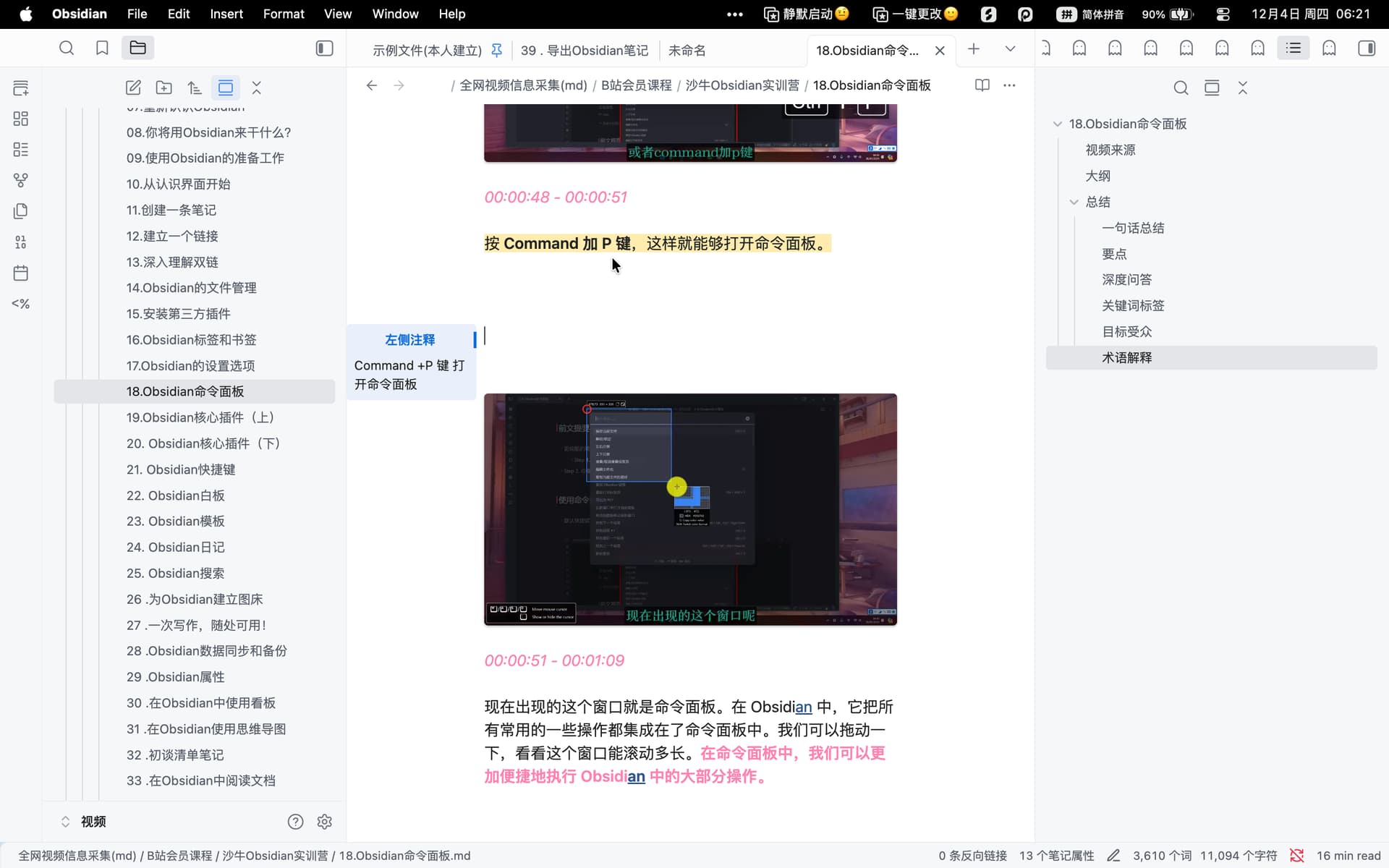
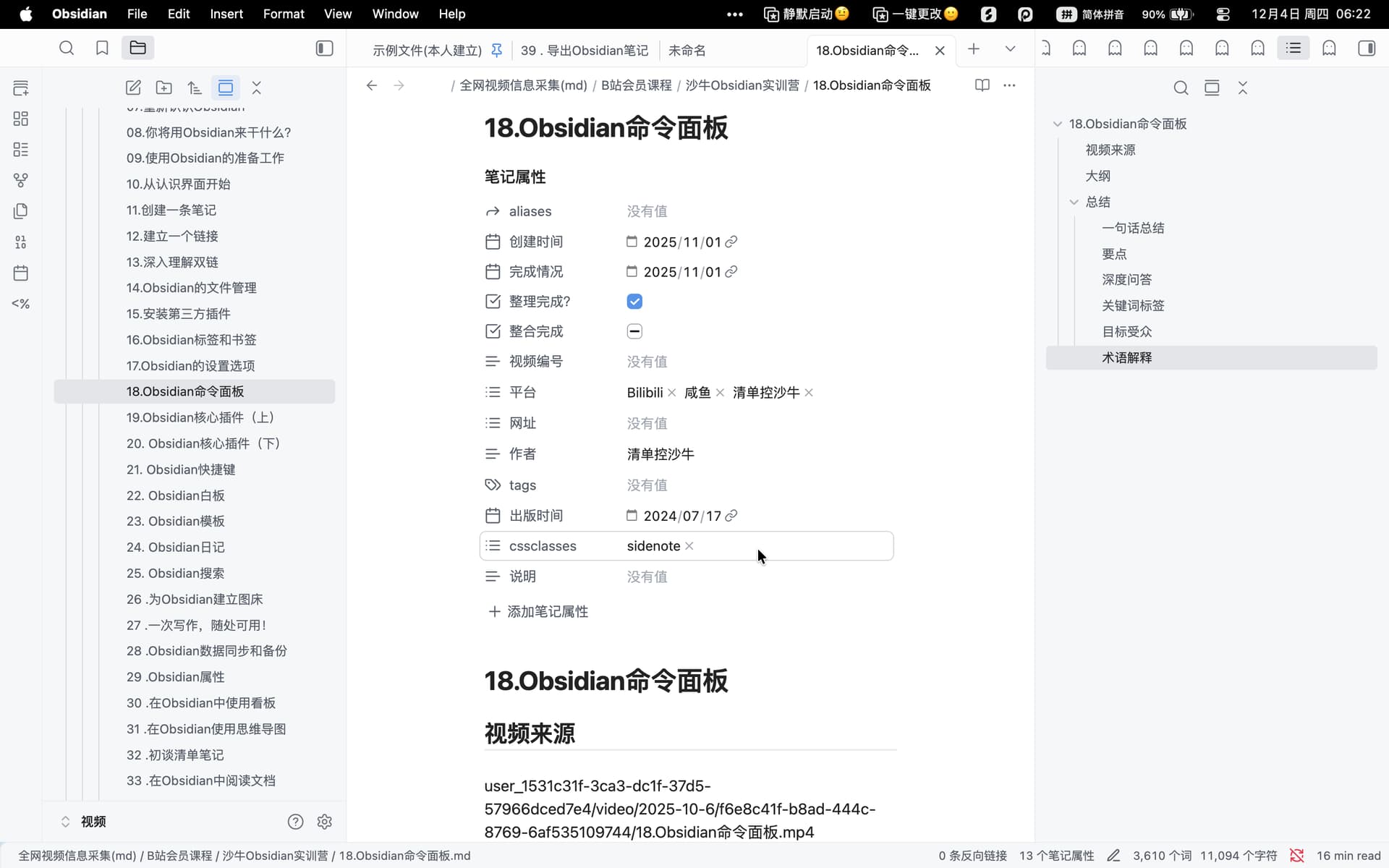
我们说的可能不是一个,我上面的css是把内联脚注显示在侧边的,你这个应该是边注callout的css吧?不太确定能指个路吗
应该是这个,我之前试用了一下这种写法,放弃了,更喜欢正文保持相对纯净
它用Callout装上注释,是写在正文中的,但看笔记时,它在侧边出现
你用的脚注是注释写在文章末
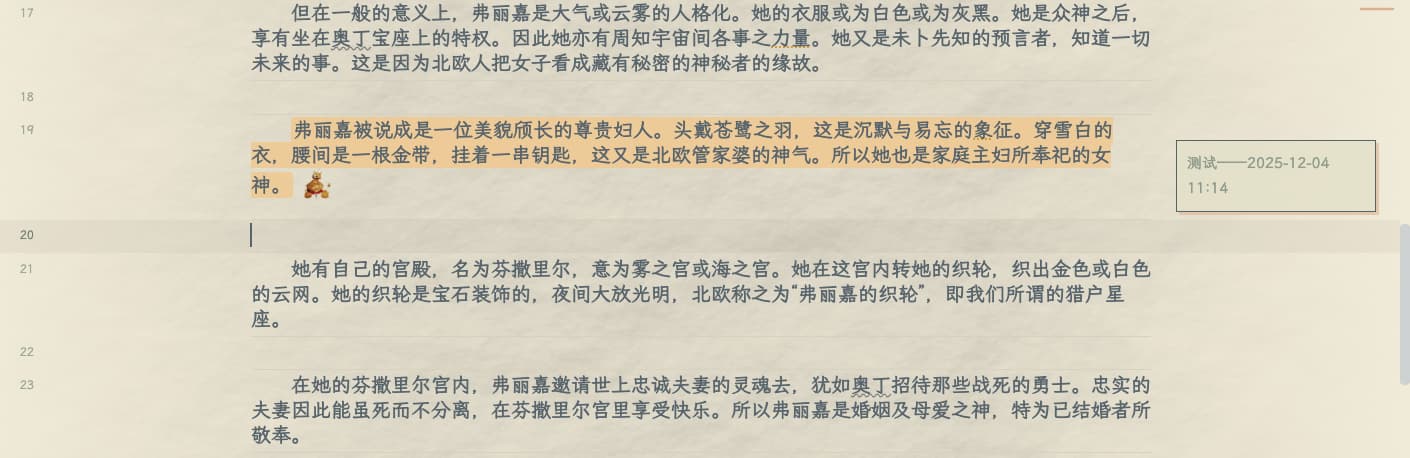
应该就是这个,我也对这个有印象
!你这种很好 我要去学一下用脚注了
还可以找ai修改CSS,让注释内容能够像Callout一样可折叠、更美观
(内联脚注应该也是注释内容写在笔记末的吧)

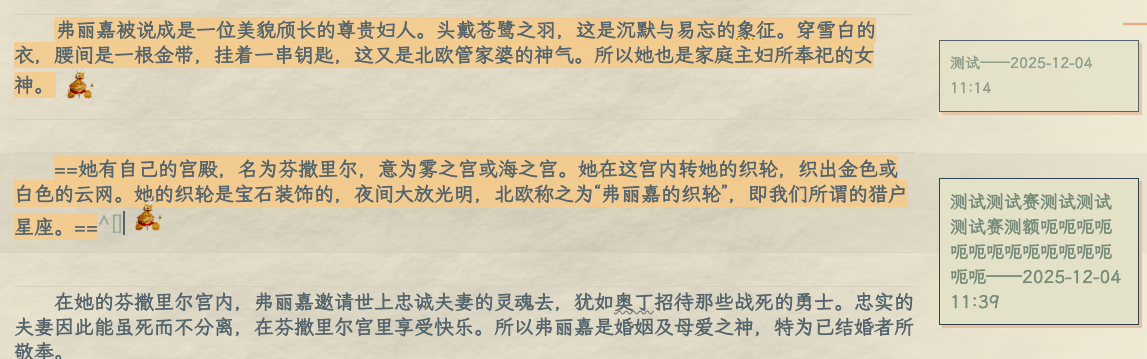
/* 仅当 cssclasses 包含 "sidenote" 时生效(增强版选择器) */
.sidenote .cm-editor .cm-content .cm-comment-start,
.sidenote .cm-editor .cm-content .cm-comment-end,
.sidenote .cm-editor .cm-content .cm-inline-footnote-start,
.sidenote .cm-editor .cm-content .cm-inline-footnote-end {
  color: transparent !important;
  font-size: .1em;
  letter-spacing: -1em;
}

.sidenote .cm-comment-end::after,
.sidenote .cm-inline-footnote-end::after {
  content: ""; /* 清空content,改用背景图 */
  font-size: 0; /* 清除文字尺寸干扰 */
  text-shadow: 0 0 0 var(--interactive-accent);
  /* 核心对齐逻辑:实现图标中心与文字行中心对齐 */
  display: inline-flex !important; /* 改为flex,方便垂直居中 */
  align-items: center; /* 自身内容垂直居中 */
  justify-content: center; /* 自身内容水平居中 */
  margin: 0px 0.2rem !important; /* 仅保留左右间距,上下间距由对齐逻辑控制 */
  transform: translateY(-0.5rem); /* 重置偏移,改为基于基线的居中 */
  vertical-align: middle; /* 关键:让图标整体与文字基线垂直居中 */
  margin-block: unset;
  /* 核心:用背景图实现,尺寸完全可控 */
  --icon-size: 40px; /* 推荐尺寸:24-32px(与文字行高匹配,原75px过大) */
  width: var(--icon-size);
  height: var(--icon-size);
  background-image: url("此处添加图片链接");
  background-size: contain; /* 保持图片比例 */
  background-repeat: no-repeat;
  background-position: center; /* 图片在容器内居中 */
}

/* 新增:单独控制 .sidenote 内的目标图片,确保行内效果 */
.sidenote .cm-comment-end::after,
.sidenote .cm-inline-footnote-end::after {
  float: unset; /* 取消浮动,避免独占一行 */
  text-align: left; /* 与文字左对齐 */
}

.sidenote .cm-editor .cm-content .cm-comment:not(.cm-comment-end):not(.cm-comment-start),
.sidenote .cm-editor .cm-content .cm-inline-footnote:not(.cm-inline-footnote-end):not(.cm-inline-footnote-start) {
  position: relative;
  z-index: 99 !important;
  display: block;
  margin-left: 25px;
  margin-right: -225px;
  margin-top: -25px;
  float: right;
  width: 200px;
  height: auto;
  overflow: hidden;
  font-size: .75em;
  padding: 10px;
  border: 1px solid #36454F;
  box-shadow: 3px 3px var(--interactive-accent);
  opacity: 80%;
  color: var(--text-muted);
  background: var(--background-secondary);
}

.sidenote .cm-editor .cm-content .cm-comment:not(.cm-comment-end):not(.cm-comment-start):hover,
.sidenote .cm-editor .cm-content .cm-inline-footnote:not(.cm-inline-footnote-end):not(.cm-inline-footnote-start):hover {
  position: relative;
  z-index: 100 !important;
  display: block;
  margin-left: 25px;
  margin-right: -225px;
  margin-top: -25px;
  float: right;
  width: 200px;
  height: auto;
  font-size: .90em;
  padding: 10px;
  border: 1px solid #36454F;
  box-shadow: 3px 3px var(--interactive-accent);
  opacity: 100%;
  color: var(--text-muted);
  background: var(--background-secondary);
}

.sidenote .cm-editor .cm-content .cm-active .cm-comment-start,
.sidenote .cm-editor .cm-content .cm-active .cm-comment-end,
.sidenote .cm-editor .cm-content .cm-active .cm-inline-footnote-start,
.sidenote .cm-editor .cm-content .cm-active .cm-inline-footnote-end {
  color: var(--text-faint) !important;
  font-size: 1em;
  letter-spacing: initial;
}

.sidenote .cm-editor .cm-content .cm-active .cm-comment-end::after,
.sidenote .cm-editor .cm-content .cm-active .cm-inline-footnote-end::after {
  display: none;
}

.sidenote .plugin-cm-typewriter-scroll-zen .cm-editor.cm-focused .cm-line:not(.cm-active) .cm-comment-end::after {
  opacity: var(--zen-opacity);
}

.sidenote .plugin-cm-typewriter-scroll-zen .cm-editor .cm-content .CodeMirror-lines:not(.selecting) .CodeMirror-code > :not(.CodeMirror-activeline) .cm-comment {
  font-size: 0px;
  border: 0px solid #36454F;
  box-shadow: 3px 3px rgba(0, 0, 0, 0);
  color: var(--text-muted);
  background: rgba(0, 0, 0, 0);
}

.sidenote .plugin-cm-typewriter-scroll-zen .cm-editor.cm-focused .cm-line:not(.cm-active) .cm-comment {
  font-size: 0px;
  border: 0px solid #36454F;
  box-shadow: 3px 3px rgba(0, 0, 0, 0);
  color: var(--text-muted);
  background: rgba(0, 0, 0, 0);
}

你说的应该是把编号脚注放在侧边,可以问问ai能不能参考做一个出来,我觉得豆包应该不行,豆包有点儿笨笨的