obsidian本身不跟踪 以.起始的文件夹,虽然可以通过show-hidden-files插件在文件列表中查看隐藏文件, 但这样ob会索引隐藏文件,导致启动变慢。所以写了个dv代码解决这个问题。
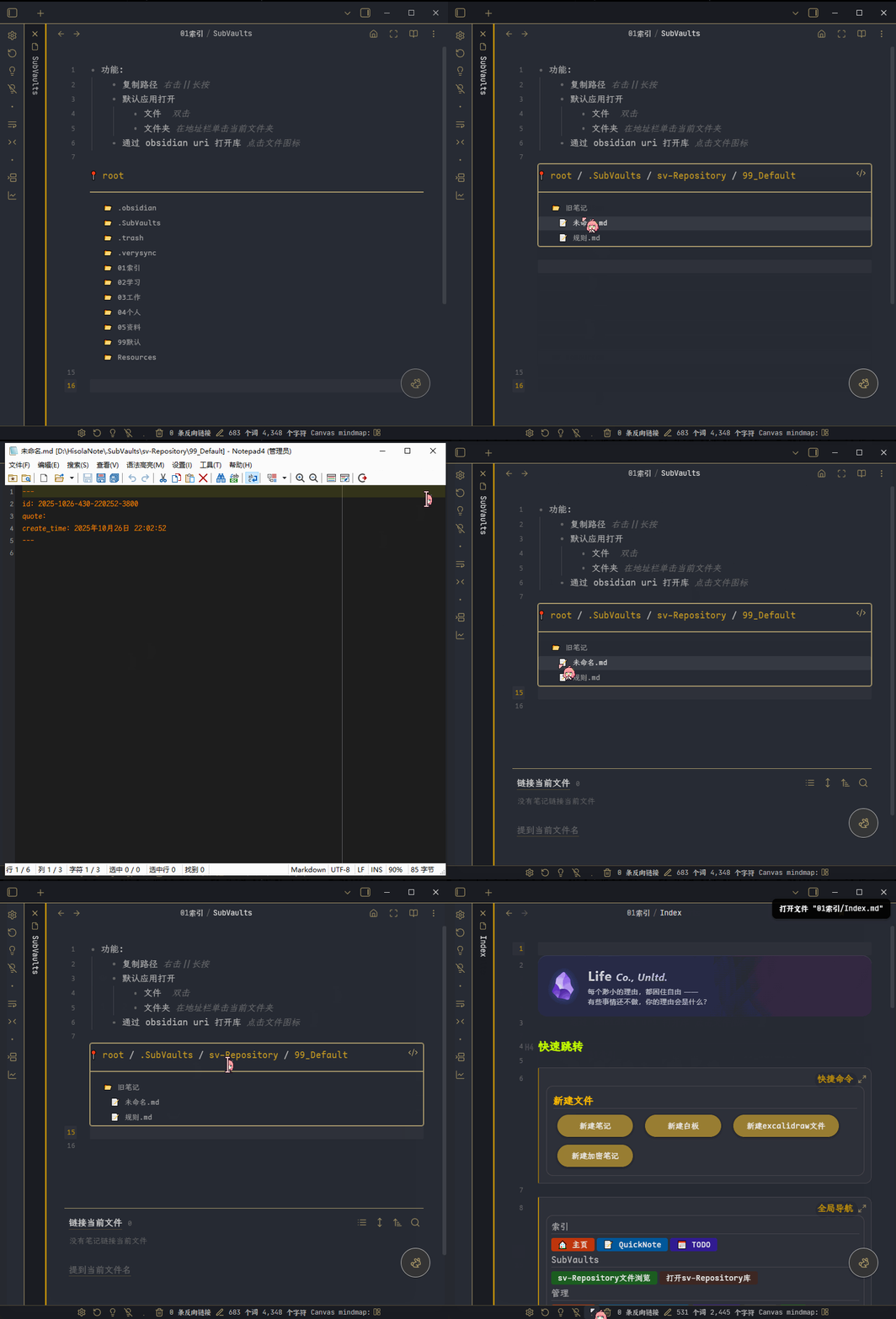
- 功能:
- 复制路径 : 右击||长按
- 默认应用打开
- 文件 : 双击
- 文件夹 : 在地址栏单击当前文件夹
- 通过 obsidian uri 打开库 : 点击文件图标
建议压缩后再运行, 压缩工具地址: https://www.lddgo.net/string/js-beautify-minify
效果预览:
代码:
// @startFolder - 修改起始文件夹; 规则: 路径开头不能有'/'; 结尾必须是'/'; 如果是根路径,设为'';
const startFolder = ""
// 初始化全局变量
if (!window.svFileExplorer) {
    window.svFileExplorer = {};
    // 数据校验
    window.svFileExplorer.root = startFolder;
    window.svFileExplorer.currentPath = startFolder;
}else{
    window.svFileExplorer.root = startFolder;
}

// 创建容器
const container = dv.container.createDiv();

// 让a标签没有下划线
// container.classList.add('link-sv-file-explorer');

// 使用异步函数获取数据
async function renderFileExplorer() {
    const currentPath = window.svFileExplorer.currentPath;

    try {
        // 使用 await 获取数据
        const allItems = await app.vault.adapter.list(currentPath);

        // 清空容器
        dv.container.innerHTML = '';

        // 渲染顶部导航
        const navContainer = dv.container.createDiv();
        await renderNavigation(navContainer, currentPath);

        // 添加分隔线
        dv.paragraph("<hr>");

        // 渲染文件夹区域 - 添加空值检查
        if (allItems.folders && allItems.folders.length > 0) {
            allItems.folders.forEach((folder, index) => {
                const folderPath = folder;
                const folderName = getLastPathSegment(folderPath);

                // const folderEl = dv.el('a', `📂 ${folderName}`);
                const folderEl = dv.el('div', `📂 ${pathFormat(folderName)}`,{cls:'tree-item-self nav-folder-title'});
                folderEl.style.cursor = 'pointer';
                folderEl.onclick = () => {
                    window.svFileExplorer.currentPath = folderPath;
                    refreshView();
                };

/*
               folderEl.ondblclick = (event) => {
                    event.stopPropagation(); // 防止事件冒泡
                    try {
                        // 使用系统默认应用打开文件
                        app.openWithDefaultApp(folderPath);
                        // 可以添加一个提示,告知用户正在打开(可选)
                        new Notice(`正在打开: ${folderName}`);
                    } catch (error) {
                        console.error('打开文件夹失败:', error);
                        new Notice("打开文件夹失败");
                    }
                }; */

                folderEl.oncontextmenu = async (event) => {
                    event.stopPropagation(); // 防止事件冒泡
                    const clipboardText = folderPath.substring(window.svFileExplorer.root.length)
                    /* // 替换根路径时, 对根路径格式校验(不开启); startFolder 遵循基本规则即可
                    let clipboardText = folderPath;
                    // 如果root存在且不为'/',并且filePath以root开头,则替换掉root部分
                    // 例 /.obsidian
                    if (window.svFileExplorer.root !== '/' && window.svFileExplorer.root !== '' ) {
                        const subLength =  window.svFileExplorer.root.endsWith("/") ? window.svFileExplorer.root.length : window.svFileExplorer.root.length + 1
                        clipboardText = clipboardText.substring(subLength);
                    }*/
                    try {
                        await navigator.clipboard.writeText(`${clipboardText}/`);
                        new Notice("已复制到剪贴板");
                    } catch (err) {
                        console.error('复制失败:', err);
                        new Notice("复制失败,请手动复制");
                    }
                };

//                 if (index < allItems.folders.length - 1) {
//                     dv.paragraph(" ");
//                 }
            });
        }

        // 添加文件夹和文件之间的分隔线
        if (allItems.folders && allItems.folders.length > 0 &&
            allItems.files && allItems.files.length > 0) {
            // dv.el('div', ' —— ');
            // dv.paragraph("<hr>");

        }

        // 渲染文件区域 - 添加空值检查
        if (allItems.files && allItems.files.length > 0) {
            allItems.files.forEach((file, index) => {
                const filePath = file;
                app.vault.adapter.basePath
                const href = 'obsidian://open?path=' + encodeURIComponent(app.vault.adapter.basePath.replace(/\\/g, '/') + '/' + filePath)
                const fileName = getLastPathSegment(filePath);
                const fileEl = dv.el('div', `<a href='${href}' style='text-decoration:none;' > 📝</a> ${pathFormat(fileName)}`,{cls:'tree-item-self nav-file-title'});
                fileEl.style.cursor = 'pointer';
                fileEl.oncontextmenu = async (event) => {
                    event.stopPropagation(); // 防止事件冒泡
                                        const clipboardText = filePath.substring(window.svFileExplorer.root.length)


                    /* // 替换根路径时, 对根路径格式校验(不开启); startFolder 遵循基本规则即可
                    let clipboardText = filePath;
                    // 如果root存在且不为'/',并且filePath以root开头,则替换掉root部分
                    if (window.svFileExplorer.root !== '/' && window.svFileExplorer.root !== '' ) {
                        const subLength =  window.svFileExplorer.root.endsWith("/") ? window.svFileExplorer.root.length : window.svFileExplorer.root.length + 1
                        clipboardText = clipboardText.substring(subLength);
                    }*/
                    try {
                        await navigator.clipboard.writeText(clipboardText);
                        new Notice("已复制到剪贴板");
                    } catch (err) {
                        console.error('复制失败:', err);
                        new Notice("复制失败,请手动复制");
                    }
                };
                // 添加双击事件监听 `contextmenu` onauxclick `dblclick` onclick
                fileEl.ondblclick = (event) => {
                    event.stopPropagation(); // 防止事件冒泡
                    try {
                        // 使用系统默认应用打开文件
                        app.openWithDefaultApp(filePath);
                        // 可以添加一个提示,告知用户正在打开(可选)
                        new Notice(`正在打开: ${fileName}`);
                    } catch (error) {
                        console.error('打开文件失败:', error);
                        new Notice("打开文件失败");
                    }
                };
                /*if (index < allItems.files.length - 1) {
                    dv.paragraph(" ");
                }*/
            });
        }

        // 如果没有内容,显示提示
        if ((!allItems.folders || allItems.folders.length === 0) &&
            (!allItems.files || allItems.files.length === 0)) {
            dv.el('div', '当前文件夹为空');
        }
    } catch (error) {
        console.error('读取文件列表失败:', error);
        dv.el('a', '读取文件列表失败,点击刷新').addEventListener('click',()=>{
            window.svFileExplorer.currentPath = window.svFileExplorer.root
            refreshView();
        })
    }
}

// 工具函数
function getLastPathSegment(path) {
    const segments = path.split('/').filter(segment => segment !== '');
    return segments.length > 0 ? segments[segments.length - 1] : path;
}

// 修复导航栏渲染函数
async function renderNavigation(container, currentPath) {
    const rootPath = window.svFileExplorer.root;
    const navEl = container.createDiv();
    navEl.style.marginBottom = '10px';

    // 构建完整的路径分段
    const pathSegments = [];

    // 添加根目录
    pathSegments.push({
        name: '📍 root',
        path: rootPath
    });

    // 如果当前路径不是根目录,添加子路径分段
    if (currentPath !== rootPath) {
        // 移除根路径部分
        const relativePath = currentPath.replace(rootPath, '');
        const segments = relativePath.split('/').filter(segment => segment !== '');

        let accumulatedPath = rootPath;
        segments.forEach(segment => {
            accumulatedPath += segment + '/';
            pathSegments.push({
                name: segment,
                path: accumulatedPath
            });
        });
    }

    // 渲染路径分段,每个都可点击
    pathSegments.forEach((segment, index) => {
        // 如果不是第一个元素,添加分隔符
        if (index > 0) {
            dv.el('span', ' / ', { parent: navEl });
        }

        // 创建可点击的路径分段
        const segmentEl = dv.el('a', pathFormat(segment.name), { parent: navEl, attr:{style:'text-decoration: none'} });
        segmentEl.style.cursor = 'pointer';
        if(pathSegments.length > 1 && pathSegments.length == index + 1 ){
            if(!app.isMobile){
                segmentEl.onclick = () => {

                    app.openWithDefaultApp('/' + window.svFileExplorer.currentPath );
                };
            }
        }else{
            segmentEl.onclick = () => {
                window.svFileExplorer.currentPath = segment.path;
                refreshView();
            };
        }
    });
}
function refreshView() {
    dv.container.innerHTML = '';
    renderFileExplorer();
}
function pathFormat(path) {
    if (!path) return '';
    // 使用正则表达式替换所有特殊字符
    return path.replace(/([_=%~`\[\]])/g, '\\$1');
}

// 初始渲染
renderFileExplorer();