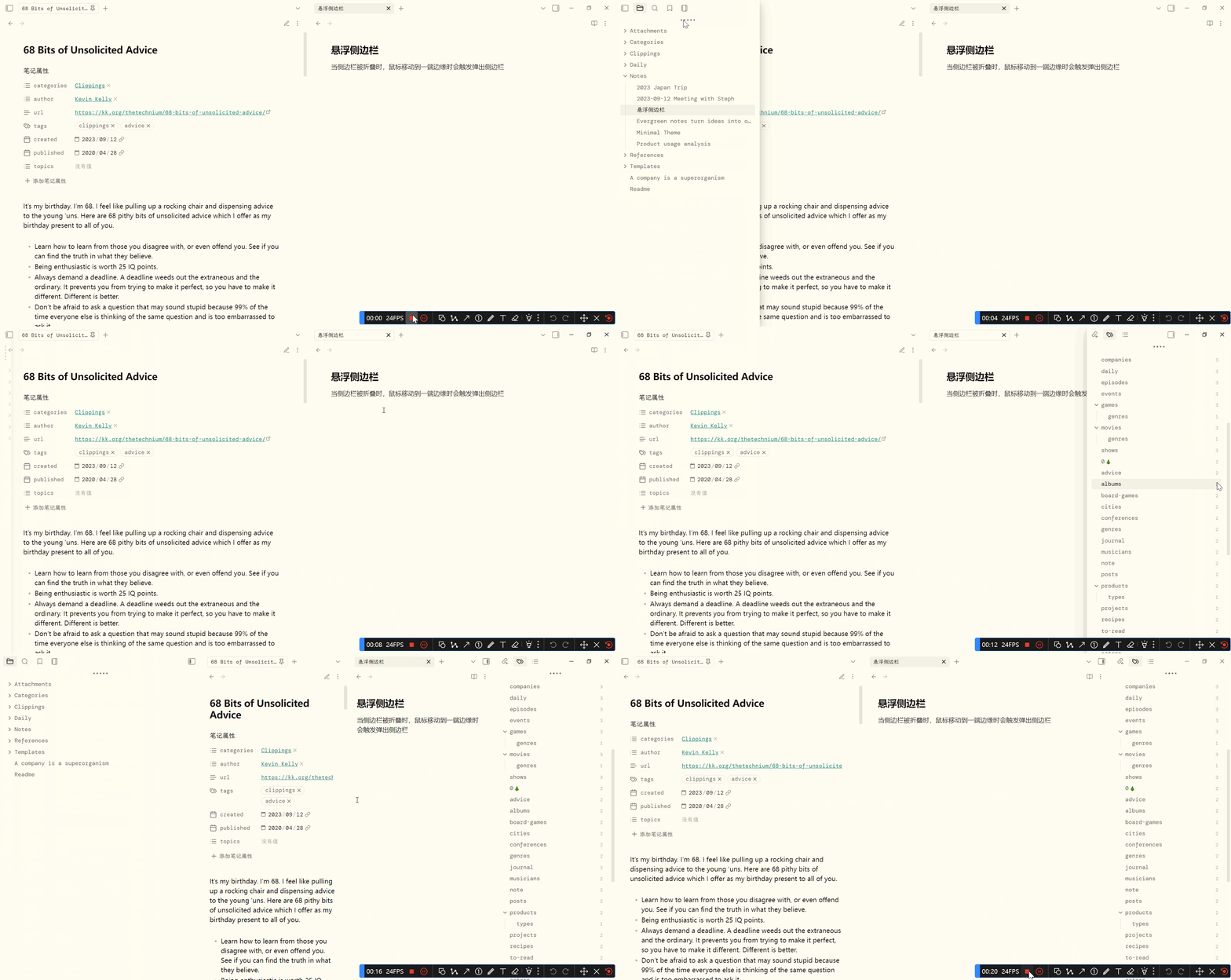
当侧边栏被关闭时,鼠标移动到边缘时会触发弹出侧边栏,改之Cupertino主题
测试主题:minimal,配色:Flexoki
优点:
- 沉浸式写笔记
- 不会挤压笔记区域
- 不会影响自带的侧边栏按钮和固定展示
缺陷:
- 右侧边栏上方图标会和关闭区域重叠,原主题没有这个问题,因为css代码不同,但原主题比较卡
- 堆叠模式下鼠标尚未移动到左侧边栏上方图标弹窗就被收回
- 左侧弹窗中下方库名设置点击没方应,我自己是隐藏库名的
- 不过以上问题都不影响使用,ob自带的固定侧边栏不影响,欢迎大佬指正做出修改,或者等后续修改
以下是scss写法,不过好像也能在obsidan中使用,建议让ai转换成css写法
body {
  --anim-duration-superfast: 80ms;
  --anim-duration-fast: 160ms;
  --anim-duration-moderate: 320ms;
  --anim-duration-slow: 640ms;
  --anim-motion-cupertino: cubic-bezier(0.32, 0.72, 0, 1.1);
  --anim-motion-cupertino-calm: cubic-bezier(0.32, 0.72, 0, 1);
  --radius-window: 6px;
  --shadow-base: inset 1px 1px 2px rgba(255, 255, 255, 0.5),
    inset -1px -1px 2px rgba(255, 255, 255, 0.5),
    inset 0 4px 16px rgba(255, 255, 255, 0.025);
  --shadow-border: 0 0 1px 0 rgba(0, 0, 0, 0.4);
  --shadow-xs: var(--shadow-base), inset 0 -8px 48px rgba(0, 0, 0, 0.02),
    0 1px 8px rgba(0, 0, 0, 0.025), 0 4px 48px rgba(0, 0, 0, 0.095);
  --shadow-s: var(--shadow-base), inset 0 0 1px 1px white, var(--shadow-border),
    0 8px 15px 0 rgba(0, 0, 0, 0.2);
  --shadow-l: var(--shadow-border), inset 0 0 1px 1px white,
    0 18px 60px 0 rgba(0, 0, 0, 0.3);

  --blur-s: blur(4px) saturate(1.5) brightness(1.025);
  --blur-m: blur(8px) saturate(1.5) brightness(1.025);
  --blur-l: blur(16px) saturate(1.5) brightness(1.025);

  --modal-background: rgb(
    from var(--background-primary) r g b / 90%
  ) !important;

  --frame-left-space: 0px;

  --frame-right-space: 144px;
}
/* -------------------------------
   Obsidian 右侧悬浮侧边栏优化
----------------------------------*/
body:not(.is-mobile) {
  /* 侧边栏主体 */
  .mod-sidedock {
    transition: var(--anim-duration-fast) var(--anim-motion-cupertino);
    .workspace-tab-header-container {
      -webkit-app-region: no-drag !important;
    }

    /* 折叠状态 */
    &.is-sidedock-collapsed {
      z-index: var(--layer-sidedock);
      border-radius: var(--radius-window);
      display: flex !important;
      position: absolute;
      height: -webkit-fill-available;
      width: 8px !important;
      box-shadow: var(--shadow-l);
      backdrop-filter: var(--blur-l);
      background: var(--modal-background) !important;
      transition: width var(--anim-duration-fast) var(--anim-motion-cupertino),
        opacity var(--anim-duration-fast);

      &::before {
        content: "";
        position: absolute;
        inset: -8px 0 -8px -8px;
        min-width: 8px;
      }

      &.mod-right-split {
        right: 0;
        &::before {
          inset: -8px -8px -8px auto;
        }
      }

      /* ---------- 悬浮展开 ----------
         关键点:侧边栏 + 顶部图标都触发展开
      ----------------------------------*/
      &:hover,
      &:hover ~ .sidebar-toggle-button,
      ~ .sidebar-toggle-button:hover {
        width: 360px !important;
        opacity: 1;

        ~ .mod-root .workspace-tab-header-container,
        ~ .mod-root .workspace-tab-header-container-inner {
          -webkit-app-region: no-drag;
        }

        div {
          pointer-events: auto;
        }
      }

      &:not(:hover):not(:has(~ .sidebar-toggle-button:hover)) {
        width: 8px !important;
        opacity: 0;

        div {
          pointer-events: none;
        }
      }

      /* Tabs 样式 */
      .workspace-tabs {
        --header-height: 40px;
        .workspace-tab-header-container {
          padding-left: 4px !important;
          padding-right: 4px !important;
        }
        &.mod-top-left-space .workspace-tab-header-container-inner {
          margin-left: 40px !important;
        }
      }

      > .workspace-leaf-resize-handle {
        display: none;
      }

      div {
        visibility: visible !important;
        -webkit-app-region: no-drag !important;
      }
    }
  }

  /* 顶部切换按钮层级确保覆盖 */
  .sidebar-toggle-button {
    z-index: 999 !important;
  }
}


