图片下方自动显示其 ALT 图名,自动添加“图”前缀,以及自动计数。
由于 Obsidian 的笔记内容是动态加载的,对于长文图号不准确,图号只适用于短文。
CSS 效果
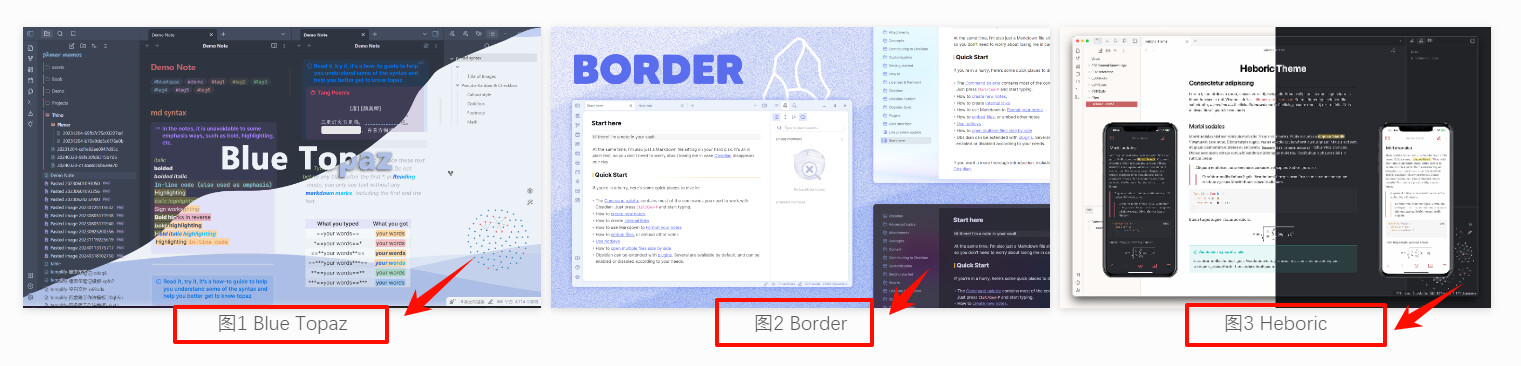
CSS 样式
/* 图片下面显示 alt text */
.markdown-preview-view, .markdown-source-view {
    counter-reset: image-counter;
}

.internal-embed.image-embed {
    display: inline-flex !important;
    flex-direction: column;
    align-items: center;
}

.image-embed[alt]:not([alt ^="Paste"]):not([alt ^="File"]):after {
    content: "图 "attr(alt);
    counter-increment: image-counter;
    content: "图"counter(image-counter) " "attr(alt);
    display: inline-block;
    margin-top: 0px;
    font-size: 0.7em;
    text-align: center;
    color: var(--text-muted);
    user-select: text !important;
}

.image-embed:after {
    counter-increment: image-counter;
    content: "图"counter(image-counter);
    display: inline-block;
    margin-top: 0px;
    font-size: 0.7em;
    text-align: center;
    color: var(--text-muted);
    user-select: text !important;
}
样式优化
添加阴影效果:
/*! 添加阴影相关 */
.image-embed img {
  box-shadow: 0 2px 8px rgba(0,0,0,0.15);
}
相邻图片并排显示:
/*! 相邻图片之间并排 */

/* 图链格式 */
.view-content p img+br,
/* wiki格式 */
.view-content p span+br {
  display: none;
}

/* 排除 callout */
.callout-content {
  p span+br {
    display: unset !important;
  }
}