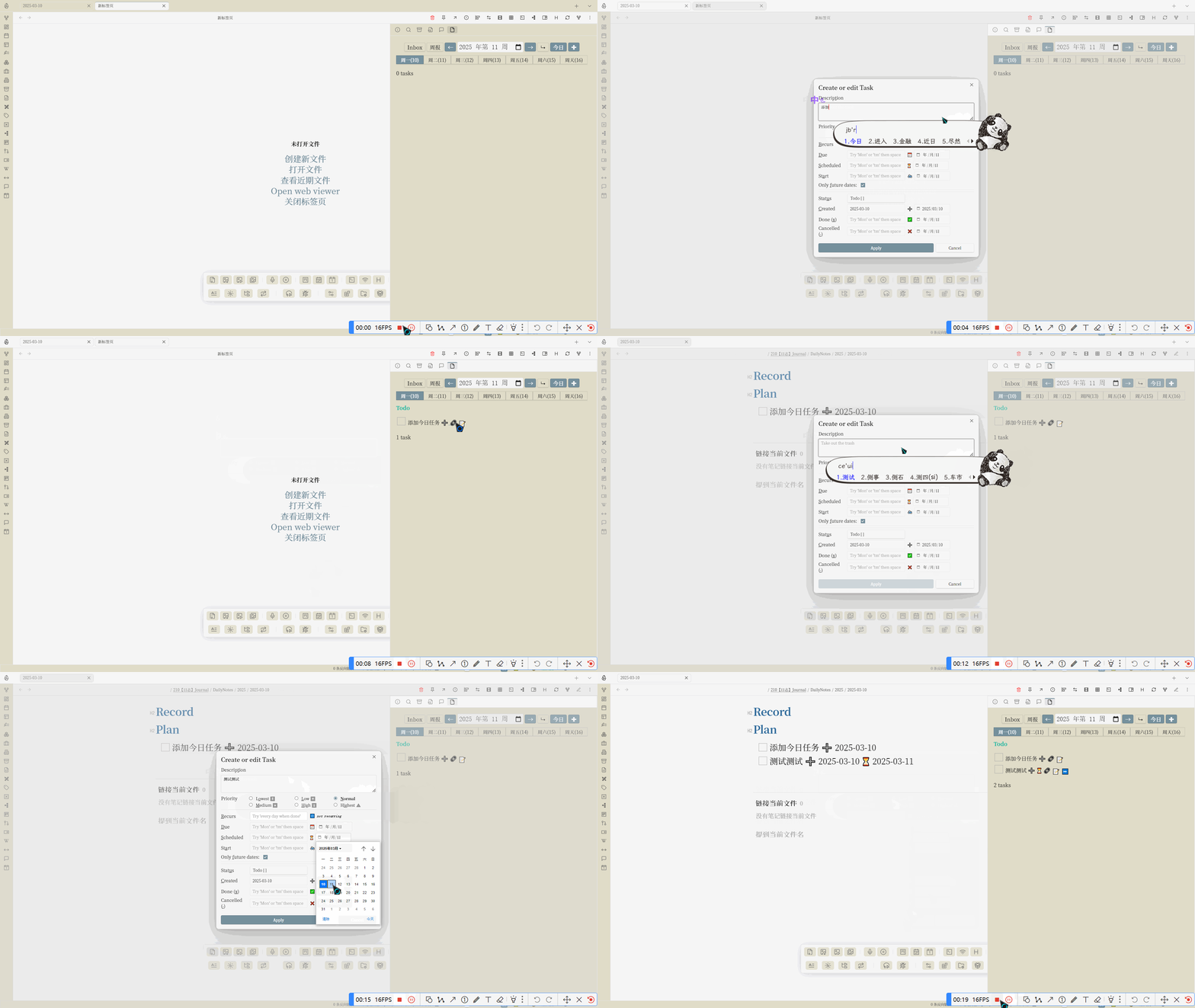
参考了#15楼中的视频案例,添加快速添加今日任务按钮,借助的Tasks API。
由于不知道从哪里获取默认日记位置,目前需要配置Periodic Notes插件来获取日记位置。
如果日记不存在则从Periodic Notes插件获取template并创建。

Reference:
其他:
- 优化了一点控件的布局以及添加类名,方便之后添加css。
- 修复了周报和inbox按钮相互掩盖的问题
dataviewjs
window.moment.updateLocale("en", {
    week: {
        dow: 1,
    },
});

// 获取当前日期
const today = window.moment();
let selectedDate = today.clone();
let currentWeekOffset = 0;

// 初始状态
let showTree = false;
let showWeekTasks = false;
let showInbox = false;

// 检查是否存在全局数据,如果不存在则初始化
if (!window.tasksQueryData) {
    window.tasksQueryData = {
        showTree: true,
        showWeekTasks: false,
        showInbox: false,
        currentWeekOffset: 0,
        selectedDate: today.format("YYYY-MM-DD")
    };
} else {
    // 恢复状态
    showTree = window.tasksQueryData.showTree;
    showWeekTasks = window.tasksQueryData.showWeekTasks;
    showInbox = window.tasksQueryData.showInbox;
    currentWeekOffset = window.tasksQueryData.currentWeekOffset;
    selectedDate = window.moment(window.tasksQueryData.selectedDate);
}

// 创建一个用于显示当前周次的标签
const weekControlsContainer = document.createElement("div");
weekControlsContainer.style.textAlign = "center";
weekControlsContainer.style.marginBottom = "10px";

// 创建 week input
const weekInput = document.createElement("input");
weekInput.type = "week";

// 为 week input 设置样式
Object.assign(weekInput.style, {
    fontSize: "larger",
    color: "var(--text-normal)",
    backgroundColor: "var(--background-primary)",
    border: "1px solid var(--background-modifier-border)",
    borderRadius: "4px",
    padding: "0.2rem",
    outline: "none"
});

// 设置初始值为当前周
function getFormattedWeekString(date) {
    const year = date.format("GGGG"); // 使用ISO年
    const week = date.format("WW");
    return `${year}-W${week}`;
}
weekInput.value = getFormattedWeekString(selectedDate);

// 设置 week input 的事件监听
weekInput.addEventListener("change", () => {
    const [year, week] = weekInput.value.split('-W').map(str => parseInt(str));
    const firstWeek = today.clone().year(year).startOf('year').week(1);
    const targetWeekStart = firstWeek.add(week - 1, 'weeks');
    currentWeekOffset = targetWeekStart.week() - today.week();
    updateWeekButtons();
    weekSelectButtonsContainer.children[0].click();
    saveState();
});

// 创建操作按钮
const leftButtonWeek = document.createElement("button");
const rightButtonWeek = document.createElement("button");
const toggleShowTreeButton = document.createElement("button");
const toggleShowWeekTasksButton = document.createElement("button");
const toggleInboxTasksButton = document.createElement("button");
const todayButton = document.createElement("button");
const creatTasKButton = document.createElement("button");

// 设置样式
[toggleInboxTasksButton, toggleShowWeekTasksButton, leftButtonWeek, rightButtonWeek, todayButton, toggleShowTreeButton, creatTasKButton].forEach(button => {
    button.style.border = "none";
    button.style.margin = "0";
    button.style.fontSize = "large";
    button.style.color = "var(--text-on-accent)";
    button.style.cursor = "pointer";
    button.style.padding = "5px 10px";
    button.style.backgroundColor = "var(--interactive-accent)";
});


leftButtonWeek.textContent = "←";
rightButtonWeek.textContent = "→";
toggleShowTreeButton.textContent = "↳";
toggleShowWeekTasksButton.textContent = "周报";
todayButton.textContent = "今日";
toggleInboxTasksButton.textContent = "Inbox";
creatTasKButton.textContent = "✚";

function updateWeekButtons() {
    daysOfWeek.forEach((day, index) => {
        const button = weekSelectButtonsContainer.children[index];
        const date = today.clone().startOf("week").add(currentWeekOffset, "weeks").add(index, "days");
        button.textContent = `${day}(${date.format("DD")})`;
    });
}

// 在切换周次的地方调用更新函数
leftButtonWeek.addEventListener("click", () => {
    currentWeekOffset -= 1;
    updateWeekInput();
    updateWeekButtons();
    weekSelectButtonsContainer.children[0].click();
    saveState();
});

rightButtonWeek.addEventListener("click", () => {
    currentWeekOffset += 1;
    updateWeekInput();
    updateWeekButtons();
    weekSelectButtonsContainer.children[0].click();
    saveState();
});

todayButton.addEventListener("click", () => {
    currentWeekOffset = 0;
    updateWeekInput();
    updateWeekButtons();
    const todayIndex = today.day() === 0 ? 6 : today.day() - 1;
    weekSelectButtonsContainer.children[todayIndex].click();
    saveState();
});
creatTasKButton.addEventListener("click", async () => {
    const tasksApi = app.plugins.plugins['obsidian-tasks-plugin'].apiV1;

    // 创建一个 MutationObserver 来监听 DOM 变化
    const observer = new MutationObserver((mutationsList) => {
        for (const mutation of mutationsList) {
            if (mutation.type === 'childList') {
                // 检查是否添加了 section.tasks-modal-dependencies-section
                const sectionToRemove = document.querySelector('section.tasks-modal-dependencies-section');
                if (sectionToRemove) {
                    sectionToRemove.remove();
                    console.log('已删除 section.tasks-modal-dependencies-section');
                    observer.disconnect(); // 停止监听
                }
            }
        }
    });

    // 开始监听 document.body 的子元素变化
    observer.observe(document.body, { childList: true, subtree: true });

    // 等待任务创建
    let taskLine = await tasksApi.createTaskLineModal();
    if (!taskLine) return;
    console.log(taskLine);

    // 任务创建完成后,停止监听(如果还没有删除)
    observer.disconnect();

    // 将任务添加到每日日志文档中
    const dailySettings = await app.plugins.plugins["periodic-notes"].settings["daily"];
    const dailyFormat = dailySettings['format'];
    const path = `${dailySettings.folder}/${window.moment().format(dailyFormat)}.md`;
    const boolean = app.vault.getFileByPath(path);
    if (!boolean) {
        const templatePath = dailySettings['template'];
        let data = "";
        if (templatePath) {
            const templateFile = await app.vault.getFileByPath(templatePath + "\.md");
            data = await app.vault.read(templateFile);
            console.log("data:" + data);
        }
        await app.vault.create(path, data);
    }

    const file = await app.vault.getFileByPath(path);
    await app.vault.append(file, taskLine + '\n');
});

// 初始化 可选按钮
function initButtonTheme(button, active) {
    if (active) {
        button.style.color = "var(--text-on-accent)";
        button.style.backgroundColor = "var(--interactive-accent)";
    } else {
        button.style.color = "var(--text-normal)";
        button.style.backgroundColor = "transparent";
    }
}

toggleShowTreeButton.addEventListener("click", () => {
    showTree = !showTree;
    initButtonTheme(toggleShowTreeButton, showTree);
    weekSelectButtonsContainer.querySelector("button[style*='interactive-accent']").click();
    saveState();
});

//
toggleShowWeekTasksButton.addEventListener("click", () => {
    showWeekTasks = !showWeekTasks;
    showInbox = false;
    initButtonTheme(toggleInboxTasksButton, showInbox);
    initButtonTheme(toggleShowWeekTasksButton, showWeekTasks);
    weekSelectButtonsContainer.querySelector("button[style*='interactive-accent']").click();
    saveState();
});

toggleInboxTasksButton.addEventListener("click", () => {
    showInbox = !showInbox;
    showWeekTasks = false;
    initButtonTheme(toggleShowWeekTasksButton, showWeekTasks);
    initButtonTheme(toggleInboxTasksButton, showInbox);
    weekSelectButtonsContainer.querySelector("button[style*='interactive-accent']").click();
    saveState();
});

// 初始化按钮主题色
initButtonTheme(toggleShowTreeButton, showTree);
initButtonTheme(toggleShowWeekTasksButton, showWeekTasks);
initButtonTheme(toggleInboxTasksButton, showInbox);

// 更新周次选择框
function updateWeekInput() {
    const startDate = today.clone().startOf('week').add(currentWeekOffset, 'weeks');
    weekInput.value = getFormattedWeekString(startDate);
}

// 保存当前状态到全局属性
function saveState() {
    window.tasksQueryData = {
        showTree: showTree,
        showWeekTasks: showWeekTasks,
        showInbox: showInbox,
        currentWeekOffset: currentWeekOffset,
        selectedDate: selectedDate.format("YYYY-MM-DD")
    };
}

// !按顺序插入控件
const taskControlButtonContainer = document.createElement("div");
taskControlButtonContainer.className = "task-control-buttons-container";
taskControlButtonContainer.style.width = "100%";
taskControlButtonContainer.style.display = "flex";
taskControlButtonContainer.style.alignItems = "center";
taskControlButtonContainer.style.justifyContent = "center";
taskControlButtonContainer.style.gap = "5px";

[toggleInboxTasksButton, toggleShowWeekTasksButton, leftButtonWeek, weekInput, rightButtonWeek, toggleShowTreeButton, todayButton, creatTasKButton].forEach(button => {
    taskControlButtonContainer.appendChild(button);
});

weekControlsContainer.appendChild(taskControlButtonContainer);

// 添加到页面中
document.body.appendChild(weekControlsContainer);
dv.container.appendChild(weekControlsContainer);

// 创建星期按钮
const daysOfWeek = ["周一", "周二", "周三", "周四", "周五", "周六", "周天"];
const weekSelectButtonsContainer = document.createElement("div");
taskControlButtonContainer.className = "week-select-buttons-container";
weekSelectButtonsContainer.style.display = "flex";
weekSelectButtonsContainer.style.justifyContent = "center";
weekSelectButtonsContainer.style.width = "100%";

// 存储当前选中的按钮
let selectedButton;
// 添加样式的默认值
const defaultButtonStyle = {
    border: "none",
    borderRadius: "0px",
    cursor: "pointer",
    fontSize: "medium",
    flex: "1 1 auto",
    color: "var(--text-normal)",
    backgroundColor: "transparent",
};


daysOfWeek.forEach((day, index) => {
    const button = document.createElement("button");
    button.className = "week-day-button";

    Object.assign(button.style, defaultButtonStyle);
    // button.textContent = day;

    // 计算并显示日期
    const date = today.clone().startOf("week").add(currentWeekOffset, "weeks").add(index, "days");
    button.textContent = `${day}(${date.format("DD")})`;

    button.addEventListener("click", () => {
        // 设置选中的日期
        selectedDate = today.clone().startOf("week").add(currentWeekOffset, "weeks").add(index, "days");
        updateTasksView();

        // 更新先前选中按钮的样式
        if (selectedButton) {
            Object.assign(selectedButton.style, defaultButtonStyle);
        }

        // 更新选中按钮的样式
        button.style.backgroundColor = "var(--interactive-accent)";
        button.style.color = "var(--text-on-accent)";
        selectedButton = button;
        saveState();
    });

    weekSelectButtonsContainer.appendChild(button);
});
// 插入星期按钮容器
dv.container.appendChild(weekSelectButtonsContainer);

function updateTasksView() {
    dv.container.innerHTML = "";
    dv.container.appendChild(weekControlsContainer);
    dv.container.appendChild(weekSelectButtonsContainer);

    const dateStr = selectedDate.format("YYYY-MM-DD");
    const weekStr = selectedDate.format("YYYY-[W]WW");
    const showTreeOption = showTree ? "show tree" : "";
    let queryDayOfWeek = `
    {(done on ${dateStr}) OR (happens on ${dateStr}) }\\
    OR {(happens before ${dateStr}) AND (not done) AND (happens on ${weekStr}) }\\
    OR {filter by function \\
        const filename = task.file.filenameWithoutExtension;\\
        const date1 = window.moment(filename).format('YYYY-MM-DD');\\
        return date1 === '${dateStr}';}
    ${showTreeOption}
    group by status.name reverse
    short mode
    is not recurring
    # limit groups 5
    `;
    const queryWeek = `
    group by function task.description.includes("http") ? "🌐阅读记录" : "📅任务记录"
    {(done on ${weekStr}) OR (happens on ${weekStr})}
    ${showTreeOption}
    is not recurring
    # group by status.name
    group by done reverse
    short mode
    limit 100
    `;
    const queryInbox = `
    not done
    group by function task.due.category.groupText
    ${showTreeOption}
    # 不包含的路径
    path does not include "700【模板】Template"
    # 不包含看板文件的任务
    filter by function !task.file.hasProperty('kanban-plugin')

    short mode
    hide tags
    limit groups 10
    `;
    queryDayOfWeek = !showInbox ? queryDayOfWeek : queryInbox;
    const query = !showWeekTasks ? queryDayOfWeek : queryWeek;

    dv.paragraph("```tasks\n" + query + "\n```");
}

// 初始化:选择今天
todayButton.click();

// 监听今日按钮的双击事件
todayButton.addEventListener("dblclick", () => {
    app.commands.executeCommandById("daily-notes");
});