【QuickAdd脚本】一种用于关联性图形来定位笔记的脚本

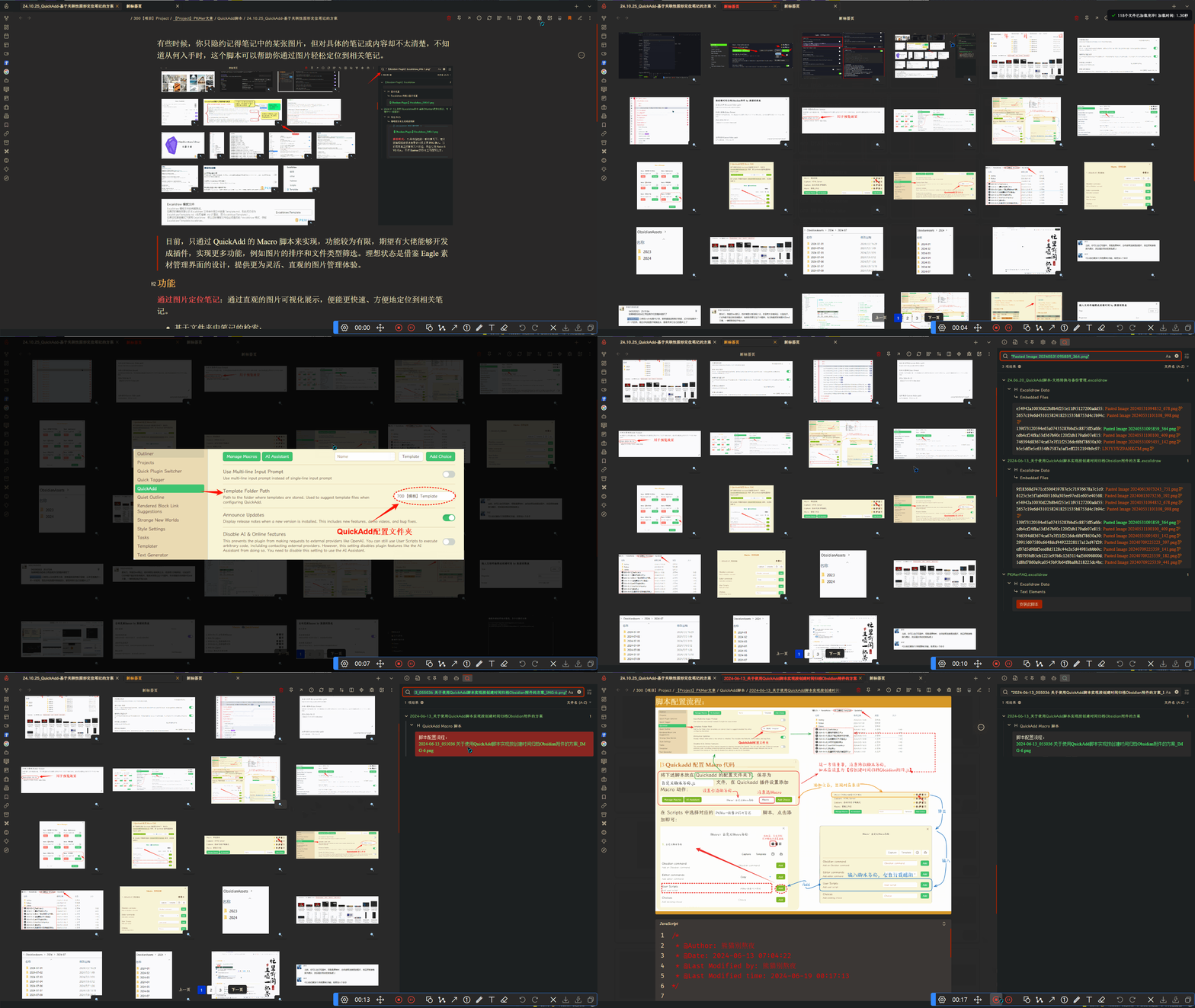
有些时候,你只隐约记得笔记中的某张图片,但对具体的笔记或内容却不太清楚,不知道从何入手时,这个脚本可以帮助你通过图片轻松定位到相关笔记。
目前,只通过 QuickAdd 的 Macro 脚本来实现,功能较为有限,期望有大佬能够开发成插件,实现更多功能,例如图片的排序和文件类型筛选。理想状态是借鉴 Eagle 素材管理界面的设计,提供更为灵活、直观的图片管理体验。

功能
PixPin_2024-10-26_21-53-17

能够通过直观的图片可视化展示,便能更快速、方便地定位到相关笔记。

  • 基于文件夹中笔记的检索:
    • 脚本会搜索文件夹内的所有笔记与之关联的图形文件。
      • 如果当前笔记是 FolderNote 时,会自动展开并展示该文件夹内的所有图形文件。
      • 如果当前笔记不是 FolderNote,则会显示选择框,默认选中当前笔记的父文件夹。
    • 特别适配了 Excalidraw,可以直接在可视化界面查看嵌入的图形文件
    • 不支持 Canvas 文件。
    • 支持的图形文件类型:svg, gif, png, jpeg, jpg, webp, mp4
  • 图片的搜索定位
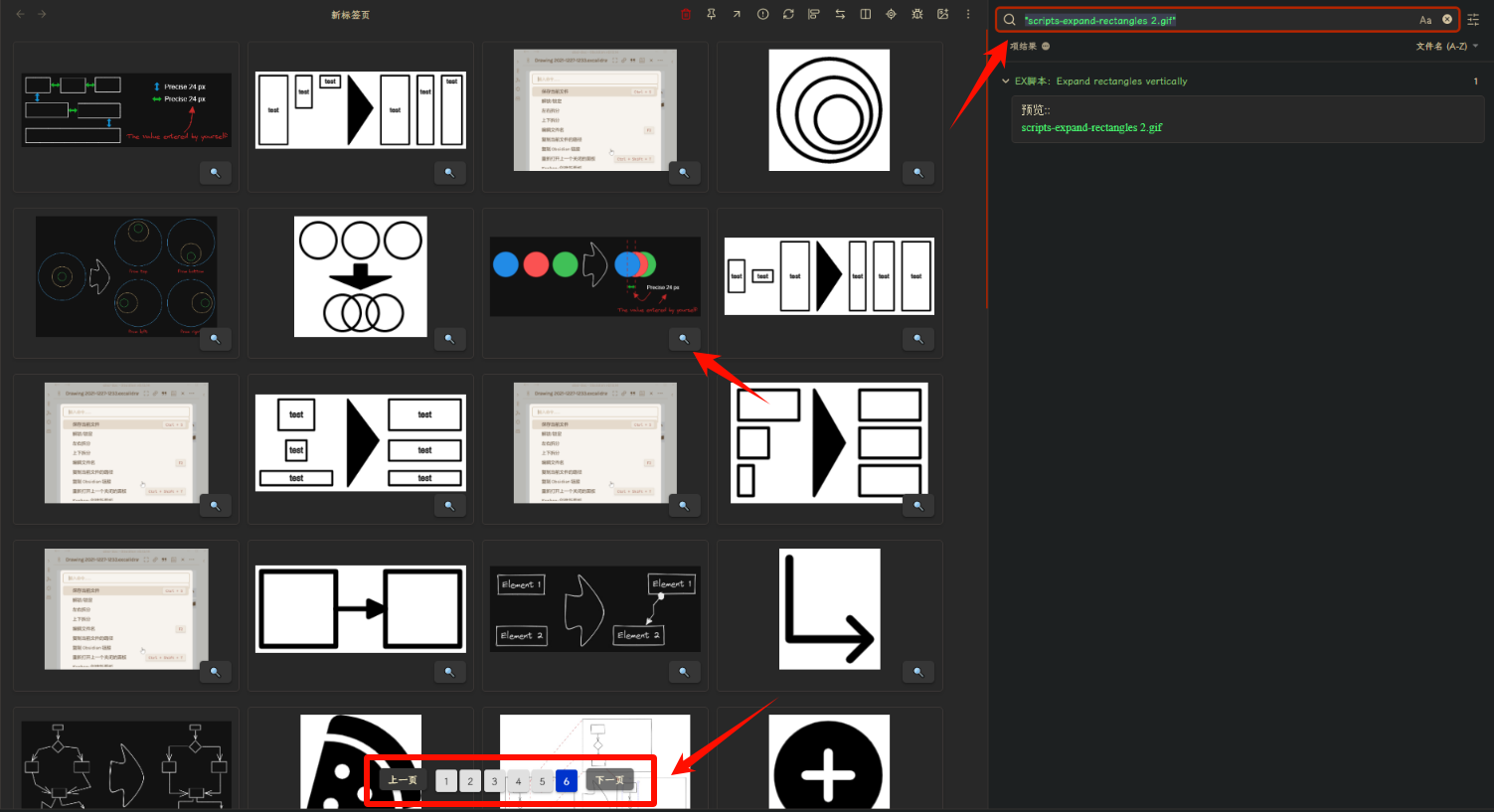
    • 图片右下角的:mag:按钮单击时会激活 Obsidian 的搜索功能,以便快速定位使用该图片的笔记。
    • 图片可单击放大。
    • 每页图片最多有50个,大于50个则出现换页器。

注意事项

  • 只会显示当前文件夹内的笔记中引用的图片。
  • 以下情况的图片将不会被显示:
    1. 引用的笔记不在当前文件夹下。
    2. 当前文件夹下的图片未被任何笔记引用。

QuickAdd Macro

module.exports = async () => {
  const quickAddApi = app.plugins.plugins.quickadd.api;
  const path = require('path');
  const attachmentTypes = ['svg', 'gif', 'png', 'jpeg', 'jpg', 'webp', 'mp4'];
  const itemsPerPage = 50;

  // 获取ob的目录路径
  const listPaths = app.vault.getAllFolders().map(f => f.path);
  // listPaths.unshift("./");

  let choicePath = "";
  // 获取笔记的基本路径
  try {
    const activeFilePath = await app.workspace.getActiveFile().path;
    const fileName = path.basename(activeFilePath);
    const isFolderNote = path.basename(path.dirname(activeFilePath)) === fileName.replace(".md", "").replace(".canvas", "");
    if (isFolderNote) {
      choicePath = path.dirname(activeFilePath);
    } else {
      listPaths.unshift(path.dirname(activeFilePath));
    }
  } catch (error) {
    console.error("获取活动文件路径时出错:", error);
  }

  // 判断是否是文件夹笔记,如果为FolderNote则直接使用当前路径,否则弹出文件夹选择器
  if (!choicePath) {
    choicePath = await quickAddApi.suggester(listPaths, listPaths);
  }
  if (!choicePath) return;

  console.log(`选择路径: ${choicePath}`);

  // 记录开始时间
  const startTime = performance.now();

  // 获取文件数据
  const files = await app.vault.getFiles();
  const fileData = getMediaPathsbyFolderPath(files, choicePath, attachmentTypes);
  console.log(`获取了${fileData.length}个媒体文件`);
  await displayMedia({ fileData, attachmentTypes, itemsPerPage });

  // 创建一个 <style> 元素
  const style = document.createElement('style');
  // 定义 CSS 样式
  const css = `
.card-container {
  display: flex;
  flex-direction: row;
  flex-wrap: wrap;
  justify-content: flex-start;
  align-items: stretch;
  align-content: flex-start;
  gap: 10px 10px;
  width: 100%;


  .file-card {
    border: 1px solid var(--background-modifier-border);
    border-radius: 5px;
    padding: 10px;
    margin-bottom: 10px;
    box-shadow: 0 2px 5px rgba(0, 0, 0, 0.1);
    background-color: var(--background-primary);
    flex: 0 1 auto;
    height: 200px;
    width: 300px;
    box-sizing: border-box;

    .media-element, .image-element {
      display: block;
      width: 100%;
      cursor: pointer;
      object-fit: contain;
      max-width: 100%;
    }
  }
}

.pagination-container {
  display: flex;
  width: 100%;
  justify-content: center;
  position: absolute;
  bottom: 20px;

  .pagination-list {
    display: flex;
    justify-content: center;
  }
}

.media-modal-overlay {
  position: fixed;
  top: 0;
  left: 0;
  width: 100vw;
  height: 100vh;
  background-color: rgba(0, 0, 0, 0.8);
  z-index: 999;

  display: flex;
  justify-content: center;
  align-items: center;

  img, video {
    max-width: 80%;
    max-height: 80%;
  }
}
  `;

  // 将 CSS 样式添加到 <style> 元素中
  style.appendChild(document.createTextNode(css));

  // 将 <style> 元素添加到文档的 <head> 中
  document.head.appendChild(style);

  // !计算加载时间
  const endTime = performance.now();
  const loadTime = ((endTime - startTime) / 1000).toFixed(2);

  // !显示加载时间
  new Notice(`✔ ${fileData.length}个文件已加载完毕! 加载时间: ${loadTime}秒`);


  async function displayMedia({ fileData, attachmentTypes, itemsPerPage = 10, page: currentPage = 1 }) {
    // !计算总页数
    const totalPages = Math.ceil(fileData.length / itemsPerPage);
    const startIndex = (currentPage - 1) * itemsPerPage;
    const endIndex = startIndex + itemsPerPage;
    const paginatedData = fileData.slice(startIndex, endIndex);

    // ! 新建tab页
    const isFile = await app.workspace.getActiveFile();
    const leaf = await app.workspace.getLeaf(Boolean(isFile));
    await app.workspace.setActiveLeaf(leaf);
    const container = leaf.view.containerEl.children[1];
    container.innerHTML = '';

    // 创建卡片容器
    const cardContainer = document.createElement("div");
    cardContainer.className = "card-container";

    // 使用 Promise.all 并行处理文件卡片创建
    const cardPromises = paginatedData.map(async ({ imgPath }) => {
      const file = await app.vault.getFileByPath(imgPath);
      return createFileCard(file, attachmentTypes);
    });

    const cards = await Promise.all(cardPromises);
    cards.forEach(card => cardContainer.appendChild(card));

    container.appendChild(cardContainer);

    // 添加分页控件
    if (fileData.length > itemsPerPage) {
      createPaginationControls({ fileData, totalPages, currentPage, itemsPerPage, cardContainer, attachmentTypes });
    }

  };

  function createFileCard(file, attachmentTypes) {
    const card = document.createElement("div");
    card.className = "file-card";
    card.style.position = "relative";

    let mediaElement = createMediaElement(file, attachmentTypes);
    if (mediaElement) {
      card.appendChild(mediaElement);
      const searchButton = createSearchButton(file);
      card.appendChild(searchButton);
    }

    return card;
  }

  function createPaginationControls({ fileData, totalPages, currentPage, itemsPerPage, cardContainer, attachmentTypes }) {
    const paginationContainer = document.createElement("div");
    paginationContainer.className = "pagination-container";
    paginationContainer.style.display = "flex";
    paginationContainer.style.flexWrap = "wrap";

    const prevButton = document.createElement("button");
    prevButton.className = "pagination-button";
    prevButton.textContent = "上一页";
    prevButton.disabled = currentPage === 1;
    prevButton.addEventListener("click", () => {
      if (currentPage > 1) {
        displayMedia({ fileData, attachmentTypes, itemsPerPage, page: currentPage - 1 });
      }
    });
    paginationContainer.appendChild(prevButton);

    const paginationList = document.createElement("div");
    paginationList.className = "pagination-list";
    paginationList.style.display = "flex";
    paginationList.style.flexWrap = "wrap";
    paginationList.style.margin = "0 10px";
    for (let i = 1; i <= totalPages; i++) {
      const pageButton = document.createElement("button");
      pageButton.className = "pagination-button";
      pageButton.textContent = i;
      pageButton.style.margin = "2px";
      pageButton.style.padding = "5px 10px";
      pageButton.style.border = "none";
      pageButton.style.borderRadius = "3px";
      pageButton.style.cursor = "pointer";
      pageButton.style.backgroundColor = i === currentPage ? "#0033cc" : "#e0e0e0";
      pageButton.style.color = i === currentPage ? "#ffffff" : "#000000";

      pageButton.addEventListener("click", () => {
        displayMedia({ fileData, attachmentTypes, itemsPerPage, page: i });
      });

      paginationList.appendChild(pageButton);
    }
    paginationContainer.appendChild(paginationList);

    const nextButton = document.createElement("button");
    nextButton.className = "pagination-button";
    nextButton.textContent = "下一页";
    nextButton.disabled = currentPage === totalPages;
    nextButton.addEventListener("click", () => {
      if (currentPage < totalPages) {
        displayMedia({ fileData, attachmentTypes, itemsPerPage, page: currentPage + 1 });
      }
    });
    paginationContainer.appendChild(nextButton);

    // 将分页控件作为兄弟元素添加到现有的 container 之后
    cardContainer.insertAdjacentElement('afterend', paginationContainer);
    console.log('分页控件添加到 DOM 中');
  }

  function createMediaElement(file, attachmentTypes) {
    let mediaElement;
    if (file.name.endsWith(".mp4")) {
      mediaElement = document.createElement("video");
      mediaElement.src = app.vault.getResourcePath(file);
      mediaElement.className = "media-element";
      mediaElement.controls = true;
    } else if (attachmentTypes.some(ext => file.name.endsWith(ext))) {
      mediaElement = document.createElement("img");
      mediaElement.src = app.vault.getResourcePath(file);
      mediaElement.className = "image-element";
      mediaElement.addEventListener("click", () => {
        openMediaInModal(mediaElement.src);
      });
    }
    return mediaElement;
  }

  function createSearchButton(file) {
    const searchButton = document.createElement("button");
    searchButton.innerHTML = "🔍";
    searchButton.className = "search-button";
    searchButton.style.position = "absolute";
    searchButton.style.bottom = "10px";
    searchButton.style.right = "10px";
    searchButton.addEventListener("click", () => {
      const searchQuery = encodeURIComponent(file.name);
      const searchUrl = `obsidian://search?vault=${encodeURIComponent(app.vault.getName())}&query="${searchQuery}"`;
      window.open(searchUrl, '_blank');
    });
    return searchButton;
  }

  function openMediaInModal(src) {
    const modalOverlay = document.createElement("div");
    modalOverlay.className = "media-modal-overlay";

    let mediaElement;
    if (src.endsWith(".mp4")) {
      mediaElement = document.createElement("video");
      mediaElement.controls = true;
    } else {
      mediaElement = document.createElement("img");
    }
    mediaElement.src = src;
    modalOverlay.appendChild(mediaElement);

    modalOverlay.addEventListener("click", (event) => {
      if (event.target === modalOverlay) {
        document.body.removeChild(modalOverlay);
        window.isModalOpen = false;
      }
    });

    document.body.appendChild(modalOverlay);
  }

  function getFilePath(files, baseName) {
    let files2 = files.filter(f => path.basename(f.path).replace(".md", "") === path.basename(baseName).replace(".md", ""));
    let filePath = files2.map((f) => f.path);
    return filePath[0];
  }

  function getMediaPathsbyFolderPath(files, folderPath, attachmentTypes) {
    const selectFiles = folderPath === "./"
      ? files
      : files.filter(file => file.path.startsWith(`${folderPath}`));
    let allImgs = [];

    for (const file of selectFiles) {
      const cache = app.metadataCache.getFileCache(file);
      if (!cache) continue;

      let embeds = [];
      let links = [];

      const noteName = path.basename(file.path, path.extname(file.path));
      if (cache.embeds) {
        embeds = cache.embeds.map(e => ({
          link: e.link,
          position: e.position,
          noteName: noteName
        }));
      }
      if (cache.links) {
        links = cache.links.map(l => ({
          link: l.link,
          position: l.position,
          noteName: noteName
        }));
      }

      const allLinks = [...embeds, ...links];

      const media = allLinks.filter(link => {
        const fileExtension = path.extname(link.link).split('.').pop();
        return attachmentTypes.includes(fileExtension);
      });
      // console.log(`媒体文件: ${media}`);
      media.forEach(i => {
        const imgPath = getFilePath(files, i.link);
        if (imgPath) {
          allImgs.push({
            imgPath,
            notePath: file.path,
            position: i.position,
            noteName: i.noteName
          });
        }
      });
    }

    const uniqueMedia = [...new Set(allImgs.map(JSON.stringify))].map(JSON.parse);
    console.log(`找到的唯一图片数量: ${uniqueMedia.length}`);
    return uniqueMedia;
  }
};

参考资料

  1. [[2024-03-15_QuickAdd脚本-移动子笔记或附件到当前文件夹]]
  2. [[24.09.13_Obsidian样式-文章图片模式]]
  3. [[【DataviewJS】卡片视图搜索 by 一箭双雕.js]]
2 个赞

gallery视图展示图片的插件已经有很多了,page gallery、note gallery、vault explorer,都是兼容笔记和图片的,vault explorer 应该是里面最完善的

不过这个脚本可以不打开就查看反链,感觉要轻量化很多

1 个赞

你说的这几个插件我都用过一点,主要用于可视化看笔记

嗯,图形可视化并不是重点,我就是想通过图片去定位笔记。

确实,一般用于笔记预览的插件虽然能兼容图片,但基本只能检索+展示,没法排序分类,功能很有限;

ob确实是缺少一个针对图片适配管理的插件

1 个赞

脚本更新:

  1. 位于该文件夹下的孤立图片也会被检测。
  2. 可以检索当前笔记关联的笔记的图片(不用在同一文件夹下),可用于ob搜索结果的可视化。
脚本源码

module.exports = async () => {
  const quickAddApi = app.plugins.plugins.quickadd.api;
  const path = require('path');
  const attachmentTypes = ['svg', 'gif', 'png', 'jpeg', 'jpg', 'webp', 'mp4'];
  const itemsPerPage = 50;

  // 获取ob的目录路径
  const listPaths = await app.vault.getAllFolders().map(f => f.path);
  // listPaths.unshift("./"); // 获取全部笔记的图片,全部加载比较卡

  let choicePath = "";
  // 获取笔记的基本路径
  try {
    const activeFilePath = await app.workspace.getActiveFile().path;
    listPaths.unshift("当前Index笔记");
    const fileName = path.basename(activeFilePath);
    const isFolderNote = path.basename(path.dirname(activeFilePath)) === fileName.replace(".md", "").replace(".canvas", "");
    // if (isFolderNote) {
    //   choicePath = path.dirname(activeFilePath);
    // } else {
    //   listPaths.unshift(path.dirname(activeFilePath));
    // }
    listPaths.unshift(path.dirname(activeFilePath));
  } catch (error) {
    console.error("获取活动文件路径时出错:", error);
  }

  // 判断是否是文件夹笔记,如果为FolderNote则直接使用当前路径,否则弹出文件夹选择器
  if (!choicePath) {
    choicePath = await quickAddApi.suggester(listPaths, listPaths);
  }
  if (!choicePath) return;

  console.log(`选择路径: ${choicePath}`);

  // 记录开始时间
  const startTime = performance.now();

  // 获取文件数据
  const files = await app.vault.getFiles();
  let fileData = [];
  if (choicePath === "当前Index笔记") {
    fileData = getMediaPathsbyMarkdwonPath(files, attachmentTypes);
  } else {
    fileData = getMediaPathsbyFolderPath(files, choicePath, attachmentTypes);
  }
  console.log(`获取了${fileData.length}个媒体文件`);
  await displayMedia({ fileData, attachmentTypes, itemsPerPage });

  // 创建一个 <style> 元素
  const style = document.createElement('style');
  // 定义 CSS 样式
  const css = `
.card-container {
  display: flex;
  flex-direction: row;
  flex-wrap: wrap;
  justify-content: flex-start;
  align-items: stretch;
  align-content: flex-start;
  gap: 10px 10px;
  width: 100%;


  .file-card {
    border: 1px solid var(--background-modifier-border);
    border-radius: 5px;
    padding: 10px;
    margin-bottom: 10px;
    box-shadow: 0 2px 5px rgba(0, 0, 0, 0.1);
    background-color: var(--background-primary);
    flex: 0 1 auto;
    height: 200px;
    width: 300px;
    box-sizing: border-box;

    .media-element, .image-element {
      display: block;
      width: 100%;
      cursor: pointer;
      object-fit: contain;
      max-width: 100%;
    }
  }
}

.pagination-container {
  display: flex;
  width: 100%;
  justify-content: center;
  position: absolute;
  bottom: 20px;

  .pagination-list {
    display: flex;
    justify-content: center;
  }
}

.media-modal-overlay {
  position: fixed;
  top: 0;
  left: 0;
  width: 100vw;
  height: 100vh;
  background-color: rgba(0, 0, 0, 0.8);
  z-index: 999;

  display: flex;
  justify-content: center;
  align-items: center;

  img, video {
    max-width: 80%;
    max-height: 80%;
  }
}
  `;

  // 将 CSS 样式添加到 <style> 元素中
  style.appendChild(document.createTextNode(css));

  // 将 <style> 元素添加到文档的 <head> 中
  document.head.appendChild(style);

  // !计算加载时间
  const endTime = performance.now();
  const loadTime = ((endTime - startTime) / 1000).toFixed(2);

  // !显示加载时间
  new Notice(`✔ ${fileData.length}个文件已加载完毕! 加载时间: ${loadTime}秒`);


  async function displayMedia({ fileData, attachmentTypes, itemsPerPage = 10, page: currentPage = 1 }) {
    // !计算总页数
    const totalPages = Math.ceil(fileData.length / itemsPerPage);
    const startIndex = (currentPage - 1) * itemsPerPage;
    const endIndex = startIndex + itemsPerPage;
    const paginatedData = fileData.slice(startIndex, endIndex);

    // ! 新建tab页
    const isFile = await app.workspace.getActiveFile();
    const leaf = await app.workspace.getLeaf(Boolean(isFile));
    await app.workspace.setActiveLeaf(leaf);
    const container = leaf.view.containerEl.children[1];
    container.innerHTML = '';

    // 创建卡片容器
    const cardContainer = document.createElement("div");
    cardContainer.className = "card-container";

    // 使用 Promise.all 并行处理文件卡片创建
    const cardPromises = paginatedData.map(async ({ imgPath }) => {
      const file = await app.vault.getFileByPath(imgPath);
      return createFileCard(file, attachmentTypes);
    });

    const cards = await Promise.all(cardPromises);
    cards.forEach(card => cardContainer.appendChild(card));

    container.appendChild(cardContainer);


    // 添加分页控件
    if (fileData.length > itemsPerPage) {
      createPaginationControls({ fileData, totalPages, currentPage, itemsPerPage, cardContainer, attachmentTypes });
    }

  };

  function createFileCard(file, attachmentTypes) {
    const card = document.createElement("div");
    card.className = "file-card";
    card.style.position = "relative";

    let mediaElement = createMediaElement(file, attachmentTypes);
    if (mediaElement) {
      card.appendChild(mediaElement);
      const searchButton = createSearchButton(file);
      card.appendChild(searchButton);
    }

    return card;
  }

  function createPaginationControls({ fileData, totalPages, currentPage, itemsPerPage, cardContainer, attachmentTypes }) {
    const paginationContainer = document.createElement("div");
    paginationContainer.className = "pagination-container";
    paginationContainer.style.display = "flex";
    paginationContainer.style.flexWrap = "wrap";

    const prevButton = document.createElement("button");
    prevButton.className = "pagination-button";
    prevButton.textContent = "上一页";
    prevButton.disabled = currentPage === 1;
    prevButton.addEventListener("click", () => {
      if (currentPage > 1) {
        displayMedia({ fileData, attachmentTypes, itemsPerPage, page: currentPage - 1 });
      }
    });
    paginationContainer.appendChild(prevButton);

    const paginationList = document.createElement("div");
    paginationList.className = "pagination-list";
    paginationList.style.display = "flex";
    paginationList.style.flexWrap = "wrap";
    paginationList.style.margin = "0 10px";
    for (let i = 1; i <= totalPages; i++) {
      const pageButton = document.createElement("button");
      pageButton.className = "pagination-button";
      pageButton.textContent = i;
      pageButton.style.margin = "2px";
      pageButton.style.padding = "5px 10px";
      pageButton.style.border = "none";
      pageButton.style.borderRadius = "3px";
      pageButton.style.cursor = "pointer";
      pageButton.style.backgroundColor = i === currentPage ? "#0033cc" : "#e0e0e0";
      pageButton.style.color = i === currentPage ? "#ffffff" : "#000000";

      pageButton.addEventListener("click", () => {
        displayMedia({ fileData, attachmentTypes, itemsPerPage, page: i });
      });

      paginationList.appendChild(pageButton);
    }
    paginationContainer.appendChild(paginationList);

    const nextButton = document.createElement("button");
    nextButton.className = "pagination-button";
    nextButton.textContent = "下一页";
    nextButton.disabled = currentPage === totalPages;
    nextButton.addEventListener("click", () => {
      if (currentPage < totalPages) {
        displayMedia({ fileData, attachmentTypes, itemsPerPage, page: currentPage + 1 });
      }
    });
    paginationContainer.appendChild(nextButton);

    // 将分页控件作为兄弟元素添加到现有的 container 之后
    cardContainer.insertAdjacentElement('afterend', paginationContainer);
    console.log('分页控件添加到 DOM 中');
  }

  function createMediaElement(file, attachmentTypes) {
    let mediaElement;
    if (file.name.endsWith(".mp4")) {
      mediaElement = document.createElement("video");
      mediaElement.src = app.vault.getResourcePath(file);
      mediaElement.className = "media-element";
      mediaElement.controls = true;
    } else if (attachmentTypes.some(ext => file.name.endsWith(ext))) {
      mediaElement = document.createElement("img");
      mediaElement.src = app.vault.getResourcePath(file);
      mediaElement.className = "image-element";
      mediaElement.addEventListener("click", () => {
        openMediaInModal(mediaElement.src);
      });
    }
    return mediaElement;
  }

  function createSearchButton(file) {
    const searchButton = document.createElement("button");
    searchButton.innerHTML = "🔍";
    searchButton.className = "search-button";
    searchButton.style.position = "absolute";
    searchButton.style.bottom = "10px";
    searchButton.style.right = "10px";
    searchButton.addEventListener("click", () => {
      const searchQuery = encodeURIComponent(file.name);
      const searchUrl = `obsidian://search?vault=${encodeURIComponent(app.vault.getName())}&query="${searchQuery}"`;
      window.open(searchUrl, '_blank');
    });
    return searchButton;
  }

  function openMediaInModal(src) {
    const modalOverlay = document.createElement("div");
    modalOverlay.className = "media-modal-overlay";

    let mediaElement;
    if (src.endsWith(".mp4")) {
      mediaElement = document.createElement("video");
      mediaElement.controls = true;
    } else {
      mediaElement = document.createElement("img");
    }
    mediaElement.src = src;
    modalOverlay.appendChild(mediaElement);

    modalOverlay.addEventListener("click", (event) => {
      if (event.target === modalOverlay) {
        document.body.removeChild(modalOverlay);
        window.isModalOpen = false;
      }
    });

    document.body.appendChild(modalOverlay);
  }

  function getFilePath(files, baseName) {
    let files2 = files.filter(f => path.basename(f.path).replace(".md", "") === path.basename(baseName).replace(".md", ""));
    let filePath = files2.map((f) => f.path);
    return filePath[0];
  }

  function getMediaPathsbyFolderPath(files, folderPath, attachmentTypes, isolatedFile = true) {
    const selectFiles = folderPath === "./"
      ? files
      : files.filter(file => file.path.startsWith(`${folderPath}`));
    let allImgs = [];

    for (const file of selectFiles) {
      const cache = app.metadataCache.getFileCache(file);
      if (!cache) continue;

      let embeds = [];
      let links = [];

      const noteName = path.basename(file.path, path.extname(file.path));
      if (cache.embeds) {
        embeds = cache.embeds.map(e => ({
          link: e.link,
          position: e.position,
          noteName: noteName
        }));
      }
      if (cache.links) {
        links = cache.links.map(l => ({
          link: l.link,
          position: l.position,
          noteName: noteName
        }));
      }

      const allLinks = [...embeds, ...links];

      const media = allLinks.filter(link => {
        const fileExtension = path.extname(link.link).split('.').pop();
        return attachmentTypes.includes(fileExtension);
      });
      // console.log(`媒体文件: ${media}`);
      media.forEach(i => {
        const imgPath = getFilePath(files, i.link);
        if (imgPath) {
          allImgs.push({
            imgPath,
            notePath: file.path,
            position: i.position,
            noteName: i.noteName
          });
        }
      });

      // 检查文件本身是否是图片文件
      const fileExtension = path.extname(file.path).split('.').pop();
      if (attachmentTypes.includes(fileExtension) && isolatedFile) {
        allImgs.push({
          imgPath: file.path,
          notePath: file.path,
          position: null,
          noteName: noteName
        });
      }
    }

    const uniqueMedia = [...new Set(allImgs.map(JSON.stringify))].map(JSON.parse);
    console.log(`找到的唯一图片数量: ${uniqueMedia.length}`);
    return uniqueMedia;
  }

  function getMediaPathsbyMarkdwonPath(files, attachmentTypes) {
    // 获取当前活动文件和缓存的元数据
    const file = app.workspace.getActiveFile();
    if (!file) {
      console.error("无法获取当前活动文件");
      return [];
    }

    const cachedMetadata = app.metadataCache.getFileCache(file);
    if (!cachedMetadata) {
      console.error("无法获取文件缓存");
      return [];
    }

    // 提取链接和嵌入的文件
    const allLinks = [
      ...(cachedMetadata.links || []).map(l => l.link),
      ...(cachedMetadata.embeds || []).map(e => e.link)
    ];

    const selectFiles = allLinks
      .map(note => getFilePath(files, note))
      .filter(Boolean);
    selectFiles.push(file.path);

    const allImgs = selectFiles.flatMap(filePath => {
      const file = app.vault.getFileByPath(filePath);
      const cache = app.metadataCache.getFileCache(file);
      if (!cache) return [];

      const noteName = path.basename(filePath, path.extname(filePath));
      const allFileLinks = [
        ...(cache.embeds || []).map(e => ({
          link: e.link,
          position: e.position,
          noteName: noteName
        })),
        ...(cache.links || []).map(l => ({
          link: l.link,
          position: l.position,
          noteName: noteName
        }))
      ];

      return allFileLinks
        .filter(link => attachmentTypes.includes(path.extname(link.link).slice(1)))
        .map(i => {
          const imgPath = getFilePath(files, i.link);
          return imgPath ? {
            imgPath,
            notePath: filePath,
            position: i.position,
            noteName: i.noteName
          } : null;
        })
        .filter(Boolean);
    });

    const uniqueMedia = [...new Set(allImgs.map(JSON.stringify))].map(JSON.parse);
    console.log(`找到的唯一图片数量: ${uniqueMedia.length}`);
    return uniqueMedia;
  }
};

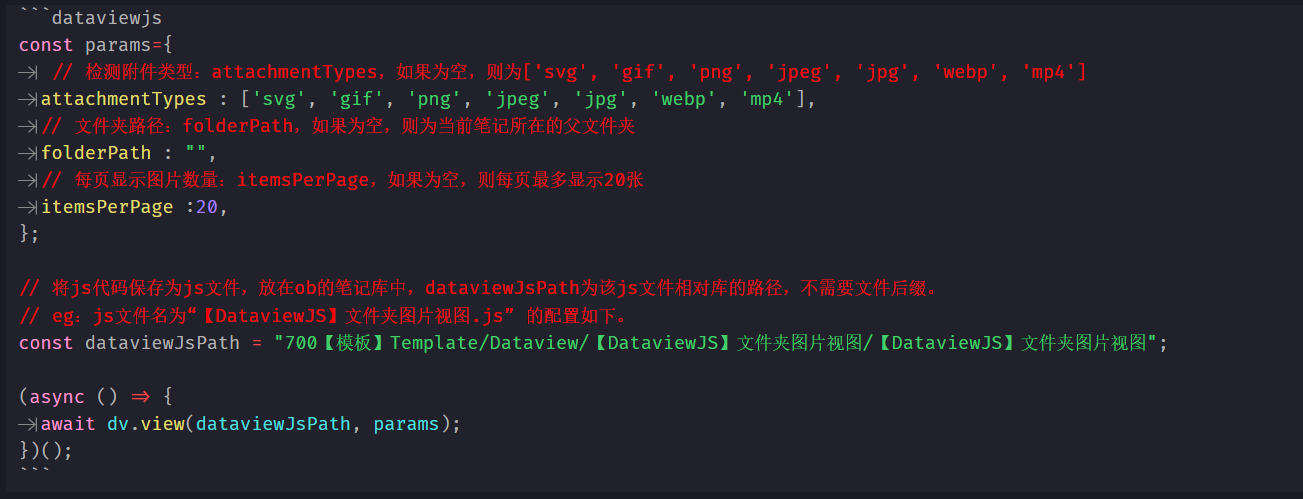
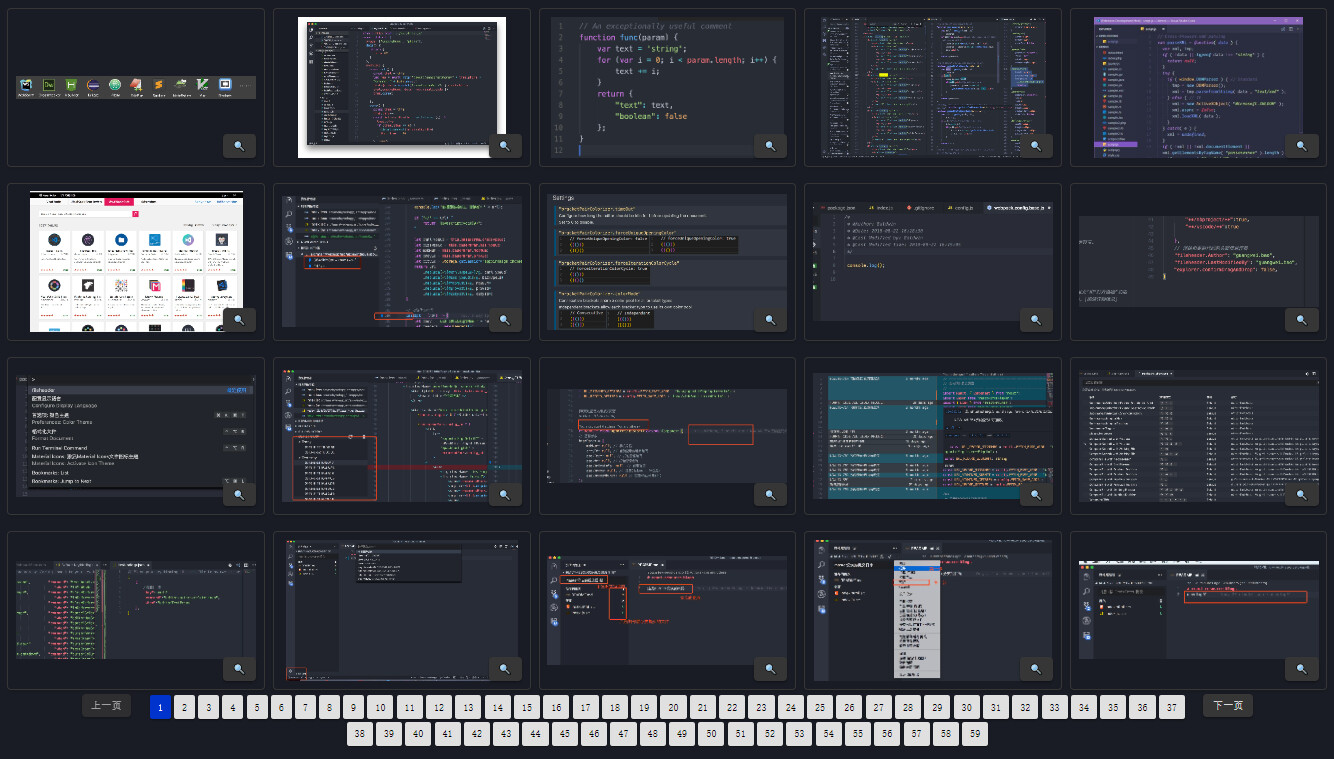
简化为DataViewJS了一下,需要自取,我主要用来查看管理svg的文件夹:

运行结果如下:

```dataviewjs
const params={
	 // 检测附件类型:attachmentTypes,如果为空,则为['svg', 'gif', 'png', 'jpeg', 'jpg', 'webp', 'mp4']
	attachmentTypes : ['svg', 'gif', 'png', 'jpeg', 'jpg', 'webp', 'mp4'],
	// 文件夹路径:folderPath,如果为空,则为当前笔记所在的父文件夹
	folderPath : "",
	// 每页显示图片数量:itemsPerPage,如果为空,则每页最多显示20张
	itemsPerPage :20,
};

// 将js代码保存为js文件,放在ob的笔记库中,dataviewJsPath为该js文件相对库的路径,不需要文件后缀。
// eg:js文件名为“【DataviewJS】文件夹图片视图.js” 的配置如下。
const dataviewJsPath = "700【模板】Template/Dataview/【DataviewJS】文件夹图片视图/【DataviewJS】文件夹图片视图";

(async () => {
	await dv.view(dataviewJsPath, params);
})();
```
【DataviewJS】文件夹图片视图.js
let {
    attachmentTypes,
    folderPath,
    itemsPerPage,
} = input;

const path = require('path');
attachmentTypes = attachmentTypes ? attachmentTypes : ['svg', 'gif', 'png', 'jpeg', 'jpg', 'webp', 'mp4'];
itemsPerPage = itemsPerPage ? itemsPerPage : 20;

// 获取笔记的基本路径
const fullPath = app.workspace.getActiveFile().path;
activePath = folderPath ? folderPath : path.dirname(fullPath);
console.log(`当前路径(无文件名): ${activePath}`);


// 获取文件数据
const files = await app.vault.getFiles();
let fileData = [];
fileData = getMediaPathsbyFolderPath(files, activePath, attachmentTypes);
console.log(`获取了${fileData.length}个媒体文件`);
await displayMedia({ fileData, attachmentTypes, itemsPerPage });
async function displayMedia({ fileData, attachmentTypes, itemsPerPage = 10, page: currentPage = 1 }) {
    // !计算总页数
    const totalPages = Math.ceil(fileData.length / itemsPerPage);
    const startIndex = (currentPage - 1) * itemsPerPage;
    const endIndex = startIndex + itemsPerPage;
    const paginatedData = fileData.slice(startIndex, endIndex);

    // 清除结果
    clearResults();

    // 创建卡片容器
    const cardContainer = document.createElement("div");
    cardContainer.className = "card-container";
    cardContainer.style.display = "flex";
    cardContainer.style.flexFlow = "row wrap";

    
    // 使用 Promise.all 并行处理文件卡片创建
    const cardPromises = paginatedData.map(async ({ imgPath }) => {
        const file = await app.vault.getFileByPath(imgPath);
        return createFileCard(file, attachmentTypes);
    });

    const cards = await Promise.all(cardPromises);
    cards.forEach(card => cardContainer.appendChild(card));

    dv.container.appendChild(cardContainer);

    // 添加分页控件
    if (fileData.length > itemsPerPage) {
        createPaginationControls({ fileData, totalPages, currentPage, itemsPerPage, cardContainer, attachmentTypes });
    }
}

function clearResults() {
    dv.container.innerHTML = '';
}

function createFileCard(file, attachmentTypes) {
    const card = document.createElement("div");
    card.className = "file-card"; // 添加类名
    card.style.flex = "1 1 auto";
    card.style.height = "200px";
    card.style.width = "300px";
    card.style.position = "relative";
    // 确保 card 的内容居中;
    card.style.display = "flex";
    card.style.justifyContent = "center"; // 垂直居中
    card.style.alignItems = "center"; // 水平居中

    if ([".mp4", ".mp3", ".m4a"].some(ext => file.name.endsWith(ext))) {
        const media = document.createElement(file.name.endsWith(".mp4") ? "video" : "audio");
        media.src = app.vault.getResourcePath(file);
        media.className = "media-element"; // 添加类名
        media.controls = true;
        card.appendChild(media);
    } else if (attachmentTypes.some(ext => file.name.endsWith(ext))) {
        const image = document.createElement("img");
        image.src = app.vault.getResourcePath(file);
        image.className = "image-element"; // 添加类名
        image.style.display = "block"; // 确保图片是块级元素
        // image.style.height = "150px"; // 设置统一的图片高度
        image.style.width = "100%";
        image.style.maxWidth = "100%";
        image.style.maxHeight = "100%";
        image.style.objectFit = "contain"; // 确保图片按比例缩放并裁剪以适应容器
        card.appendChild(image);
    }
    const searchButton = createSearchButton(file);
    card.appendChild(searchButton);

    return card;
}


// 获取文件路径函数
function getFilePath(files, baseName) {
    let files2 = files.filter(f => path.basename(f.path).replace(".md", "") === baseName.replace(".md", ""));
    let filePath = files2.map((f) => f.path);
    return filePath[0];
}


function getMediaPathsbyFolderPath(files, folderPath, attachmentTypes, isolatedFile = true) {
    const selectFiles = folderPath === "./"
        ? files
        : files.filter(file => file.path.startsWith(`${folderPath}`));
    let allImgs = [];

    for (const file of selectFiles) {
        const cache = app.metadataCache.getFileCache(file);
        if (!cache) continue;

        let embeds = [];
        let links = [];

        const noteName = path.basename(file.path, path.extname(file.path));
        if (cache.embeds) {
            embeds = cache.embeds.map(e => ({
                link: e.link,
                position: e.position,
                noteName: noteName
            }));
        }
        if (cache.links) {
            links = cache.links.map(l => ({
                link: l.link,
                position: l.position,
                noteName: noteName
            }));
        }

        const allLinks = [...embeds, ...links];

        const media = allLinks.filter(link => {
            const fileExtension = path.extname(link.link).split('.').pop();
            return attachmentTypes.includes(fileExtension);
        });
        // console.log(`媒体文件: ${media}`);
        media.forEach(i => {
            const imgPath = getFilePath(files, i.link);
            if (imgPath) {
                allImgs.push({
                    imgPath,
                    notePath: file.path,
                    position: i.position,
                    noteName: i.noteName
                });
            }
        });

        // 检查文件本身是否是图片文件
        const fileExtension = path.extname(file.path).split('.').pop();
        if (attachmentTypes.includes(fileExtension) && isolatedFile) {
            allImgs.push({
                imgPath: file.path,
                notePath: file.path,
                position: null,
                noteName: noteName
            });
        }
    }

    const uniqueMedia = [...new Set(allImgs.map(JSON.stringify))].map(JSON.parse);
    console.log(`找到的唯一图片数量: ${uniqueMedia.length}`);
    return uniqueMedia;
}

function createPaginationControls({ fileData, totalPages, currentPage, itemsPerPage, cardContainer, attachmentTypes }) {
    const paginationContainer = document.createElement("div");
    paginationContainer.className = "pagination-container";
    paginationContainer.style.width = "100%";
    paginationContainer.style.justifyContent = "center";
    paginationContainer.style.position = "relative";
    paginationContainer.style.bottom = "15px";
    paginationContainer.style.display = "flex";
    paginationContainer.style.flexWrap = "wrap";

    const prevButton = document.createElement("button");
    prevButton.className = "pagination-button";
    prevButton.textContent = "上一页";
    prevButton.disabled = currentPage === 1;
    prevButton.addEventListener("click", () => {
        if (currentPage > 1) {
            displayMedia({ fileData, attachmentTypes, itemsPerPage, page: currentPage - 1 });
        }
    });
    paginationContainer.appendChild(prevButton);

    const paginationList = document.createElement("div");
    paginationList.className = "pagination-list";
    paginationList.style.maxWidth = "80%";
    paginationList.style.overflow = "auto";
    paginationList.style.display = "flex";
    // paginationList.style.justifyContent = "center";
    paginationList.style.flexWrap = "wrap";
    paginationList.style.margin = "0 10px";
    for (let i = 1; i <= totalPages; i++) {
        const pageButton = document.createElement("button");
        pageButton.className = "pagination-button";
        pageButton.textContent = i;
        pageButton.style.margin = "2px";
        pageButton.style.padding = "5px 10px";
        pageButton.style.border = "none";
        pageButton.style.borderRadius = "3px";
        pageButton.style.cursor = "pointer";
        pageButton.style.backgroundColor = i === currentPage ? "#0033cc" : "#e0e0e0";
        pageButton.style.color = i === currentPage ? "#ffffff" : "#000000";

        pageButton.addEventListener("click", () => {
            displayMedia({ fileData, attachmentTypes, itemsPerPage, page: i });
        });

        paginationList.appendChild(pageButton);
    }
    paginationContainer.appendChild(paginationList);

    const nextButton = document.createElement("button");
    nextButton.className = "pagination-button";
    nextButton.textContent = "下一页";
    nextButton.disabled = currentPage === totalPages;
    nextButton.addEventListener("click", () => {
        if (currentPage < totalPages) {
            displayMedia({ fileData, attachmentTypes, itemsPerPage, page: currentPage + 1 });
        }
    });
    paginationContainer.appendChild(nextButton);

    // // 将分页控件作为兄弟元素添加到现有的 container 之后
    // cardContainer.insertAdjacentElement('afterend', paginationContainer);
    // console.log('分页控件添加到 DOM 中');

    // 将分页控件作为子元素添加到现有的 container 中
    cardContainer.appendChild(paginationContainer);
    console.log('分页控件添加到容器中');
}

function createSearchButton(file) {
    const searchButton = document.createElement("button");
    searchButton.innerHTML = "🔍";
    searchButton.className = "search-button";
    searchButton.style.position = "absolute";
    searchButton.style.bottom = "10px";
    searchButton.style.right = "10px";
    searchButton.addEventListener("click", () => {
        const searchQuery = encodeURIComponent(file.name);
        const searchUrl = `obsidian://search?vault=${encodeURIComponent(app.vault.getName())}&query="${searchQuery}"`;
        window.open(searchUrl, '_blank');
    });
    return searchButton;
}


260320 脚本更新 :


module.exports = async () => {
  const quickAddApi = app.plugins.plugins.quickadd.api;
  const path = require('path');

  // 定义所有可用的媒体类型
  const allAttachmentTypes = ['svg', 'gif', 'png', 'jpeg', 'jpg', 'webp', 'mp4', 'bmp', 'tiff', 'ico'];
  const itemsPerPage = 30;
  const maxDisplayedImages = itemsPerPage * 50; // 新增:限制显示图片的数量

  // 第一步:选择文件夹路径
  // 获取ob的目录路径
  const listPaths = await app.vault.getAllFolders().map(f => f.path);
  // listPaths.unshift("./"); // 获取全部笔记的图片,全部加载比较卡

  let choicePath = "";
  // 获取笔记的基本路径
  try {
    const activeFilePath = await app.workspace.getActiveFile().path;
    listPaths.unshift("当前Index笔记");
    // const fileName = path.basename(activeFilePath);
    // const isFolderNote = path.basename(path.dirname(activeFilePath)) === fileName.replace(".md", "").replace(".canvas", "");
    // if (isFolderNote) {
    //   choicePath = path.dirname(activeFilePath);
    // } else {
    //   listPaths.unshift(path.dirname(activeFilePath));
    // }
    listPaths.unshift(path.dirname(activeFilePath));
  } catch (error) {
    console.error("获取活动文件路径时出错:", error);
  }

  // 选择文件夹路径
  if (!choicePath) {
    choicePath = await quickAddApi.suggester(listPaths, listPaths);
  }
  if (!choicePath) return;

  console.log(`选择路径: ${choicePath}`);

  // 第二步:选择要显示的媒体文件类型
  // 创建包含"全部类型"选项的列表
  const typeOptions = ['全部类型', ...allAttachmentTypes];
  // 设置默认选中的选项(只勾选"全部类型")
  const defaultSelected = ['全部类型'];
  const selectedTypes = await quickAddApi.checkboxPrompt(typeOptions, defaultSelected);
  if (!selectedTypes || selectedTypes.length === 0) {
    new Notice("未选择任何媒体类型,操作已取消");
    return;
  }

  // 处理选择的类型
  let attachmentTypes;
  if (selectedTypes.includes('全部类型')) {
    attachmentTypes = allAttachmentTypes;
    console.log(`选择了全部类型: ${attachmentTypes.join(', ')}`);
  } else {
    attachmentTypes = selectedTypes;
    console.log(`选择的媒体类型: ${attachmentTypes.join(', ')}`);
  }

  // 记录开始时间
  const startTime = performance.now();

  // 获取文件数据
  const files = await app.vault.getFiles();
  let fileData = [];
  if (choicePath === "当前Index笔记") {
    fileData = getMediaPathsbyMarkdwonPath(files, attachmentTypes);
  } else {
    fileData = getMediaPathsbyFolderPath(files, choicePath, attachmentTypes);
  }
  console.log(`获取了${fileData.length}个媒体文件`);

  // 新增:按照新→旧排序显示
  // 先为每个fileData项添加ctime属性
  fileData.forEach(item => {
    const file = app.vault.getFileByPath(item.imgPath);
    if (file && file.stat && typeof file.stat.ctime === "number") {
      item._ctime = file.stat.ctime;
    } else {
      item._ctime = 0;
    }
  });
  // 按ctime降序排序(新→旧)
  fileData.sort((a, b) => b._ctime - a._ctime);

  // 新增:限制显示图片的数量
  if (fileData.length > maxDisplayedImages) {
    fileData = fileData.slice(0, maxDisplayedImages);
    console.log(`限制显示图片数量为${maxDisplayedImages}`);
    new Notice(`媒体文件数量过多,限制到${maxDisplayedImages}`);
  }

  // 定义样式并注入到文档中(只注入一次)
  const styleId = 'media-preview-style';
  if (!document.getElementById(styleId)) {
    const style = document.createElement('style');
    style.id = styleId;
    style.innerHTML = `
      .card-container {
         display: grid;
         grid-template-columns: repeat(auto-fill, minmax(250px, 1fr));
         gap: 15px;
         padding: 20px;
         background: var(--background-primary);
         overflow-y: auto;
         flex: 1;
       }
       .file-card {
         border: 1px solid var(--background-modifier-border);
         border-radius: 8px;
         overflow: hidden;
         background: var(--background-secondary);
         display: flex;
         flex-direction: column;
         align-items: center;
         justify-content: center;
         min-height: 200px;
         position: relative;
         box-shadow: 0 2px 4px rgba(0,0,0,0.1);
         transition: transform 0.2s;
       }
       .file-card:hover {
         transform: scale(1.02);
       }
       .media-element, .image-element {
         max-width: 100%;
         max-height: 200px;
         object-fit: contain;
         cursor: pointer;
       }
       .search-button {
         position: absolute;
         bottom: 5px;
         right: 5px;
         background: var(--background-primary);
         border: 1px solid var(--background-modifier-border);
         border-radius: 4px;
         padding: 2px 5px;
         cursor: pointer;
         opacity: 0.6;
         transition: opacity 0.2s;
       }
       .search-button:hover {
         opacity: 1;
       }
       .pagination-container {
         display: flex;
         justify-content: center;
         align-items: center;
         padding: 10px 20px;
         gap: 10px;
         background: var(--background-primary);
         border-bottom: 1px solid var(--background-modifier-border);
         z-index: 100;
         flex-shrink: 0;
       }
      .pagination-button {
        padding: 5px 12px;
        border-radius: 4px;
        border: 1px solid var(--background-modifier-border);
        background: var(--background-secondary);
        cursor: pointer;
      }
      .pagination-button:disabled {
        opacity: 0.5;
        cursor: not-allowed;
      }
      .pagination-button.active {
        background: var(--interactive-accent);
        color: var(--text-on-accent);
      }
      .media-modal-overlay {
        position: fixed;
        top: 0;
        left: 0;
        width: 100%;
        height: 100%;
        background: rgba(0,0,0,0.8);
        display: flex;
        justify-content: center;
        align-items: center;
        z-index: 10000;
        cursor: pointer;
      }
      .media-modal-overlay img, .media-modal-overlay video {
        max-width: 90%;
        max-height: 90%;
        box-shadow: 0 0 20px rgba(0,0,0,0.5);
      }
    `;
    document.head.appendChild(style);
  }

  // 获取初始 leaf
  const isFile = await app.workspace.getActiveFile();
  const leaf = await app.workspace.getLeaf(Boolean(isFile));
  await app.workspace.setActiveLeaf(leaf);

  await displayMedia({ fileData, attachmentTypes, itemsPerPage, leaf });

  // !计算加载时间
  const endTime = performance.now();
  const loadTime = ((endTime - startTime) / 1000).toFixed(2);

  // !显示加载时间
  new Notice(`✔ ${fileData.length}个文件已加载完毕! 加载时间: ${loadTime}秒`);


  async function displayMedia({ fileData, attachmentTypes, itemsPerPage = 10, page: currentPage = 1, leaf }) {
    // !计算总页数
    const totalPages = Math.ceil(fileData.length / itemsPerPage);
    const startIndex = (currentPage - 1) * itemsPerPage;
    const endIndex = startIndex + itemsPerPage;
    const paginatedData = fileData.slice(startIndex, endIndex);

    // ! 使用传入的 leaf,不再重复获取
    if (!leaf || leaf.view === undefined) {
      new Notice("预览页面已关闭,操作停止");
      return;
    }

    // 获取容器,改用更通用的方式
    const container = leaf.view.contentEl || leaf.view.containerEl.children[1] || leaf.view.containerEl;
    container.innerHTML = '';

    // 强制容器为 flex 布局,防止内部内容滚动
    container.style.display = 'flex';
    container.style.flexDirection = 'column';
    container.style.height = '100%';
    container.style.overflow = 'hidden';

    // 添加分页控件到顶部
    if (fileData.length > itemsPerPage) {
      createPaginationControls({ fileData, totalPages, currentPage, itemsPerPage, container, attachmentTypes, leaf });
    }

    // 创建卡片容器
    const cardContainer = document.createElement("div");
    cardContainer.className = "card-container";

    // 确保卡片容器滚动到顶部
    cardContainer.scrollTop = 0;

    // 使用 Promise.all 并行处理文件卡片创建
    const cardPromises = paginatedData.map(async ({ imgPath }) => {
      const file = await app.vault.getFileByPath(imgPath);
      return createFileCard(file, attachmentTypes);
    });

    const cards = await Promise.all(cardPromises);
    cards.forEach(card => cardContainer.appendChild(card));

    container.appendChild(cardContainer);
  };

  function createFileCard(file, attachmentTypes) {
    const card = document.createElement("div");
    card.className = "file-card";

    let mediaElement = createMediaElement(file, attachmentTypes);
    if (mediaElement) {
      card.appendChild(mediaElement);
      const searchButton = createSearchButton(file);
      card.appendChild(searchButton);
    }

    return card;
  }

  function createPaginationControls({ fileData, totalPages, currentPage, itemsPerPage, container, attachmentTypes, leaf }) {
    const paginationContainer = document.createElement("div");
    paginationContainer.className = "pagination-container";

    // 上一页
    const prevButton = document.createElement("button");
    prevButton.className = "pagination-button";
    prevButton.textContent = "上一页";
    prevButton.disabled = currentPage === 1;
    prevButton.addEventListener("click", () => {
      if (currentPage > 1) {
        displayMedia({ fileData, attachmentTypes, itemsPerPage, page: currentPage - 1, leaf });
      }
    });
    paginationContainer.appendChild(prevButton);

    // 分页页码
    const pageButtonsList = document.createElement("div");
    pageButtonsList.style.display = "flex";
    pageButtonsList.style.gap = "5px";
    pageButtonsList.style.margin = "0 10px";
    pageButtonsList.style.flexWrap = "wrap";
    pageButtonsList.style.justifyContent = "center";

    const maxVisiblePages = 5; // 限制显示的页码数量
    let startPage = Math.max(1, currentPage - 2);
    let endPage = Math.min(totalPages, startPage + maxVisiblePages - 1);

    if (endPage - startPage + 1 < maxVisiblePages) {
      startPage = Math.max(1, endPage - maxVisiblePages + 1);
    }

    // 第一页
    if (startPage > 1) {
      addPageButton(1, pageButtonsList, currentPage === 1);
      if (startPage > 2) {
        const ellipsis = document.createElement("span");
        ellipsis.textContent = "...";
        pageButtonsList.appendChild(ellipsis);
      }
    }

    // 中间页码
    for (let i = startPage; i <= endPage; i++) {
      addPageButton(i, pageButtonsList, i === currentPage);
    }

    // 最后一页
    if (endPage < totalPages) {
      if (endPage < totalPages - 1) {
        const ellipsis = document.createElement("span");
        ellipsis.textContent = "...";
        pageButtonsList.appendChild(ellipsis);
      }
      addPageButton(totalPages, pageButtonsList, currentPage === totalPages);
    }

    paginationContainer.appendChild(pageButtonsList);

    // 下一页
    const nextButton = document.createElement("button");
    nextButton.className = "pagination-button";
    nextButton.textContent = "下一页";
    nextButton.disabled = currentPage === totalPages;
    nextButton.addEventListener("click", () => {
      if (currentPage < totalPages) {
        displayMedia({ fileData, attachmentTypes, itemsPerPage, page: currentPage + 1, leaf });
      }
    });
    paginationContainer.appendChild(nextButton);

    // 辅助函数:创建页码按钮
    function addPageButton(pageNum, parent, isActive) {
      const btn = document.createElement("button");
      btn.className = `pagination-button${isActive ? ' active' : ''}`;
      btn.textContent = pageNum;
      btn.addEventListener("click", () => {
        if (!isActive) {
          displayMedia({ fileData, attachmentTypes, itemsPerPage, page: pageNum, leaf });
        }
      });
      parent.appendChild(btn);
    }

    // 将分页控件添加到 container 中
    container.appendChild(paginationContainer);
  }

  function createMediaElement(file, attachmentTypes) {
    let mediaElement;
    const fileExtension = path.extname(file.path).split('.').pop().toLowerCase();
    if (attachmentTypes.includes(fileExtension)) {
      if (fileExtension === "mp4") {
        mediaElement = document.createElement("video");
        mediaElement.src = app.vault.getResourcePath(file);
        mediaElement.className = "media-element";
        mediaElement.controls = true;
      } else {
        mediaElement = document.createElement("img");
        mediaElement.className = "image-element";
        mediaElement.src = app.vault.getResourcePath(file);
        // 实现懒加载
        mediaElement.loading = 'lazy';
        mediaElement.addEventListener("click", () => {
          openMediaInModal(mediaElement.src);
        });
      }
    }
    return mediaElement;
  }

  function createSearchButton(file) {
    const searchButton = document.createElement("button");
    searchButton.innerHTML = "🔍";
    searchButton.className = "search-button";
    searchButton.style.position = "absolute";
    searchButton.style.bottom = "10px";
    searchButton.style.right = "10px";
    searchButton.addEventListener("click", () => {
      const searchQuery = encodeURIComponent(file.name);
      const searchUrl = `obsidian://search?vault=${encodeURIComponent(app.vault.getName())}&query="${searchQuery}"`;
      window.open(searchUrl, '_blank');
    });
    return searchButton;
  }

  function openMediaInModal(src) {
    const modalOverlay = document.createElement("div");
    modalOverlay.className = "media-modal-overlay";

    let mediaElement;
    if (src.endsWith(".mp4")) {
      mediaElement = document.createElement("video");
      mediaElement.controls = true;
    } else {
      mediaElement = document.createElement("img");
    }
    mediaElement.src = src;
    modalOverlay.appendChild(mediaElement);

    modalOverlay.addEventListener("click", (event) => {
      if (event.target === modalOverlay) {
        document.body.removeChild(modalOverlay);
        window.isModalOpen = false;
      }
    });

    document.body.appendChild(modalOverlay);
  }

  function getFilePath(files, baseName) {
    let files2 = files.filter(f => path.basename(f.path).replace(".md", "") === path.basename(baseName).replace(".md", ""));
    let filePath = files2.map((f) => f.path);
    return filePath[0];
  }

  function getMediaPathsbyFolderPath(files, folderPath, attachmentTypes, isolatedFile = true) {
    const selectFiles = folderPath === "./"
      ? files
      : files.filter(file => file.path.startsWith(`${folderPath}`));
    let allImgs = [];

    for (const file of selectFiles) {
      const cache = app.metadataCache.getFileCache(file);
      if (!cache) continue;

      let embeds = [];
      let links = [];

      const noteName = path.basename(file.path, path.extname(file.path));
      if (cache.embeds) {
        embeds = cache.embeds.map(e => ({
          link: e.link,
          position: e.position,
          noteName: noteName
        }));
      }
      if (cache.links) {
        links = cache.links.map(l => ({
          link: l.link,
          position: l.position,
          noteName: noteName
        }));
      }

      const allLinks = [...embeds, ...links];

      const media = allLinks.filter(link => {
        const fileExtension = path.extname(link.link).split('.').pop();
        return attachmentTypes.includes(fileExtension);
      });
      // console.log(`媒体文件: ${media}`);
      media.forEach(i => {
        const imgPath = getFilePath(files, i.link);
        if (imgPath) {
          allImgs.push({
            imgPath,
            notePath: file.path,
            position: i.position,
            noteName: i.noteName
          });
        }
      });

      // 检查文件本身是否是图片文件
      const fileExtension = path.extname(file.path).split('.').pop();
      if (attachmentTypes.includes(fileExtension) && isolatedFile) {
        allImgs.push({
          imgPath: file.path,
          notePath: file.path,
          position: null,
          noteName: noteName
        });
      }
    }

    // 改进的去重逻辑:基于imgPath去重,但保留所有引用信息
    const mediaMap = new Map();
    allImgs.forEach(item => {
      if (mediaMap.has(item.imgPath)) {
        // 如果文件已存在,添加引用信息
        const existing = mediaMap.get(item.imgPath);
        if (!existing.references) {
          existing.references = [{
            notePath: existing.notePath,
            position: existing.position,
            noteName: existing.noteName
          }];
        }
        existing.references.push({
          notePath: item.notePath,
          position: item.position,
          noteName: item.noteName
        });
      } else {
        // 新文件,直接添加
        mediaMap.set(item.imgPath, {
          imgPath: item.imgPath,
          notePath: item.notePath,
          position: item.position,
          noteName: item.noteName,
          references: []
        });
      }
    });

    const uniqueMedia = Array.from(mediaMap.values());
    console.log(`找到的唯一图片数量: ${uniqueMedia.length}`);
    return uniqueMedia;
  }

  function getMediaPathsbyMarkdwonPath(files, attachmentTypes) {
    // 获取当前活动文件和缓存的元数据
    const file = app.workspace.getActiveFile();
    if (!file) {
      console.error("无法获取当前活动文件");
      return [];
    }

    const cachedMetadata = app.metadataCache.getFileCache(file);
    if (!cachedMetadata) {
      console.error("无法获取文件缓存");
      return [];
    }

    // 提取链接和嵌入的文件
    const allLinks = [
      ...(cachedMetadata.links || []).map(l => l.link),
      ...(cachedMetadata.embeds || []).map(e => e.link)
    ];

    const selectFiles = allLinks
      .map(note => getFilePath(files, note))
      .filter(Boolean);
    selectFiles.push(file.path);

    const allImgs = selectFiles.flatMap(filePath => {
      const file = app.vault.getFileByPath(filePath);
      const cache = app.metadataCache.getFileCache(file);
      if (!cache) return [];

      const noteName = path.basename(filePath, path.extname(filePath));
      const allFileLinks = [
        ...(cache.embeds || []).map(e => ({
          link: e.link,
          position: e.position,
          noteName: noteName
        })),
        ...(cache.links || []).map(l => ({
          link: l.link,
          position: l.position,
          noteName: noteName
        }))
      ];

      return allFileLinks
        .filter(link => attachmentTypes.includes(path.extname(link.link).slice(1)))
        .map(i => {
          const imgPath = getFilePath(files, i.link);
          return imgPath ? {
            imgPath,
            notePath: filePath,
            position: i.position,
            noteName: i.noteName
          } : null;
        })
        .filter(Boolean);
    });

    // 改进的去重逻辑:基于imgPath去重,但保留所有引用信息
    const mediaMap = new Map();
    allImgs.forEach(item => {
      if (mediaMap.has(item.imgPath)) {
        // 如果文件已存在,添加引用信息
        const existing = mediaMap.get(item.imgPath);
        if (!existing.references) {
          existing.references = [{
            notePath: existing.notePath,
            position: existing.position,
            noteName: existing.noteName
          }];
        }
        existing.references.push({
          notePath: item.notePath,
          position: item.position,
          noteName: item.noteName
        });
      } else {
        // 新文件,直接添加
        mediaMap.set(item.imgPath, {
          imgPath: item.imgPath,
          notePath: item.notePath,
          position: item.position,
          noteName: item.noteName,
          references: []
        });
      }
    });

    const uniqueMedia = Array.from(mediaMap.values());
    console.log(`找到的唯一图片数量: ${uniqueMedia.length}`);
    return uniqueMedia;
  }
};